
Items filtered by date: Monday, 07 December 2015
Phronesis - How do I change to separate home screen and apps?
No need to re-flash the rom. You can change it from 'Home screen settings'.
- Find a blank area on the home page and then press and hold. This will bring up a menu.
- Select 'Home screen settings'.
- Select 'Home screen layout'
- Select one of the following:
- Home and Apps screens
- Home screen only
cPanel Security
This article will outline some basic steps to increase the security of cPanel and reduce SPAM but only as an end user. This is not targetted at people who have access to the server, but they can use this information.
To Reduce SPAM
Enable the following services:
- DMARC
- SPF
- DKIM
- Forced SMTP Authentication - I believe this can help with delivery.
- Forced SSL/TLS SMTP - Disable all plain text email services.
- SpamAssassin - Use the following settings
- score BAYES_95 - 4.5
- score BAYES_99 - 6.0
- score BAYES_999 - 7.0
- score SPF_FAIL - 10.0
- score SPF_SOFTFAIL - 10.0
- score URIBL_BLACK - 6.0
- score URIBL_DBL_SPAM - 6.0
- score URIBL_JP_SURBL - 4.0
- score URIBL_WS_SURBL - 4.0
Services
Enable the following services:
- DNSSEC
- Anti-Virus
- ClamAV
- Ummunify
Things to do
- Go through the cPanel Security Center
- Run Health Check
- Run Security Advisor
- Check for any account over-quota, this can be a sign of a virus.
- Only use secure DNS providers such as 9.9.9.9 and avoid using 8.8.8.8 etc..
Run OpenWrt as a Virtualbox virtual machine
These are my instructions to install LEDE on a Virtualbox virtual machine so i can play around with various setups and add-ons without breaking my router. I am a windows user, so these instructions are windows based but a lot should be the same. Through this guide I will use 'VB' which is instead of typing virtualbox virtual machine lots of times.
Download and install VirtualBox before anything else.
These instructions are a companion to LEDE Project: Run LEDE as a Virtualbox virtual machine which has some errors in it.
Which Image File
This is can be confusing so I will outline what the different types are below. The image files are also specific to certain chips or technology, so in this case these images are for x86/x64 archeitectures. The Stable Releases are also sorted by their release number, so make aure you always get teh latest version.
- Stable Release - These are the current stable production releases and also include LuCI (the GUI for LEDE)
- Snapshots - These are the bleeding edge release and are for development and testing. They do NOT contain LuCI.
- squashfs
- Images with this in title store all the primary system files in a compressed read only partition. Now I am not 100% how this works but the 2 scenarios but there are
- All changes to the system files are stored on the eread/write partition and override those on the read only partition
- The system files on first boot are copied into the read/write partion and it is those files that are used.
- These images allow the use of a factory reset because they can wipe the read/write partition and then restore data from the read only partition
- Images with this in title store all the primary system files in a compressed read only partition. Now I am not 100% how this works but the 2 scenarios but there are
- ext4 - Images with this in the title are = not sure yet, perhaps there is just 1 single ext4 partition
The 2 files to choose from will have filenames similiar to these which are from the 17.01.4 stable release folder.
I have chosen to use lede-17.01.4-x86-64-combined-ext4.img.gz because I can easily expand the ext4 storage partition.
Notes
- in Prerequisites on LEDE Project: Run LEDE as a Virtualbox virtual machine there is the following notice
- Download the lede-x86-64-combined-squashfs.img image, from snapshots/targets/x86/64/(On Linux, download the lede-x86-64-combined-ext4.img image)
- Update, I think the sentence should read:
- For embedded systems or systems with a small amount of storage then download lede-x86-64-combined-squashfs.img. If you are installing on a full x86-64 machine such as a PC or Virtual Machine then use lede-x86-64-combined-ext4.img.
- openwrt on x86-64 - lackof.org - groups - Crabgrass - This goes into details about the different types of image file.
- LEDE Project: Run LEDE as a Virtualbox virtual machine
- OpenWrt in virtualbox - YouTube
- OpenWrt in VirtualBox [OpenWrt Wiki]
- VBoxVmService download | SourceForge.net
Prepare the virtual hard drive Image file (lede-17.01.4-combined-ext4.img)
- This is the preferred image to use for Full systems, PCs and Virtual Machines.
- The ext4 partition can be easily extended for those who need more storage.
- You will also notice that this image file is full size when you extract it.
Make the VirtualBox VDI file
Run the following command in the directory you have your LEDE image file.
"C:\Program Files\VirtualBox\VBoxManage" convertfromraw --format VDI lede-17.01.4-combined-ext4.img lede-17.01.4-combined-ext4.vdi
Now skip to the section Make the Virtualbox Virtual Machine.
Prepare the virtual hard drive Image file (lede-17.01.4-combined-squashfs.img)
- This image is designed for embedded systems or systems with a small amount of storage.
- You can usually image this directly to a real machine but image file will not work out of the box because it needs to be prepared to use in a virtual machine.
- I have not been able to resize the storage partion for this image type and from what I read you are suppose to do this when you compile the image file. I am sure there is a work aroun but i cannot find it.
Make the VirtualBox VDI file
Run the following command in the directory you have your LEDE image file.
"C:\Program Files\VirtualBox\VBoxManage" convertfromraw --format VDI lede-17.01.4-x86-64-combined-squashfs.img lede-17.01.4-x86-64-combined-squashfs.vdi
Converting the img file to a VDI file fails with an error
When you try and convert an untouched lede-17.01.4-x86-64-combined-squashfs.img to a virtualbox VDI file using VboxManage you will always get an error similiar to the one below:
D:\>"C:\Program Files\VirtualBox\VBoxManage" convertfromraw --format VDI lede-17.01.4-x86-64-combined-squashfs.img lede-17.01.4-x86-64-combined-squashfs.vdi
Converting from raw image file="lede-17.01.4-x86-64-combined-squashfs.img" to file="lede-17.01.4-x86-64-combined-squashfs.vdi"...
Creating dynamic image with size 19852146 bytes (19MB)...
VBoxManage.exe: error: VD: The given disk size 19852146 is not aligned on a sector boundary (512 bytes)
VBoxManage.exe: error: Error code VERR_VD_INVALID_SIZE at F:\tinderbox\win-5.1\src\VBox\Storage\VD.cpp(7002) in function int __cdecl VDCreateBase(struct VBOXHDD *,const char *,const char *,unsigned __int64,unsigned int,const char *,const struct VDGEOMETRY *,const struct VDGEOMETRY *,const union RTUUID *,unsigned int,struct VDINTERFACE *,struct VDINTERFACE *)
VBoxManage.exe: error: Cannot create the disk image "lede-17.01.4-x86-64-combined-squashfs.vdi": VERR_VD_INVALID_SIZE

D:\>
Explanation
This simple to explain. The image file is only 19MB in size but represents a drive that is nearly 300mb in size (16mb + 256mb). VboxManage parses the img file and sees a 300mb file system so it expects a file that is 300mb long, but because the file is not 300mb long as expected VboxMan returns an error. This is basically an unexpected end of file error. VboxMan actually interprets the files system in the file which is stored at the beginning so this error is expected.
NB: the img file does not need to be 300mb in normal circumstances because if you image the file 'as-is' onto a large enough drive then you would not have this issue because the OS would just see the extra space dues tot he partition table being correct. This keeps the file size to the absolute minimum. We only change the image because we want to create a virtual drive from the img and this process like validate partions and files systems so it can convert them to its own format.
Research / Examples
Look at these 2 examples where I have padded the files with 100mb and 300mb respectively, converted them to a VDI image, loaded them in the LEDE virtual machine and then booted with Gparted to see what was going on with the disks.
The 100mb example has an error that come up before you even get the disk map.
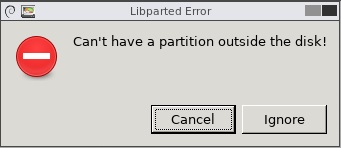
This error actually appears twice, I am guessing that is because there are 2 partitions.
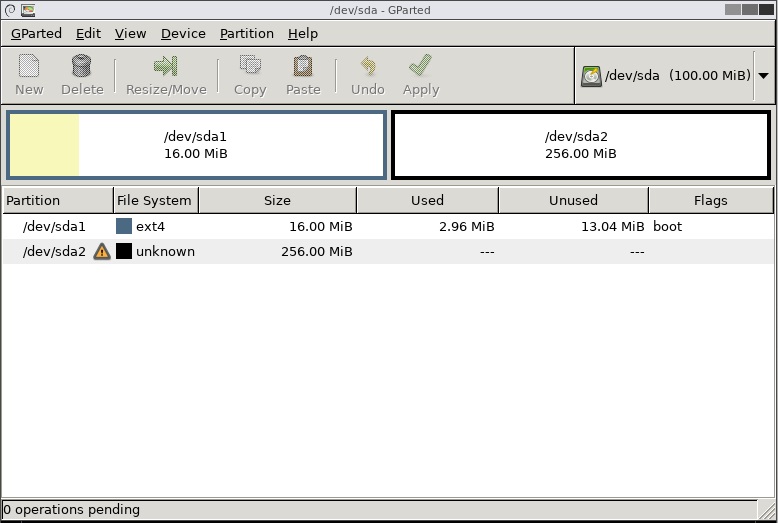
Now as you know is not possible to fit the sda2 256mb partition onto a hard disk that is only 100mb in size. . The 100mb drive is likely to be corrupted or cause many issues.
So I now move on to where I padded the image file with 300mb.
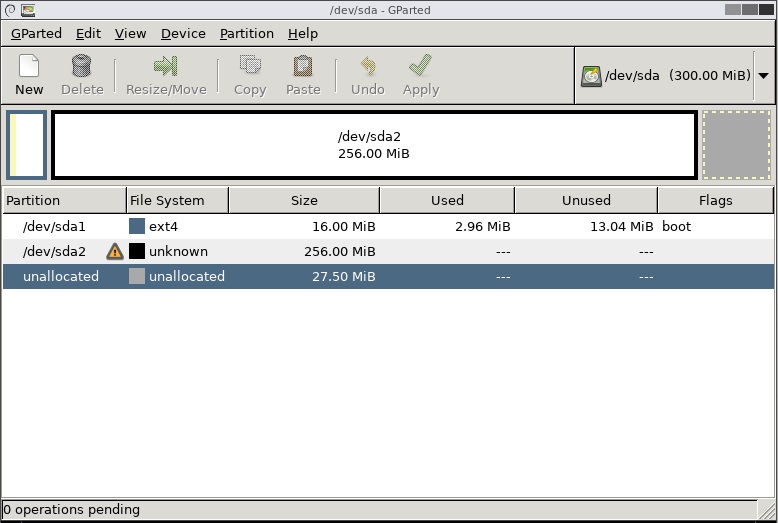
You can see the whole partition sda2 is within the drive boundries so will be healthy. VboxManage considers the whole file size when creating a VDI file. Both the 100mb and the 300mb VDI files were 9,216kb exactly so there must only be a slight difference in a setting controlling the virtual hard drive size.
NB: I do not know why the file system is unknown.
Padding the file
Now we know what the issue is we can fix it. We do this by making the file 300mb in size using the linux command dd. This allows us to extend the length of the file without affecting the contents that are already there.
You need a Linux system to be able to run the following commands. If you are on windows there is section below briefly telling you how to setup an Ubuntu virtual machine.
This command is wrong (from LEDE Project: Run LEDE as a Virtualbox virtual machine )
dd if=lede-17.01.4-x86-64-combined-squashfs.img of=lede.img bs=128000 conv=sync
- bs=128000 - this sets the block size that dd will work with and this is to small to wrk with a 300mb file so the secondary partion will get truncate but the primary system partition is still thre. This is why people will get a VB machine to boot but have no spare disk space to work with.
- The outputed file is xxxxxxxxMB in size.
Use this command
dd if=lede-17.01.4-x86-64-combined-squashfs.img of=padded-lede-17.01.4-x86-64-combined-squashfs.img bs=300M conv=sync
- This command makes an image that is 300mb which is more than enough to hold the whole file system.
- The names are slightly different but that is just to make managing the files easier.
- The outputed file is 300MB in size.
We now have a file that will convert
Run the following command in the directory you have your padded img file to create your virtual hard drive VDI file.
"C:\Program Files\VirtualBox\VBoxManage" convertfromraw --format VDI padded-lede-17.01.4-x86-64-combined-squashfs.img lede-17.01.4-x86-64-combined-squashfs.vdi
Notes
- Linux dd command help and examples
- 12 Linux dd command examples - The Linux Juggernaut
- VirtualBox - convert RAW image to VDI and otherwise
Create an Ubuntu Virtual Machine
This is a workaround for windows users to be able to use the dd command. There must be a windows equavalent but I don't know of one at the minute so here are my instructions to setup an Ubuntu virtual machine.
I used an Ubuntu 17.10 Artful (Final) Virtualbo prebuilt image from http://www.osboxes.org/ubuntu/
Credentials
- Username: osboxes
- Password:org
Create the VB Machine
- Extract the VDI file to your Vitual Machine images folder
- Create a VB machine in expert mode using the settings below
- Name: Ubuntu 64-bit
- Type: Linux
- Version: Ubuntun (64-bit)
- RAM: 2048mb
- Use an existing virtual hard disk file: point it to the VDI file you just extracted
- Click create
- Now run the machine
Configure the VB
Ubuntu is now running but we need to get the image files into the installation so there are a few settings that need to be configured to amke this an easy process.
- Open Settings
- Top right, click the drop down arrow
- Click on the screwdriver and spanner
- All settings can be managed here
- Set regional settings (optional)
- The keyboards is set to American , so needs changing to your locale.
- Check Time region aswell
- Update ubuntu
- this is required to be able to enable file sharing (for some reason, see 12.10 - Package 'samba' is virtual - Error when installing Samba - Ask Ubuntu) other wise you will get errors about missing services (sharing service is not install / package 'samba' is virtual / Could not find package 'libpam-smbpass' / Sharing service installation failed)
- verify you are connectedd to the internet
- Open up a terminal console and run sudo apt-get update
- Install any updates you are prompted for
- Reboot
- Enable file sharing
- Make sure the Ethernet is enabled in ubuntu (should be)
- Follow the instructions from Share Folders On Local Network Between Ubuntu And Windows
- share out desktop folder with ‘Allow others to create and delete files in this folder’ and ‘Guest access’ enabled
- allow any permissions that you are prompted for
Pad the file
You can now access your Ubuntu install by using \\osboxes
- Start the Ubuntu machine (if not already)
- on your windows PC run \\osboxes and you should now see the Ubuntu desktop
- copy the lede-17.01.4-x86-64-combined-squashfs.img to the Ubuntu desktop
- Open up a terminal console and type the following commands
- navigate to theDesktop folder by type the command cd Desktop
- now run the dd command shown above and this will pad the file as required.
- on your windows PC open \\osboxes and copy of the padded file
- shutdown your Ubuntu machine as it is not needed now. Dont delete the machine you might need a linux machine in the future.
- Carry on with the next section below.
Notes
- Share Folders On Local Network Between Ubuntu And Windows
- networking - Sharing Connection to other PCs (Via Wired Ethernet) - Ask Ubuntu
- 12.10 - Package 'samba' is virtual - Error when installing Samba - Ask Ubuntu
Make the Virtualbox Virtual Machine
Follow the instructions below
- Open the page LEDE Project: Run LEDE as a Virtualbox virtual machine
- Goto VM Setup in VirtualBox section
- Follow the VM Creation instructions
- I set my RAM to be 512MB (optional)
- Follow the VM setup/Virtualbox settings instructions
- ignore that fist paragraph of text
- the first network section deals with general Virtualbox network preferences and should all be setup.
- You might see VirtualBox Host-Only Network or VirtualBox Host-Only Network #2 and these can be used instead of vboxnet0 as they are just different names for the same thing.
Make the data partition larger (squashfs) (research only/not working)
I never got this to work (resizing sda2) but I did a lot of looking on the internet and here are the links I collected.
- Partitioning, Formatting and Mounting Storage Devices [OpenWrt Wiki]
- The OpenWrt Flash Layout [OpenWrt Wiki]
- Building a x86-based image and need more disk space in the image - For Developers - LEDE Project Forum
- How to Resize a Partition using fdisk - Red Hat Customer Portal
- Make a squashfs partition larger on a virtualbox virtual machine - Installing and Using LEDE - LEDE Project Forum - My thread I started.
- how to create a new partition in linux
- How to modify squashfs image
- Mountable, compressed full disk backup in Linux - MCbx - The biggest problem with compressed full-disk backups in Linux is "all or nothing" philosophy. If you make an image by streaming dd's output to GZip, making a ".img.gz" file, you will end with file which needs decompression before any processing.
- SquashFS HOWTO | tldp.org
Extroot
- LEDE Project: Extroot configuration
- More space for packages with extroot on your OpenWrt router | samhobbs.co.uk
Make the data partition larger (ext4 only) (optional)
The virtual hard disk is split into 2 partitions, 16mb system and a 256mb data partition. For most people this should be enough however if you want more space follow these instructions which are best done before you start playing with your LEDE install bu you can do this later if you want.
Increase the capacity of the virtual hard drive
- Unmount the VDI file from your virtual machine if attached
- Backup the VDI file (optional)
- Run the following command in the same folder as the image file to resize the virtual hard drive to 10GB
-
"C:\Program Files\VirtualBox\VBoxManage" modifymedium lede-17.01.4-combined-ext4.vdi --resize 10000
NB: For compatibility with earlier versions of VirtualBox, the "modifyvdi" and "modifyhd" commands are also supported and mapped internally to the "modifymedium" command. see Chapter 8. VBoxManage
Increase the partition size
Just by increasing the size of the hard drive will not increase the size of the Partitions so now we have to make the partition(s) bigger
- remount the new larger VDI file to your LEDE virtual machine
- Download Gparted
- Load the ISO into the DVD-ROM drive of your virtual machine
- Power on the LEDE Virtual machine and boot of the DVD Drive
- Gparted will now load after you have selected the appropriate settings
- Use Gparted to expand the required partition. (Dont forget to apply the changes)
- Power of the virtual machine and remove the Gparted ISO
- Power on and boot LEDE
Your sda2 partition will not have 10GB of free space.
Notes
Notes on partitions, their layouts and the process of making more space available to LEDE in a virtual machine.
- How to resize a virtualbox VDI disk under windows | derekmolloy.ie
- Resizing a VirtualBox 5.1.4 HDD vdi file - Red Stack Tech
- virtualbox - How to change fixed size VDI with modifyhd command in Windows? - Super User
- 8.23. VBoxManage modifymedium
- Building a x86-based image and need more disk space in the image - For Developers - LEDE Project Forum
- [VM] No network config? - Installing and Using LEDE - LEDE Project Forum
- How to know disk space occupied by packages in OpenWrt? - Unix & Linux Stack Exchange
- Typing df in the command line will list the partitions and their properties.
- LEDE Project: Extroot configuration
Configure LEDE
Quick Setup
LEDE will now boot but we will not be able to access it because the IP address is wrong. To fix that:
- Start the new Virtual machine
- Goto the virtual machine as we will be working in it now
- Press enter when br-lan message is display and LEDE console will appear
- Type the following commands in, each followed by pressing enter
- uci set network.lan.ipaddr='192.168.56.2'
- uci commit
- reboot
Because we used the stable release when LEDE is booted up you can access LuCI via you browser by using the address http://192.168.56.2/ .This means you can do a lot of editing in the GUI rather than the command line. If you used a snapshot you will need follow the Full Setup shown below and install LuCI manually.
Full Setup
There are many more settings that 'might' need to be done but I have not got that far yet.
- Open the page LEDE Project: Run LEDE as a Virtualbox virtual machine
- Goto VM Setup in VirtualBox section
- Follow all of the VM Settings section
You are all done now, enjoy!!!
Misc
These are some other things that do not fit into the guide above but might be useful for some people.
Upgrading
I do not know how to do this. I am guessing you just update the root/system/sda1 partition with either of these packages as appropriate:
I/O Errors
If you get I/O errors when using the uci command it is probably caused by lack of free space on the file system. Instructions below. Using VI will not fix these errors but will let you change the IP address in /etc/config/network so you can access LuCI for easier diagnosis.
Editing with VI editor
Just incase you cannot make any changes with the uci commands then here is a crash course on VI editor
- Insert = starts editing
- Escape = takes you to the VI command line
- :w = writes the changes
- :q = quits VI editor
Notes
- Editing files with vi — Guide to Linux for Beginners
- How to Open and Edit Text Files in Linux by Using Terminal
- linux - How to edit a text file in my terminal - Stack Overflow
Moving a VDI image
You really should disconnect a VDI image from Virtualbox via the 'Virtual Media Manger' before moving the VDI file but if you dont here is the quick way of fixing that issue.
- Goto the 'Virtual Media Manager'
- Release teh affect VDI image
- Delete the VDI image, but keep the file
- Goto the Virtual machine
- re-add the VDI while it is in it's new location
Notes
- How to move VirtualBox VMs from one drive to another - TechRepublic
- virtual machine - What's the recommended way to move a VirtualBox VM to another computer? - Super User - Most of these ideas are crazy.
Questions
Install OpenWrt on a BT Home Hub 5 / Plusnet One Router
Updated to [OpenWrt Wiki] OpenWrt 21.02.1 - Service Release - 25 October 2021
Overview / Purpose of this guide
These instructions are for aimed at users of Windows but a lot of the information will work for other OS users.
I wrote these instructions just to clear few things up so next time I flashed a BT Home Hub 5 Model A (HH5A) router, it would be easier. The instructions done by other people are not necessarily faulty but not as clear as I needed at points and this mini guide will address those. It must be said I am also a bit of a newbie at electronics so not everything is obvious.
These instructions are complementary to the guides and information that has already been done by the community and in particular thanks goes out to:
- Bill at ebilan for the excellent instructions for installing OpenWrt on a HH5A.
- OpenWrt groups for the hard work with the open source router software.
- mkresin - for the BT HH5A install image
- Anyone else I have not mentioned who helped with this setup.
My guide covers all aspects of this process:
- Opening the routers case
- Soldering the serial connection
- Flashing / Installing OpenWrt and backup of the original router firmware
- Configuring OpenWrt on the router
Things you need
- Documents
- OpenWrt HH5A Page - Original OpenWrt page for the HH5A and the main starting point
- 1-OpenWrt-LEDE Installation Guide for HH5A.pdf (ebilan)
- 2-BT HH5A openwrtLEDE Windows instructions.pdf (ebilan)
- Printout of the three wires on the board in colour (My version below) (optional) – makes it easier when you are soldering
- Printout of the fine pad locations in colour (optional) – makes it easier when you are soldering
- Equipment
- Spudgers and other tools to open the routers plastic case
- Soldering Equipment to solder wires to HH5A circuit board for serial console access.
- Various wires
- 5 Pin Header Block - you can cut these to size
- Soldering iron and solder etc..
- Kapton tape (optional) – for masking of the areas you are soldering to, to prevent damage.
- PL2303TA USB To TTL RS232 Converter Serial Adapter Cable – This is not the Chinese copy.
- Chinese copies based on the Prolific PL2303HX will require the vista driver from here and also see eliban instructions about using these devices.
- USB pen drive at least 512mb - FAT32 or exFAT
- Software
- Firmware / Install Files for the HH5A
- lede-lantiq-bthomehubv5a_ram-u-boot.asc – BT HH5A LEDE/OpentWRT custom U-boot (mkresin)
- lede-lantiq-xrx200-BTHOMEHUBV5A-installimage.bin –BT HH5A LEDE/OpenWrt install image (mkresin)
- BT HH5A sysupgrade file (OpenWrt)
- bt_homehub-v5a-squashfs-sysupgrade.bin (21.02.1)
- bt_homehub-v5a-squashfs-sysupgrade.bin (21.02.3) (Last non-DSA)
- bt_homehub-v5a-squashfs-sysupgrade.bin (21.03.0-rc4) (DSA)
Step 1 – Opening the routers case
If you do not open the case carefully you will break the 'fixing tabs' inside. I broke them on my first go and then repaired them with a soldering iron. Look at these instructions in order on how to open the case.
- BT HomeHub 5A Router UART Access Hack (ebilan) – This tutorial shows you how to open the case (in detial) and how to mount a permanent serial connection.
- BT home hub 5A case opening - YouTube - This hub has been open before, don’t just pull the hub apart and all of the clips need to be loosened.
Step 2 – Soldering the serial connection
Before you start soldering read this article:
Simple no soldering flashing jig made from a cat5e keystone jack - openwrt.ebilan.co.uk
It is perfect for those who cannot solder. You will need to buy a RJ45 Network Keystone from eBay.
You can use your own method for soldering the connections as long as you have access to the required connections on the circuit board and can attach them to a USB to TTL RS232 Converter.
People have done this many different ways but I am going to replicate the arrangement on the OpenWrt BT HomeHub 5.0 Type A as this is the page most people will land and the method is quite clean.
You do not have to use the ground points that I have used based on the OpenWrt BT HomeHub 5.0 Type A page.
This method described on this page mounts a 5 pin header block designed for reuse.
Connections of the 5 pin header
Before soldering, you need to know what you are soldering and why.
The images and instructions could be a little clearer about what is actually soldered to where, so I will just clear that up now.
I have taken the image off the OpenWrt HH5A page that shows the wires connected and then labelled the connections with an accompanying table below showing the connections. These are now labelled in a logical order and are easier to follow but do not have the same numbering as the OpenWrt HH5A page.

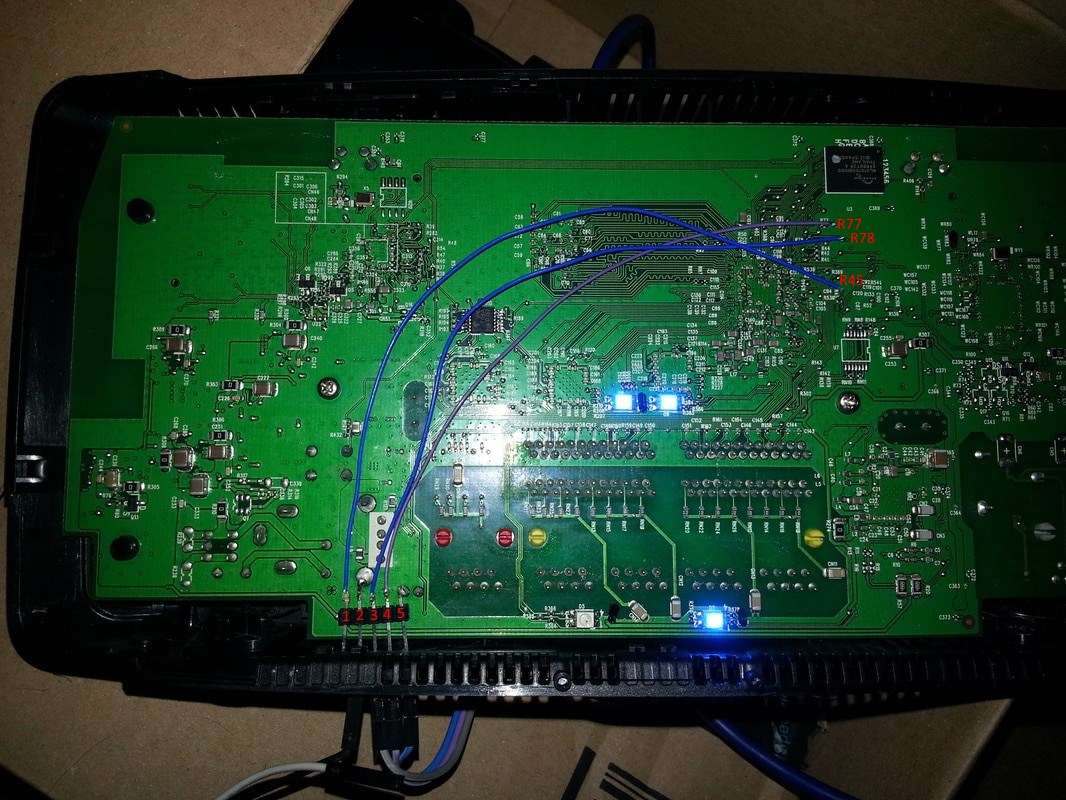
Image from the OpenWrt HH5A page
| Pin No. | USB Serial to TTL Adapter | Wire Colour | Home Hub Connection Point |
| 1 | n/a | Blue | boot_sel2 / R45 Pad |
| 2 | n/a | n/a | GND / Use the USB socket ground/case pin |
| 3 | TX | Blue | RX / R78 Pad |
| 4 | RX | Purple | TX / R77 Pad |
| 5 | GND | n/a | GND / Use the ground plane connection of the capacitor |
- As you can see there are 2 groups. One is for the ‘Boot Selection’ and the other is for the 'Data Connection'
- There are 2 grounds because each group needs its own ground.
- The ground on the left is a case pin of the USB socket and the one on the right is the ground plane of a capacitor. The 5 pin header is soldered directly to these points (pins 2 and 5) which gives it stability as well as a ground connection on each pin.
- If left as is, the case would need to have some holes drilled into it to allow the 5 Pin header to be exposed outside of the case for permanent access.
- After the process is complete the serial interface is not needed unless router becomes bricked.
- Some people say to remove the serial interface (wires etc.) as it can affect the wireless calibration. Eliban left his in
This is a close up of the pads
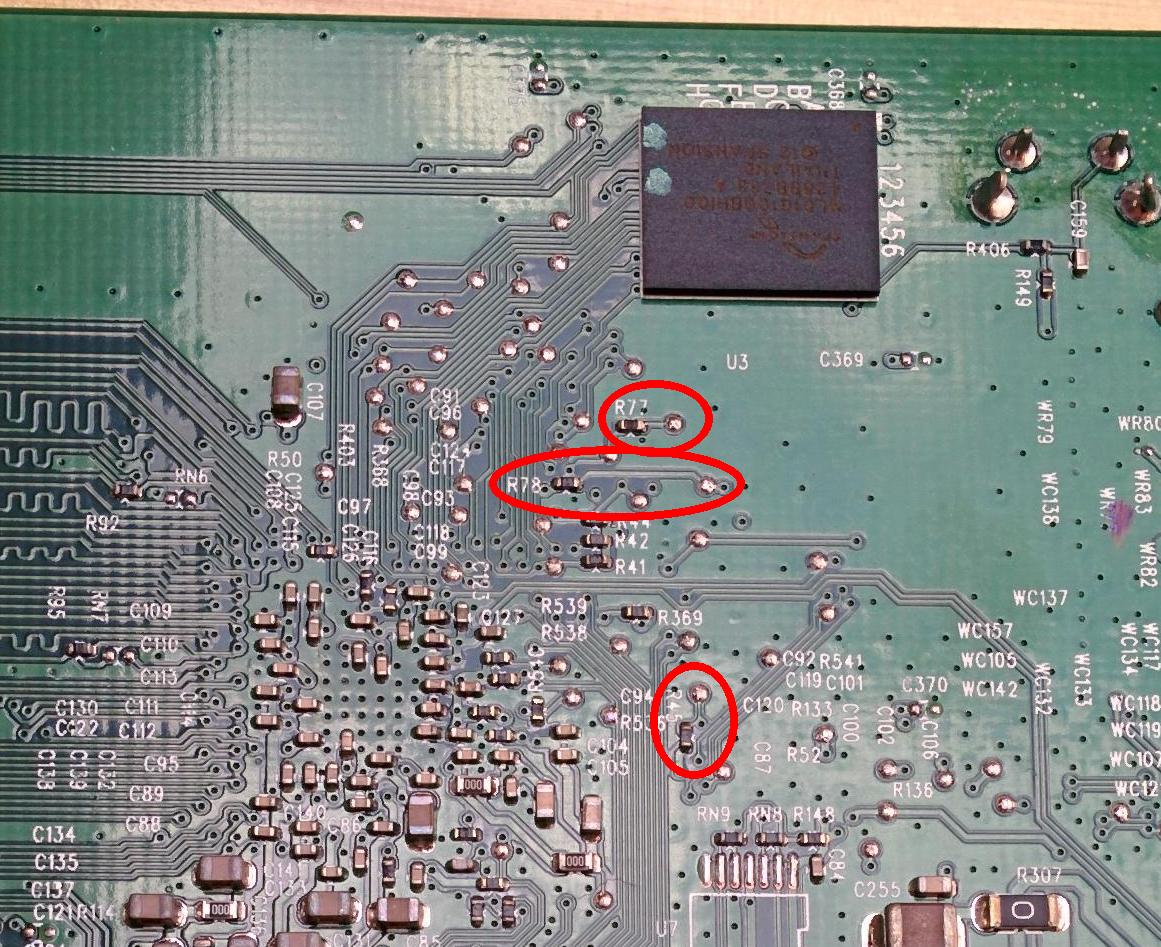
Image from the OpenWrt HH5A page
Fitting the 5 pin header and soldering the wires to the pads
These are my newbie notes
- Do not use to much heat because you will damage stuff. If it gets a bit warm wait a few minutes before doing the next pad or pin.
- if you are not a good solderer, get some practice (or someone to do it for you)
- Mask of the area around the pads with some kapton tape to prevent accidental damage to components
Soldering instructions
- Get some wires and make sure you get the approximate length to match how it looks in the picture
- Strip the ends of the wire, but not too much.
- Solder the wires to the required pins of the 5 pin header.
- Solder the 5 pin header on to the 2 grounding points.
- Make sure you have not melted the 5 Pin header and the pins are still tight so do not move.
- Lay the wires in place on the board so they run from the header to the pads
- Tape the down the wires with some Kapton tape. This makes it much easier to solder them to the pads and removes load of the solder pads when the wires are soldered to the pads
- Solder the wires to the pads carefully. The solder mask will be quite forgiving.
Example of neat soldering
Step 3 - Flashing / Installing OpenWrt and backup of the orginal router firmware
Follow the instructions from 1-OpenWrt-LEDE Installation Guide for HH5A.pdf (ebilan) and use this as a companion guide.
Download Firmware / Install Files for the HH5A
You should of downloaded these from the prerequisites section.
Install the required software
- PuTTY
- Notepad++
- TFTPD32 - Use the Standard edition installer
- WinSCP - This is only needed for messing with the router later. FlashFXP will also work.
Connect the adapter
- Connect the USB serial adapter to the 5 pin connector as the connection table above.
- pl2303ta Wires Legend - You can use the diagram to work out what each of the wires on the adapter do.
- Connect the USB serial adapter to windows.
- Get the COM number of the adapter by going to windows device manager and find the COM assignment of the new device.
Configure Putty
- As per the ebilan instructions page 3
Access the router firmware via the console
With putty running and the adapter connected:
- Short the boot_sel2 pin to Ground (GND) and power on the HH5A. Now immediately disconnect the boot_sel2 pin from Ground. The UART ‘CFG 04’ prompt will appear.
Do NOT leave it connected any longer than necessary because it may damage the hub, causing it to remain permanently stuck in ‘CFG 04’ mode! - CFG04 mode should now appear in the console. This means it is in a read/write mode.
- If you get CFG06 either you soldering is wrong for the boot select, you did not make a good short for long enough or you did not short the pins properly.
Transfer ‘HH5A LEDE/OpenWrt install image’ to the router
- Transfer the lede-lantiq-bthomehubv5a_ram-u-boot.asc (u-boot) to the router
- Open the .asc file with Notepad++, select all and copy
- Goto the Putty console window and right click (should still be open and connected to the router). The asc file will transfer and execute.
- I believe the .asc is file contains loads of pre-written scripts that get executed
- After about 90 seconds, the custom U-boot will start and the BTHOMEHUBV5A U-boot prompt will appear.
- On you windows PC set IP on the Ethernet to be 192.168.1.2/255.255.255.0
- Open TFTPD32
- Put lede-lantiq-xrx200-BTHOMEHUBV5A-installimage.bin into the TFTPD32 program directory. This prevents permission errors.
- Configure TFTPD32 as per eliban instructions, page 7
- Run the Put command
- Go back to putty
- Type the following command into the console
tftpboot 0x81000000 lede-lantiq-xrx200-BTHOMEHUBV5A-installimage.bin; bootm 0x81000000 - The file should automatically transfer via TFTP
- Type the following command into the console
- Wait 5+ mins for ‘br-lan’ to appear and then press enter
Now move on to the 1-OpenWrt-LEDE Installation Guide for HH5A.pdf (ebilan) as the rest of the instructions should be the same as the linux OS.
Backup BT Firmware (ebilan 3.0)
Before doing anything else you need to back your routers original firmware.
When you remove a pendrive from windows you should eject it properly so the volume is not marked as dirty
- Plug a pendrive into the USB socket (if a FSCK notice is shown, the volume was not unmounted properly, just a warning but it is better to use a clean pendrive). It will auto mount, usually as USB-A1
- Get the USB mount name by typing
ls /tmp/mounts
- Check the pendrive works by doing a directory listing
ls /tmp/mounts/USB-A1
- Run the backup command to send the nanddump to the pendrive took (12 minutes to complete on mine)
nanddump -f /tmp/mounts/USB-A1/hh5a.nanddump /dev/mtd4
- Unmount the pendrive and transfer the nandbackup backup to a PC. You can run the backup process again as above and then binary compare them if you want.
umount /tmp/mounts/USB-A1
- Whilst the USB is in the PC, put the file lede-17.01.4-lantiq-xrx200-BTHOMEHUBV5A-squashfs-sysupgrade.bin in the root of the USB
- Plug the USB back into the router
Replace the stock BT firmware (ebilan 4.0)
- Eun the prepare script by entering the command below. This will unlock the internal bootloader. Only ever run this once.
prepare
- Enter the confirmation
- The bootloader is now decrypted, unlocked and rewritten back to the firmware
- A LEDE/OpenWrt console will now appear root@lede:/#
- Enter the command
sysupgrade /tmp/mounts/USB-A1/lede-lantiq-xrx200-BTHOMEHUBV5A-squashfs-sysupgrade.bin
- This only takes a couple of minutes at most before the CFG04 message is on screen and this means the flash has finished successfully
- Powercycle the router
Backup settings - (ebilan 4.3)
Always backup your current OpenWrt configuration before making any significant changes.
- (System-->Backup / Flash Firmware-->Backup / Restore-->Download Backup)
- Get the backup of your configuration settings and store safely on another device.
- This seems to include all of the /etc/ folder and in particular the /etc/config/ folder
We have now installed OpenWrt successfully installed on our HH5A. You should now follow my instructions but I still use references to the 1-OpenWrt-LEDE Installation Guide for HH5A.pdf (ebilan) tutorial.
Step 4 - Configuring OpenWrt on the router
The following are my instructions on how to configure OpenWrt to give the same functionality (and more) of the orginal HH5A.
Router password
(System-->Administration-->Router Password)
Notes
- This must be done ASAP for security.
- When the password is not set you can just click on the message at the top for easy access
- I use the admin password off the router itself because it is easier to remember
Change hostname and local time
- Goto (System --> System --> General Settings)
- Hostname: primaryrouter
- You can pick a name of your choosing but it is easier to keep it like this for now while doing the tutorial.
- This prevents confusion if using other OpenWRT routers
- Timezone: Europe/London (this is correct for me)
- Hostname: primaryrouter
- Click 'Save & Apply'
SSH / SCP
This is optional and probably does not need changing for most peoples setup.
(System --> Administration --> SSH Access --> Dropbear Instance --> Interface)
- By default dropbear is set to listen to port 22 on all interfaces (unspecified), but the default firewall blocks it on the WAN zone.
- Perhaps set this to ‘LAN’ for better security?
Wireless
(Network --> Interfaces --> Wireless)
Only change things if they are noted below, else just leave as is. Some items are left in for reference if you are wondering.
Set the WiFi SSID and encryption with a suitable password
- 5GHz / wlan0
- Device Configuration --> General Setup
- Operating frequency: (AC / 36(5180 MHz) / 80 MHz) (default)
- Maximum transmit power: driver default (default)
- Device Configuration --> Advanced Settings
- You dont need to change anything here.
- Interface Configuration --> General Setup
- Mode: Access Point (default)
- ESSID (SSID): quantumwarp_5G
- Interface Configuration --> Wireless Security
- Encryption: WPA2-PSK/WPA3-SAE Mixed Mode (strong security)
- Cipher: auto (default)
- Key: {your password}
- Interface Configuration --> MAC-Filter
- You dont need to change anything here.
- Interface Configuration --> Advanced Settings
- Country Code: GB United Kingdom (or your country)
- Country Code: GB United Kingdom (or your country)
- Device Configuration --> General Setup
- 2.4GHz / wlan1
- Device Configuration --> General Setup
- Operating frequency: (N/ 11(2462 MHz) / 20 MHz) (default)
- Allow legacy 802.11b rates: unticked (default) - HH5A would have this enabled, but no-one uses this slow speed any more.
- Maximum transmit power: driver default (default)
- Device Configuration --> Advanced Settings
- You dont need to change anything here.
- Interface Configuration --> General Setup
- Mode: Access Point (default)
- ESSID (SSID): quantumwarp
- Interface Configuration --> Wireless Security
- Encryption: WPA2-PSK/WPA3-SAE Mixed Mode (strong security)
- Cipher: auto (default)
- Key: {your password}
- Interface Configuration --> MAC-Filter
- You dont need to change anything here.
- Interface Configuration --> Advanced Settings
- Country Code: GB United Kingdom (or your country)
- Device Configuration --> General Setup
Notes
- WiFi is off by default
- You can also use the same SSID for both networks if you want. This is the way BT Home Hub normally does it.
BT/Plusnet fibre using the DSL socket
- Read How do I connect the HH5A to my UK ISP ? (eliban 7.5) – this will give you the settings for your VDSL (fibre) or ADSL line but more importantly gove you the correction section to read next which depends on your required setup.
- Select the correct section to goto, In my case (eliban 9.1)
- Read Quick PPPoE setup using DSL port for VDSL Connection (eliban 9.1)
- Follow the instructions below to configure your BT/Plusnet fibre.
(Network-->Interfaces-->WAN-->Edit)
- Protocol =PPPoE
- PAP/CHAP username = your broadband username
- PAP/CHAP password = your password if you have one
- If you need to set a VLAN tag (i.e. for BT with VLAN tag of 101)
- (Network-->Interfaces-->WAN-->Edit-->Physical Settings-->Interface-->Custom Interface:) = dls0.101
- This setting will not stay on Custom Interface: but will create a new setting called Software VLAN: "dls0.101" (wan) which will be selected.
- Leave the rest
(Network-->Interfaces-->DSL)
- Settings for the UK
- Annex: B (all)
- Tone: A (A43c + J43 + A43)
- Encapsulation mode: PTM/EFM (Packet Transfer Mode) (default)
- DSL line mode: VDSL - slightly faster to connect on VDSL if you specify, however the HH5A would have this on auto.
- Ignore the rest
(Network-->Interfaces-->ATM Bridge)
- Delete the ATM Bridge
- This is only needed for ADSL
Now Reboot Router (System-->Reboot)
DNS
OpenDNS / Quad9 / Custom DNS servers
This still sends 192.168.1.1 to the clients but sets the DNS servers used by the router to OpenDNS
- (Network-->Interfaces-->WAN-->Advanced Settings-->Use DNS servers advertised by peer) = unticked
- (Network-->Interfaces-->WAN-->Advanced Settings-->Use custom DNS servers) = OpenDNS servers (208.67.222.222 / 208.67.220.220)
- Check out Quad9 and use their security based Public DNS servers (9.9.9.9 / 149.112.112.112) as an alternative.
Notes
- In (Networks-->Interfaces-->LAN-->Edit-->Advanced Settings-->Use custom DNS servers) you can set what DNS servers are issued to the LAN clients.
- This becomes available after you unticked/disable:
(networks-->Interfaces-->LAN-->Edit-->Advanced Settings-->Use DNS servers advertised by peer)
- This becomes available after you unticked/disable:
- In (Network-->DHCP and DNS-->General settings-->DNS forwardings) you can change where DNS queries are forwarded to.
- Edit the config file manually /etc/config/dhcp
- Configuring OpenWrt and OpenDNS to log all DNS lookups - might has some relevance.
- You can use the Dynamic DNS plugin to update the client IP at OpenDNS servers directly (or use DNS-O-Matic) so you can perform any required filtering you want such as a familiy filter etc...
DHCP
Notes
- DHCP settings are configured on the interface (i.e. network-->interfaces-->LAN-->DHCP Server)
- You can edit the DHCP settings manually by editing the Config file = /etc/config/dhcp
- (network-->DHCP and DNS-->) has the non-interface specific settings for DHCP and DNS.
Set Red WAN port as a LAN port (optional)
- 1-OpenWrt-LEDE Installation Guide for HH5A.pdf (ebilan) - part 9.7 (page 72)
- (network-->switch-->VLAN ID 1) set the WAN to be untagged
- (network-->switch-->VLAN ID 2) set the WAN to be off
- You need to do both settings above otherwise you get this error
“WAN is untagged in multiple VLANs!”
You could delete VLAN 2, but I don’t know what that does.
Notes
- By default: VLAN1 WAN = off, VLAN 2 WAN = untagged
Firewall
I currently do not have any specific configurations for the firewall because it has all been done.
Notes
- OpenWRT - Firewall - Port Forwarding and Traffic Rules - YouTube ( Van Tech Corner) In video video, we use OpenWRT Firewall to configure Port Forwarding and Traffic Rules. We will discuss the basic concept of Firerwall, such as zones, actions and network interfaces.
- Port Forwarding: Just that, it forwards ports based on patterns.
- Traffic Rules: Thi can perform none routing actions on packets based on patterns and the actions are:
- drop, accept
- reject
- don't track
- assign conntrack helper
- apply firewall mark
- XOR firewall mark
- DSCP classification
LED Lights
You are able to configure the router's 3 compound LEDs to provide feedback from the router's various functions with a selection of colours which can also be controlled independently.
There are some really nice features you can add such as the heartbeat effect where you can translate the CPU load in to a heartbeat pulse via the select LED. I use the WiFi LED configured as red.
Colours available
- Red
- Green
- Blue
- Orange - The router hardware is capable, but OpenWrt is not because of a limitation in the driver (See below)
Notes
- You can edit the LED rules very easily using LuCI
(System-->LED Configuration) - The LED configurations are stored in the file /etc/config/system
- You can edit the system file directly without needing to use LuCi.
- The order the rules appear in the system file is important because they are hierarchical like CSS so each rule will override the ones before it if they conflict. These will be in the same order as displayed in LuCi in which you can drag and drop the rules to change their order.
- The dimmed rule when enabled will dim all the LEDs.
- You can only program each LED with a single colour.
- This is a limitation od the GPIO Kerenl driver.
- Read this excellent explanation by a developer: FS#321 : BTHomeHub5 Type A dsl_notify.sh fails to set LED
- The hub has only three LEDs, but these LEDs are RGB LEDs, where each LED is controlled by three GPIOs. That is why you have red:broadband, green:broadband, blue:broadband.
- The GPIO LED driver does not have support for RGB LEDs and you can not use these colours intendant. Means, if you enable red + blue, the LED will be purple. With red + blue + green the LED will be white. If you use some kind of blinking pattern you get nice colour effects. What is missing in the kernel driver is the possibility to define an LED with multiple GPIOs and the value of each GPIO.
- So you cannot mix 2 colours such as red + green to give you orange.
- LED triggers prefixed with phy mean they are direct physical polls of the WiFi hardware. phy0 is the
- netdev trigger is a wrapper for polling various different software polls.
- The LED flashes on events triggered in physical interface, rather than in software network interface. Besides phy triggers have more events, it also provides possibility of static LED setup in case you want to monitor your 2.4 GHz radio (phy0 usually) and 5 GHz radio (phy1 usually) separately. netdev can’t guarantee this distinguishing since wlan0 may be referring to 2.4 GHz or 5 GHz radio based on current network setup.
- You cannot monitor both wifi networks as one.
- Linux LEDs GPIO, I am not sure it is the same things as OpenWrt's: linux/leds-gpio.c at master · torvalds/linux · GitHub
- Some Scripts for controling LEDs
- Device Tree (How LEDs are discovered)
- GPIO LED configuration - For Developers - OpenWrt Forum
- [OpenWrt Wiki] Device Tree Usage in OpenWrt (DTS)
- [OpenWrt Wiki] Adding a new device
- How to write a DTS file of a router for OpenWrt - For Developers - OpenWrt Forum
- Specifications - DeviceTree
- Linux commands to display your hardware information | Opensource.com
Links
- LED configuration /etc/config/system | OpenWrt - This is the official documentation which is geared towards developers.
- LEDE/OpenWrt — Disabling Your LEDs – LEDE/OpenWrt & IoT – Medium - Another way of disabling your LEDs using the command line.
LED Configurations
This section contains various configuration for your HH5A LEDs.
Default OpenWrt Configuration
This is the default configuration for the LEDs when you first install OpenWrt.
config led 'led_wifi'
	option name 'wifi'
	option sysfs 'blue:wireless'
	option trigger 'phy0tpt'

config led 'led_dsl'
	option name 'dsl'
	option sysfs 'blue:broadband'
	option trigger 'netdev'
	option mode 'link tx rx'
	option dev 'dsl0'

config led 'led_dimmed'
	option name 'dimmed'
	option sysfs 'dimmed'
	option default '0'
Configure LEDs to be like the HH5A
This is not exactly the same as the default BT HH5A LED configuration because the LED configuration in OpenWrt lacks the features I need to program this.
This configuration will do the following:
- The WIFI LED will be disabled.
- The Internet LED will light up blue when the DSL connection is up
- All LEDs will be dimmed.
- The load up procedure and it's LED configuration is untouched because it is controlled by the bootloader. This also means the Power LED will stay on coloured as blue.
- the rules are processed in order from the top down and can be re-ordered.
In LuCi
- Goto LED Configuration
- Edit wifi and set the following:
- Name: wifi
- LED Name: blue:wireless
- Trigger: Always off (kernel: none)
- Edit dsl and set the following:
- Name: dsl
- LED Name: blue:broadband
- Trigger: Network device activity (kernel: netdev)
- Device: dsl0
- Trigger Mode: Link On
- Edit dimmed and set the following:
- Name: dimmed
- LED Name: dimmed
- Trigger: Always On (kernel: default-on)
- Default state: ticked
This is the code the rules above create in the /etc/config/system file.
config led 'led_wifi'
	option name 'wifi'
	option sysfs 'blue:wireless'
	option trigger 'none'

config led 'led_dsl'
	option name 'dsl'
	option sysfs 'blue:broadband'
	option trigger 'netdev'
	option dev 'dsl0'
	list mode 'link'

config led 'led_dimmed'
	option name 'dimmed'
	option sysfs 'dimmed'
	option trigger 'default-on'
	option default '1'
Disable Power LED / Other LED
It is possible to disable the Power LED (or other LED) by adding a new rule via LuCI or directly in the /etc/config/system file. The Power LED is turned on by the bootloader and this is why you need to add an extra rule whereas other LEDs you could just delete the rule that turns them on.
In LuCi
- Goto LED Configration
- Click on the 'Add LED action' button
- Add a new LED action with the following:
- Name: power
- LED Name: blue:power
- Trigger: Always off (kernel: none)
Or you can add the following code directly into the /etc/config/system file.
config led
	option name 'power'
	option sysfs 'blue:power'
	option trigger 'none'
Unmodified HH5A LED behaviour
This is the default LED behaviour of an unmodified HH5A and I can use this to program up the LED behaviour in OpenWrt to match this default behaviour when the required functionality is added in a future version of OpenWrt.
Booting a configured router with DSL plugged in
Router bootloader
- (0:00) Start:
- Power: Green, Solid
- (0:25) Power: Green, Flashing
Router has booted
- (0:40) Power: Blue, Solid
- (1:00) Power: Orange, Flashing
- (1:50) Power: Orange, Solid
- (2:00) Internet: Orange, Solid
- (2:33) Internet: Orange, Off
- (2:35) Power: Blue, Solid
NB: occasionally at 1:15 the orange light goes solid while the internet led flashes about 4 times before resuming flashing orange.
Remove DSL wire from a connected and configured router
- (0:00) Start:
- Power: Blue, Solid
- (0:07) Power: Orange
- (0:07) Internet: Orange, Solid
- (0:13) Internet: Red, Flashing (0.5 second on/off)
Plug in DSL wire to a configured router
- (0:00) Start:
- Internet: Orange, Solid
- Internet: Red, Flashing (0.5 second on/off)
- (0:06) Power: Orange, Flashing (0.5 second on/off)
- (0:40) Power Orange, Solid
- (0:55) Internet: Orange, Solid
- (1:24) Internet: Red, Off
- (1:25) Power: Blue, Solid
Hold the WPS Button
- Wifi: Orange, Flashing (2 second on/1 second off)
Step 5 - Additional OpenWrt functionality with Add-ons (Packages)
(System-->Software)
Your Router must be on the internet to be able to install software
These extra features do not come pre-installed in OpenWrt so need to be installed. The GUI (web interface) is called LuCI and all of the GUI add-ons are prefixed with ‘luci’ so you can search for just GUI add-ons by using the search term 'luci-'. I have found that if I install a ‘LUCI’ add-on then the other dependencies such as the actual service it will controls gets installed as well. This is why using LuCI is much better for most people than using the command line.
The plugins I have listed below are the main ones to get your router doing the original HH5A features and the little extras to make life easier.
There is currently no place online you can browse the software repository. The best place for descriptions is to type something in to the search box on the software page of your router and look at the packages you want to install and you will see a brief description of them but only on the 'Available Packages' tab.
Please bear in mind this is my setup to get a good baseline as close to the HH5A as possible. All those add-ons that have (not used) means I have installed them to make sure they work but have uninstalled them because I did not want the features they offered. Some people might want those features so I have left the install notes here for reference.
The optional add-ons should only be installed if you want those features. All the rest of the add-ons should be installed unless you absolutely do not need those features.
OpenWrt will run with none of these add-ons installed.
Add-on Notes
- LEDE/OpenWrt — Managing Packages – LEDE/OpenWrt & IoT – Medium
- [OpenWrt Wiki] Package table - A full searchable list of packages (Add-ons) with descriptions. This table also lists all of the dependencies.
- [OpenWrt Wiki] packages:index:start - A quick overview to all available packages, sorted by type.
- [OpenWrt Wiki] Documentation - The documentation covers setting up many different services and features on you router such as DLNA and Ad-blocking so it is worth a look.
- [OpenWrt Wiki] Reasons to Use OpenWrt - This page has a small list of add-ons you might like to install.
Editing Files (SSH / SCP / SFTP)
You need to use this to edit config files with windows using WinSCP or FlashFXP which is easier than the command line but this requires a little configuration. You can use SSH and edit via the command line using the VI editor.
- Install openssh-sftp-server - OpenSSH SFTP server.
- Installs nothing else
Install Notes
- [OpenWrt Wiki] SSH access for newcomers
- this sub system is require because FlashFXP give the error {see sftp flashfxp error.txt}
- You can now edit files like you can in ftp
- this might already be installed. I did a reset and uploaded my old config and openssh-sftp-server was in the installed packages. This could be a bug or an incomplete reset.
- If you try and use SFTP over SSH without openssh-sftp-server installed you will get the following error
[15:11:23] [R] Connection failed (Unable to access SFTP sub-system, operation failed.)
[15:11:23] [R] Delaying for 10 seconds before reconnect attempt #1
FlashFXP/WinSCP
- Install WinSCP in windows. FlashFXP will do the same (SFTP over SSH)
- connect using the 'root' account and password
- once connected, click up folder once to see all of the folders
- Config settings are at /etc/config/
- Edit them like a normal text file
- Read WinSCP (ebilan 10.2)
Notes
- How to open a file in ssh - Linux - nixCraft Linux/Unix Forum - If you need to edit directly via the SSH command line then this article will tell you how.
- Linux And Unix Command To View File - nixCraft - How to view a file via SSH. You can then use Putty or Kitty to copy and paste the file in windows. Very useful for grabbing config files.
cat /etc/config/packages.list
UPnP (optional)
UPnP is not installed by default.
- Upnp available on LEDE? - Installing and Using OpenWrt - OpenWrt Forum
- install luci-app-upnp - Universal Plug & Play configuration module
- also installs
- libuuid
- miniupnpd
- creates a menu under services called ‘UPnP’
Once installed UPnP will need to be turned on.
WPS
WPS doesn't work out of the box on OpenWrt, you need to:
- remove wpad-mini
- This package contains a minimal IEEE 802.1x/WPA Authenticator and Supplicant (WPA-PSK only).
- install wpad
- This package contains a full featured IEEE 802.1x/WPA/EAP/RADIUS Authenticator and Supplicant
- does not install anything else
- install hostapd-utils
- This package contains a command line utility to control the IEEE 802.1x/WPA/EAP/RADIUS Authenticator.
- does not install anything else
- remove wpad-basic-wolfssl
- This package contains a basic IEEE 802.1x/WPA Authenticator and Supplicant with WPA-PSK, SAE (WPA3-Personal), 802.11r and 802.11w support.
- install wpad-wolfssl
- This package contains a full featured IEEE 802.1x/WPA/EAP/RADIUS Authenticator and Supplicant
- does not install anything else
- install hostapd-utils
- This package contains a command line utility to control the IEEE 802.1x/WPA/EAP/RADIUS Authenticator.
- does not install anything else
- Reboot
- Log back into LuCI
- You will now have the option to enable WPS in LuCI
- (Network-->Wireless-->(radio0/radio1) -->Edit-->Interface Configuration-->Wireless Security--> Enable WPS pushbutton, requires WPA(2)-PSK/WPA3-SAE
- I use radio1/wlan1/2.4GHz but you might be able to choose both.
- Tick the box
- Click 'Save & Apply'
- Done, WPS is enabled.
Notes
- WPS works my HH5A with LEDE 17.0.0.4, and just to confirm, yes the button does work with no extra configuration. But i have read that WPS working, can be hit or miss varying from router to router.
- [OpenWrt Wiki] Wi-Fi /etc/config/wireless - Contains information on configuring WPS, this is really for reference or advanced users.
WIFI On/Off Button (optional)
This is cannot be used use WPS as they use the same button, otherwise you can use this to configure the WPS button for something else such as turning the WIFI on or off.
- install wifitoggle
- Very versatile script to toggle Wi-Fi with a button. Allows to set timeouts, persist changes after boot, and set LEDs according to the state.
- I dont think this installs anything else as I have not tested it.
Notes
- [OpenWrt Wiki] Wi-Fi on/off buttons - instructions and developer reference.
uHTTPd GUI for the web server daemon (optional)
You only need this if you want to play around with the web server settings. Most people will not need this.
- Install luci-app-uhttpd
- uHTTPd Webserver Configuration
- This installs nothing else
- Creates a menu under services called ‘uHTTPd’ (you might need to refresh the page)
- Change the Server Hostname (Services-->uHTTPd-->uHTTPd Self-signed Certificate Parameters-->Server Hostname) to match your FQDN which will be Hostname + Local domain
- Hostname (System-->system-->General Settings--> Hostname) (primaryrouter)
- Local domain (Network-->DHCP and DNS-->Server Settings-->General Settings-->Local domain (quantumwarp.com)
- Server Name = primaryrouter.quantumwarp.com
- NB: I am not sure if this needs to be changed, it just seems the right thing to do.
- The other certificate settings at (Services-->uHTTPd-->uHTTPd Self-signed Certificate Parameters) will probably need to be changed if you were doing things right.
Notes
- SSL Certificate Country Codes - Create CSR | DigiCert.com - Get your country code here.
Force HTTPS
This is a must nowadays, and there are 2 ways of doing it.
- uHTTPd
- If you have installed uHTTPd above then goto
(Services-->uHTTPd-->General Settings-->Redirect all HTTP to HTTPS) - Tick the box and apply.
- NB: Make sure you are logged in via HTTPS otherwise it will fail when using LuCi.
- NB: if you are changing details then once you change and save the details you must click the Remove configuration for certificate and key button to update the certificate.
- If you have installed uHTTPd above then goto
- Command line
- Run the following commands
uci set uhttpd.main.redirect_https=1     # 1 to enable redirect, 0 to disable redirect
uci commit uhttpd
service uhttpd reload
- Run the following commands
Secure Connection Failed
If you get the following message after you have forced HTTPS then is it most likely a certificate mismatch error and all you have to do is closes and restart your browser.
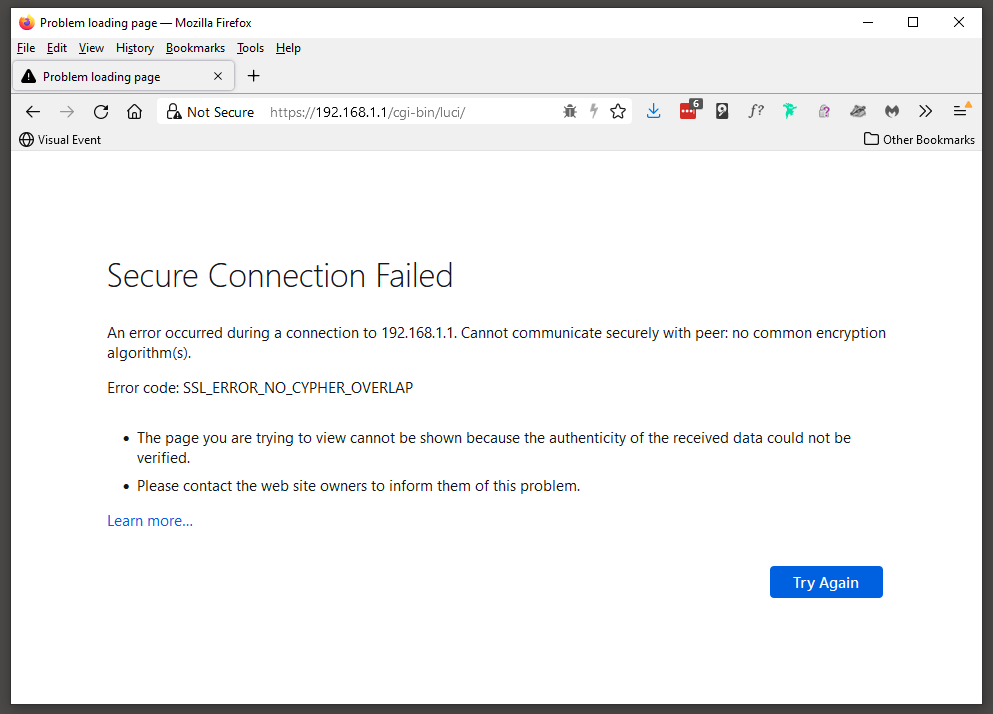
Notes
- [OpenWrt Wiki] How to get rid of LuCI HTTPS certificate warnings - Do you like the security of using LuCI-SSL (or Luci-SSL-OpenSSL), but sick of the security warnings your browser gives you because of an invalid certificate? With these instructions, you can generate your own self-signed certificate, which your browser will accept as valid.
- FireFox does not handle you messing with HTTPS/SSL in LuCi so you might find using chrome easier while setting everything up reguarding this.
- In FF, becasue the cert is unsafe, FF might not redirect to it. I cannot figure out the pattern, sometimes it works and sometimes it does not. (FF 94.0.2 64-bit).
HTTPS for LuCI (optional)
This is now enabled by default by default OpenWrt 21.02 I will leave this section here as a reference.
This installs https for LuCi, the required SSL libraries and disables http:// for LuCI,
- Install luci-ssl-openssl
- LuCI with OpenSSL as the SSL backend (libustream-openssl). OpenSSL cmd tools (openssl-util) are used by uhttpd for SSL key generation instead of the default px5g. (If px5g is installed, uhttpd will prefer that.)
- Also installs
- zlib
- libopenssl
- openssl-util
- libustream-openssl
Notes
SSL
SSL is not installed by default OpenWrt 21.02 so you do not need to install SSL or CA-Bundles. I will leave this section here as a reference.
There seems to be a few SSL packages but most people seem to use one which is the package that is used by LuCI for https/SSL (see below).
Basic Open SSL
This will install the minimum to use SSL
- Install libustream-openssl
- ustream SSL Library (openssl)
- Also installs
- Zlib
- libopenssl
CA Certificates (optional)
This installs all root certificates as one bundle file and seems to be updated on a regular basis to keep upto date with certificate authority changes. Root certificates are required to validate HTTPS certificates.
- Install ca-bundle
- System CA certificates as a bundle
- This installs nothing else
ca-bundle vs ca-certificates
I do not know why there is ca-bundle and ca-certificates but I believe that ca-bundle is all of the root certificates in one file where as ca-certificates the root certificates are all separate and that some programs require them to be separate. Which ones these are is beyond me and unless otherwise told I will use ca-bundle.
- [OpenWrt Wiki] package: ca-bundle - System CA certificates as a bundle
- [OpenWrt Wiki] package: ca-certificates - System CA certificates
- Things to do after installing Linux LEDE 17.01 | Tech Tutorials - Mentions "wget: SSL support not available, please install one of the libustream-ssl-* libraries as well as the ca-bundle and ca-certificates packages."
- ca-certificates: Add certificate bundle package (3015af96) · hayden / source · GitLab - Mentions "Some SSL applications requires a certificates bundle rather than a directory containing certificates. For those applications we build the ca-bundle package"
LetsEncrypt (not used)
Control the ACME LetsEncrypt certificate interface. For you that dont know, LetsEncrypt gives out free SSL/TLS certificates.
- Install luci-app-acme
- Control the ACME Letsencrypt certificate interface
- Also installs
- libmbedtls
- libcurl
- luci-app-uhttpd
- curl
- netcat
- ca-bundle
- acme
Notes
- Amongst other things, this installs a LuCI add-on for the uHTTPd webserver which is already installed and running for OpenWrt LuCi by default.
- [OpenWrt Wiki] package: acme
- How to run on OpenWrt · acmesh-official/acme.sh Wiki · GitHub
- the instructions from the developer.
- I dont think yu need to install luci-ssl-openssl anymore since OpenWrt 20.02
- The developer tells you to force LuCi to be HTTPS, this might be optional and/or you have already done this above.
Adblock
LuCI support for Adblock
- Install luci-app-adblock
- LuCI support for Adblock
- Also installs
- adblock
- Creates a menu under services called ‘Adblock’
Notes
- Blocks advertising at the router by intercepting DNS requests and checking them against a list.
- This adds a menu item under services called 'Adblock'.
- Adblock Documentation | GitHub
- Adblock support thread - Community Builds, Projects & Packages - OpenWrt Forum
- Adblock [Turris wiki] _ this is a comprehensive tutorial on Adblock.
- Adblock downloads the lists local and uses these for its lookups rather then doing an online lookup for each domain.
- the block lists are stored locally after downloading them
- Updating Block Lists
- The block lists are updated when the adblock process is started or stopped but you can configure a cron job to do this on a regular basis.
- To setup a cron job to update the lists
- Goto (System-->Scheduled Tasks)
- add the following line to the 'Scheduled Tasks' and click submit
This updates the block list every day @ 06:00# Adblock - Block list update 0 06 * * * /etc/init.d/adblock reload - Reboot the router. This might not be needed but it is easier just to do it.
- [OpenWrt Wiki] Scheduling tasks with cron
- Adblock - Weekdays only - Installing and Using OpenWrt - OpenWrt Forum - This is very useful.
- See the official documentation for more stuff you can do by the command line and CRON.
- OpenDNS might do a similar job, but Adblock will check against its own lists aswell before forwarding the DNS request to your chosesn DNS server.
- You can configure Adblock locally for your own whitelists and blacklists
- Test your browsers ads blocker - Load this page and see if AdBlocker is working.
- Adblock lists are all adblock formatted lists.
- The firewall rules get added to the bottom of your rules, you might need to move them up depending on your setup.
- DNS based adblock using OpenWRT, OpenDNS, and dnsmasq – Paul Bryan Vreeland - This is a alternative script that will do something similiar.
Dynamic DNS
LuCI Support for Dynamic DNS Client (ddns-scripts). The HH5A has this, but is optional to install.
- Install luci-app-ddns
- LuCI Support for Dynamic DNS Client (ddns-scripts)
- Also installs
- ddns-scripts
- This adds a menu item under services ‘Dynamic DNS’
Configuring no-ip.com as a custom DDNS provider
For some reason no-ip.com is not in the list of DDNS providers and by the looks of it people have been using a custom script for no-ip.com. I dont know wether that is still the prefered method by most people.
no-ip.com now offer the standard http/https API method of updating the DNS records with them, so that is my prefered method of updating no-ip.com DNS records.
In (Services-->Dynamic DNS-->myddns_ipv4) configure these settings
- Lookup Hostname: myexampledomain.ddns.net
- DDNS Service provider [IPv4]: -- custom --
- Custom update-URL: http://[USERNAME]:[PASSWORD]@dynupdate.no-ip.com/nic/update?hostname=[DOMAIN]&myip=[IP]
- Domain: myexampledomain.ddns.net
- Username: account@example.com
- Password: xxxxxxxxxx
These settings work fine and are using normal http.
You need to install SSL to use HTTPS
To use SSL you needs to install the basic SSL package or install https for LuCI will also install the basic SSL package and make the web interface use https at the same time.
If you try and use https for DDNS without installing a suitable SSL package you will get the following error and The DDNS service will also fail to start:
 223214  WARN : uclient-fetch: no HTTPS support! Additional install one of ustream-ssl packages - TERMINATE
 223214  WARN : PID '4597' exit WITH ERROR '1' at 2017-11-23 22:32
The resolution is simple, Install SSL functionality by following the instructions in the sections below.
Configure DDNS to use https
Making DDNS use https is really simple
- install a suitable SSL package
- in (Services-->Dynamic DNS-->myddns_ipv4)
- enable Use HTTP Secure
- a new box will apear called Path to CA-Certificate
- You now have to options to enter in
- type in IGNORE and SSL will work but will not verify the SSL certificate of the provider. this does add a slight security risk because you do not verify the certificates. It is still better than not using https.
- type in /etc/ssl/certs/ and install the ca-bundle package - This installs the root certificates (CA Bundles) OpenWrt can use to verify the SSL certificates that are issued by the DDNS prover. I have not verified this works.
Notes
- This script checks the IP against the domain and will only update the record at supplier if the IP has changed. Makes sense and reduces traffic.
- even when you are using https the url in Custom update-URL stays http://. I looked in the config file for this script and they were all http://.
- You could add the Custom update-URL into the config file manually and then select it as normal.
- packages/list at master · openwrt/packages · GitHub- Look at the DDNS providers list config file.
- Request Method - No-IP - No-IP API calls that i used to make the custom URL.
- [OpenWrt Wiki] SSH access for newcomers
- OpenDNS
- Using Dynamic DNS with OpenDNS – OpenDNS
- OpenDNS used the DynDNS API (with different domain of course).
- Managed DNS API | Dyn Help Center
- Dynamic IP: General Information for OpenDNS usage – OpenDNS
- Dynamic Update the IP / use of own URL – OpenDNS
- FAQ: OpenDNS Developer Resources – OpenDNS
- DNS-O-Matic
- DNS-O-Matic can update multiple services with 1 call, but this is not really needed with OpenWrt and this add-on.
- DNS-O-Matic Documentation: api
OpenVPN (not used)
This section is not complete. check out the links to get things working.
Ebilan now has a document on how to do this in his DropBox Repo
LuCI Support for OpenVPN
- install luci-app-openvpn
- LuCI Support for OpenVPN
- installs nothing else
- creates a menu item unders services called 'OpenVPN
- install openvpn-openssl
- Open source VPN solution using OpenSSL
- Also installs
- kmod-tun
- liblzo
- install openssl-util (optional?)
- The OpenSSL Project is a collaborative effort to develop a robust, commercial-grade, full-featured, and Open Source toolkit implementing the Secure Sockets Layer (SSL v2/v3) and Transport Layer Security (TLS v1) protocols as well as a full-strength general purpose cryptography library. This package contains the OpenSSL command-line utility.
- Also installs
- openvpn-easy-rsa
- install openvpn-easy-rsa – (optional?)
- Simple shell scripts to manage a Certificate Authority
- This might not be needed for some configurations.
- i do
- Creates a menu under service called ‘OpenVPN’
Notes
- This might need something else installing to get working
- OpenVPN on your OpenWrt router has 3 potential modes
- Force all local traffic through the VPN
- Configured as a VPN server so clients can connect to your network remotely.
- Bridge mode so 2 routers bridge their networks. (might be the same as 1 and 2)
Links
- Setting up OpenVPN client on BT Home Hub 5A using Windows - openwrt.ebilan.co.uk - A OpenVPN tutorial PDF by ebilan
- OpenWrt (LEDE) OpenVPN Setup : My Private Network - Recent tutorial
- How to setup ProtonVPN (OpenVPN) on a OpenWrt/LEDE router - Recent tutorial
- VPN(pptp) Router with OpenWrt/LEDE Tutorial (Super Easy) — Steemit - Recent tutorial
- Setup OpenVPN with OpenWrt/LEDE | LTE-Forum Österreich - Recent tutorial
- OpenVPN Setup Guide for Beginners [OpenWrt Wiki]
- OpenVPN Server HowTo (Streamlined) [OpenWrt Wiki]
- Setting an OpenWrt / LEDE Based Router as OpenVPN Client · GitHub - Some instructions
- Enterprise Servers and Networking: Step-by-Step: Base Install - VPN Client Router using LEDE (or OpenWrt)
- How to set up anonymous VPN OpenVPN use at OpenWrt router - YouTube
- Setting an OpenWrt / LEDE Based Router as OpenVPN Client · GitHub
- Setting an OpenWrt Based Router as OpenVPN Client · StreisandEffect/streisand Wiki · GitHub
ClamAV (not used)
ClamAV is an anti-virus package you can run on the router independant of the clients but it is CPU intensive. This is better suited for higher spec setups such as virtual machines.
- install luci-app-clamav
- This package will install ClamAV Web UI.
- This also installs
- libmbedtls
- libcurl
- uclibcxx
- clamav
- This creates a menu item under services called 'ClamAV'
- install freshclam (optional)
- Database updater for ClamAV
- this does not install anything else
Notes
- This will put a high cpu load on the router.
- freshclam is a service to keep the definition files upto date
Statistics
Out of the box, OpenWRT can show you real-time statistics, however it will not store the data for historical view. Install luci-app-statistics to have a nice historical data graphs for router, eg: ping, interfaces bandwidth utilization, cpu load, ram, disk, uptime, etc…
- Netdata
- This is very powerful but can be quite costly in resources.
- OpenWRT - Install Netdata - Real Time Monitoring Dashboard - YouTube
- To install, the package name is netdata
- [OpenWrt Wiki] package: netdata
- luci-app-statistics
- Linux command line instructions
- top - The most obvious
- Check Linux memory usage with 5 command line tools
- in LuCi
- Goto (System-->Processes)
Step 6 - Secure DNS (optional - but recommended)
This needs its own section because there are several ways of encrpting your DNS request and also there is DNSSEC.
See the different methods below and pick whichs ones are right for you, but my recommendation is:
- DNS Hijacking (via the Firewall)
- Requires dnsmasq-full to filter by IPSets.
- dnsmasq-full
- Supports DNSSEC
- Easy to use with Stubby for DoT
- Closet to dnsmasq in terms of config and current LuCi setup
- I dont need a full authoriative recursive DNS server (you need Unbound for this)
- You need dnsmasq-full to do DNSSEC validation locally and you only need to do this if your upstream DNS provider does not do it for you.
- DNS Hijacking needs dnsmasq-full to filter by IPSets.
- DoT (dnsmasq and Stubby)
- IT manages can still control traffic.
- Doesn't require a full HTTPS stack like DoH
- more compatible with devices
- DoT runs on a different port so is easier for traffic management
- Less resources needed
- Your local ca-bundles must be upto date (there might an override but this would defeat the object of DoT)
- dnsmasq supports IPv6
- Quad9
- It Supports DNSCrypt, DoH, DoT, DNSSEC
- I think it validates DNSSEC on it's own server so i dont need to install dnsmasq-full to do this locally.
- Its purpose is to send NXDOMAIN responses for domains that are flagged as malware/dirty.
- DNSSEC (dnsmasq)
- This validated cryptographocaly the domain you are talking it legitimate and not spoofed.
- The DNSSEC validation is done at Quad9 servers
- I dont believe I dnsmasq-full for this to work as I was getting verification just using dnsmasq
- With just dnsmasq I went to intentionally misconfigured domain and Quad9 blocked me as expected.
DNS Hijacking (via the Firewall)
This script allows OpenWrt to intercept all DNS traffic from your local network and send it to your preferred DNS provider. This is useful nowadays because of all of the encrypted DNS traffic from various apps and devices on your network.
Standard DNS and DoT are easy to identify becasue of the port they run on, however for DoH you need to match the domain the packet is being sent to from a known list DoH which is updated regulary via the hotplug.d, you can see in the code where the list is if you want to have a look.
To install DNS Hijacking run the following code blocks from the official documentation [OpenWrt Wiki] DNS hijacking via a SSH command line
- Upgrade dnsmasq to dnsmasq-full if you have not already done so
# Upgrade to dnsmasq full
opkg update
opkg remove dnsmasq
opkg install dnsmasq-full
- Command-line instructions - Configure firewall to intercept DNS traffic (The basic rule).
- Setup IP set extras
- Goto [OpenWrt Wiki] IP set extras
- Copy the code block under Instructions and paste this into your SSH window and execute.
- Setup Hotplug extras
- Goto [OpenWrt Wiki] Hotplug extras
- Copy the code block under Instructions and paste this into your SSH window and execute.
- NAT6 - Enable NAT6 to process IPv6 traffic when using dual-stack mode.
- DNS over HTTPS (DoH) - Filter DoH traffic with firewall and IP sets forcing LAN clients to switch to plain DNS. Set up IP set extras and Hotplug extras to automatically populate IP sets.
- The script has paced a file in /etc/hotplug.d/online/ so when the router comes on line this script will run.
- Setup .
- Now run the code block
- DNS over TLS (DoT) - Configure firewall to filter DoT traffic forcing LAN clients to switch to plain DNS.
- Reboot your router
Notes
- Script Notes
- DoT port is unique matching both IPv4 and IPv6 traffic, so filtering by port works well. DoH uses the same port as HTTPS, so we need to filter by the destination IP address.
- There are many public DoH servers, and filtering them all efficiently relies on IP sets. Each IP set contains only IPv4 or IPv6 entries, so a couple of sets/rules is necessary.
- IP set extras to resolve the DoH domains, and Hotplug extras to trigger IP set update at startup.
- The script downloads a domain list, converts it to ip addresses, create IPv4 and IPv6 block list and then the firewall uses this to block requests so the clients will downgrade to unsecure DNS requests on port 53 which can then be routed as required. But it does required IP set extras and Hotplug extras to be installed/run first.
- The block list will only update when the router comes on line so basically when you reboot the router. This could potential be altered if you change the location of the 60-ipset-doh script file to another hotplug folder.
- These scripts will need to be re-run after a firmware upgrade
- DNS Hijacking Doc - 2 rules for DNS over HTTPS - Talk about Documentation - OpenWrt Forum
- This script seems to need dnsmasq-full even thought it does not explicity mention it becasue all fo the examples of using those other scripts seem to say upgrade to dnsmasq-full
- IP set extras
- [OpenWrt Wiki] IP set extras
- This instruction extends the functionality of IP sets.
- Create and populate IP sets with domains, CIDRs and ASNs.
- Populate IP sets automatically at startup.
- The automatic script is the same as pasting in the code from the window
- Hotplug
- [OpenWrt Wiki] Hotplug
- This daemon will runs scripts based on events.
- Hotplug extras
- [OpenWrt Wiki] Hotplug extras
- This instruction extends the functionality of Hotplug.
- Run scripts at startup when the network is online.
- These are slightly different to the ones from Adblock but seem to be kept up to date.
Tutorials
- [OpenWrt Wiki] DNS hijacking Official Guide. This how-to describes the method for intercepting DNS traffic on OpenWrt.DNS Hijacking
DNS Hijacking (via Adblock)
Using this feature and OpenDNS (or other DNS provider) adds extra security to your network and prevents rogue uncontrolled DNS requests.
This option adds a rule into the OpenWrt firewall so all DNS requests are forced to the router and if you have set up OpenDNS as a custom DNS server then all DNS requests will be sent to OpenDNS via the router.
- Goto (Adblock-->Settings-->General Settings-->Force Local DNS)
- Enable Force Local DNS
- Forced Zones: lan
- Forced Ports: 83, 853, 5353
- Save & Apply
Firewall rules have now been added to accomplish this however the firewall rules are removed when the Adblock service is disabled or you uninstall the adblock package.
From looking at this, these rules will only work for DoT and not DoH traffic.
Keep firewall rules for DNS requests but disable the Adblock service
When you disble the adblock service under (Adblock-->Settings-->General Settings-->Enabled) the firewall which force DNS routing are removed. Sometimes you might not want the Adblock service but really want the DNS funnelling rules. So this is how to keep the rules and have the adblock service disabled. If you really want you can manually add these rules to the firewall but who wants to do that.
- Install Adblock (if not already)
- Enable Force Local DNS
- Goto (System-->Startup)
- Find the line with adblock
- Click Stop
- Click Disabled
Now the Firewall rules are still in place and the adblock service is not running. It will also not restart the service when you reboot your router.

config redirect 'adblock_lan53'
	option name 'Adblock DNS (lan, 53)'
	option src 'lan'
	option proto 'tcp udp'
	option src_dport '53'
	option dest_port '53'
	option target 'DNAT'

config redirect 'adblock_lan853'
	option name 'Adblock DNS (lan, 853)'
	option src 'lan'
	option proto 'tcp udp'
	option src_dport '853'
	option dest_port '853'
	option target 'DNAT'

config redirect 'adblock_lan5353'
	option name 'Adblock DNS (lan, 5353)'
	option src 'lan'
	option proto 'tcp udp'
	option src_dport '5353'
	option dest_port '5353'
	option target 'DNAT'
DNS over TLS (DoT) (dnsmasq and Stubby)
This is very easy to set up and the 2 options I recommend are (both have the same end result:
- Pick a method
- OpenWRT: Secure DNS over TLS with LuCI [No Command Line]
- This uses LuCi and is well written.
- [OpenWrt Wiki] DoT with Dnsmasq and Stubby
- This uses the command line and is very quick.
- Make a note of your current DNS entries as these will get wiped and if the dont, they should be.
- Open a SSH windows and run the commands in Command-line instructions
- OpenWRT: Secure DNS over TLS with LuCI [No Command Line]
- Set your own DoT DNS provider to use (eg: OpenDns/Quad9)
- edit the resolvers in /etc/config/stubby
- If your ISP does not provide IPv6 then you must comment out or remove the IPv6 resovlers otherwise this will just generate errors.
- I removed the CloudFlare resolvers as I only wanted to use Quad9.
- Further Stubby configuration (from README.md)
- Set dnsmasq to send DNS requests to stubby
- The sets up the proxy arrangement but is already done by the script we ran earlier.
- Disable sending DNS requests to ISP provided DNS servers
- This changes your WAN connections to route DNS locally.
-
If using a DoT/Stubby setup: When you do a router upgrade you will temporarily change your WAN/WAN6 DNS settings to 9.9.9.9/2620:fe::fe while you install the required packages because without this change your router will not be able to talk to the internet for this process.
- Enabling DNSSEC (Optional)
- This is a bit misleading.
- This should say enable local DNSSEC validation.
- Use DNSSEC by dnsmasq
- This is only required if your upstream resolver does not perfomr DNSSEC validation.
- Quad9 does DNSSEC validation upstream and if it faills will return a NXDOMAIN result, however if there is no DNSSEC crypto for that domain, DNS lookup will occur as normal.
- The setting (Network --> DHCP and DNS --> Advanced Settings -->DNSSEC) should be left unticked.
- The setting (Network --> DHCP and DNS --> Advanced Settings -->DNSSEC check unsigned) is a related setting and is on by default.
- Requires upstream supports DNSSEC; verify unsigned domain responses really come from unsigned domains
- See DNSSEC support in OpenWrt 15.05 Chaos Calmer | falstaff - yet another tech blog
There is one problem thought: If an attacker forges an answer and removes its DNSSEC records, dnsmasq silently accepts them. The dnsseccheckunsigned option avoids that by asking the upstream servers whether the domain in question really does not support DNSSEC. Hence this leads to additional DNS requests for all non DNSSEC domains… Well, security comes not for free - Should this be on or off?
- Set dnsmasq to send DNS requests to stubby
- Stubby Config File - Additional configurations you should set after going through the config file
- set option triggerdelay '5' to prevent some stubby errors in your syslog.
- If you dont have a delay on stubby getting triggered you get many of the following errrors
Sat Nov 27 17:24:00 2021 daemon.err stubby[3738]: Could not schedule query: None of the configured upstreams could be used to send queries on the specified transports
- This is caused purely becasue whent he WAN comes up it does not instantly have an internet connection availbe but stubby thinks it does and starts doing DNS requests. To stop this we just add a delay between WAN coming up and Stubby doing DNS requests.
- Depending on your router you might need to increase thjis a little but for mine this setting is good.
WAN Up --> Stubby Up --> No internet --> Errors
WAN Up --> Pause 4 seconds --> Stubby Up --> Internet --> No Errors
- If you dont have a delay on stubby getting triggered you get many of the following errrors
- set option triggerdelay '5' to prevent some stubby errors in your syslog.
- Complete the TLS1.3 setup
These options can be overriden on a per-resolver basis but I dont have a need for that.- Force the newer TLS1.3 cipher standards by uncommenting the following line. Please note
option tls_cipher_list 'EECDH+AESGCM:EECDH+CHACHA20'
option tls_ciphersuites 'TLS_AES_256_GCM_SHA384:TLS_CHACHA20_POLY1305_SHA256:TLS_AES_128_GCM_SHA256'
Please note that the following line is for TLS1.2 only and should be left commented out aws it is not needed.
# option tls_cipher_list 'EECDH+AESGCM:EECDH+CHACHA20'
- Set option tls_min_version '1.3'
- This ensures no downgrade to TLS1.2
- Force the newer TLS1.3 cipher standards by uncommenting the following line. Please note
- Remove CloudFlare Resolver sections
- You can have as many resolvers as you want but I only want to use Quad9
- Backup stubby YAML config files (optional)
- This does not seem to be required becasue Stubby is using the UCI system
- It says in the official doc to "You might want to add /etc/stubby/ to the list of config files that should be preserved on upgrade / backup! ", unless you use the .yaml files in that folder dont bother as all settings used are in /etc/config/stubby.
- This is done in (System --> Backup / Flash firmware --> Configuration)
- Reboot your router
- Test your new DNS system (see links below)
- Tutorials
- OpenWRT: Secure DNS over TLS with LuCI [No Command Line] - A really easy tutorial to follow using dnsmasq and stubby all done via the GUI.
- [OpenWrt Wiki] DoT with Dnsmasq and Stubby Official Guide.
- This how-to describes the method for setting up DNS over TLS on OpenWrt. It relies on Dnsmasq and Stubby for resource efficiency and performance.
- We'll basically be putting Stubby in between dnsmasq and the internet, leaving most things untouched so that dnsmasq will continue to work in OpenWrt. = easier
- The script on this page adds 2 listening addresses '127.0.0.1@5453' and '0::1@5453' (taken from the subby config file) but on the README.md it just tells you to use '127.0.0.1@5453'. Both configs work just dont know if one is better than the other.
- [Tutorial] [No CLI] Configuring DNS over TLS with LuCI using Stubby and Dnsmasq - Network and Wireless Configuration - OpenWrt Forum
- DNS Over TLS on OpenWrt 18.06, 19.07, and 21.01 – Craig Andrews
- GitHub - getdnsapi/stubby: Stubby is the name given to a mode of using getdns which enables it to act as a local DNS Privacy stub resolver (using DNS-over-TLS).
- DNS Over TLS on OpenWrt 18.06, 19.07, and 21.01 – Craig Andrews
- [OpenWrt Wiki] Stubby - Package homepage with OpenWrt Stubby install instructions.
- UPDATED GUIDE FOR Getdns 1.4.2-2 stubby 0.2.3-3 and unbound 1.8.1-2 - Member Tutorials - TorGuard Forums
- This tutorial tells you how to install and use Stubby on OpenWrt but it also give you information about setting TLS1.3 and the appropriate ciphers and how to test them with OpenSSL.
- The best ciphers for TLS1.3 are the ones in the Stubby config file that are commented out. These might be the same as the defaults, I am trying to find this out.
- DNS over TLS - Windows 10 (Stubby /w GUI) | Quad9
- Quad9 have told me nslookup -q=txt -class=chaos id.server does work when using the Windows client.
- Stubby documentation
- DNS Privacy Daemon - Stubby :: dnsprivacy.org - Official homepage.
- packages/README.md at master · openwrt/packages · GitHub - OpenWrt Stubby Package repo - All configs are described here, DNSSEC tests and good instructions to install on OpenWrt
- stubby/stubby.yml.example at develop · getdnsapi/stubby · GitHub - All configs are described here in this example YAML file. OpenWrt does nto use this file but the settings are the same.
- Enforce DNSSEC validation if your DNS provider does not support it, or you want to perform the validation yourself. Beware of fault tolerance and performance issues. See notes below for more information.
- Misc
- Stubby can receive IPv6 and IPv4 traffic.
- SPKI pins
- Dont use.
- Public Resolvers :: dnsprivacy.org - Quad9 do NOT publish or recommend use of SPKI pins with their servers.
- SPKI validation for public DOT systems · Issue #242 · getdnsapi/stubby · GitHub
- EDNS
- Stubby does not have its own log file. When enabled, it posts the messeages in to the System Log which can be viewed as ever (Statuis --> System Log)
DNS over TLS (DoT) (Unbound and odhcpd)
- Tutorials
- OpenWRT - Configure DNS-over-TLS with Cloudflare DNS - YouTube (Van Tech Corner) In this video, we will configure DNS over TLS on OpenWRT router with Cloudflare DNS, in order to secure the DNS requires. By default, OpenWRT was pre-installed Dnsmasq as an internal resolver and therefore doesn't support DNS-over-TLS. We will need to uninstall it and install unbound & odhcpd in order to enable DNS-over-TLS with Cloudflare DNS. In this video, I will also explain the basic concept of DNS and why do we need DNS-over-TLS
- [OpenWrt Wiki] DoT with Unbound - Official Guide.
- Privacy-Protecting Portable Router: Adding DNS-Over-TLS support to OpenWRT (LEDE) with Unbound Cloudflare
DNS over HTTPS (DoH) (dnsmasq and https-dns-proxy)
- Tutorials
- OpenWRT - Configure DNS-over-HTTPS (DoH) - YouTube (Van Tech Corner) In this video, we are going to configure DNS over HTTPS on OpenWRT LuCI to secure the DNS queries that come from LAN devices to the internet. This is a great video.
- [OpenWrt Wiki] DoH with Dnsmasq and https-dns-proxy (Official Guide) This how-to describes the method for setting up DNS over HTTPS on OpenWrt. It relies on Dnsmasq and https-dns-proxy for masking DNS traffic as HTTPS traffic.
DNSSEC (dnsmasq-full)
OpentWrt comes with the small version of dnsmasq which is fine for most basic operations but DNSSec requires the full package to be installed.
It should be possible to run DNSSec and DNSCrypt if the target DNS server supports both of these technologies.
- uninstall dnsmasq
- It is intended to provide coupled DNS and DHCP service to a LAN.
- install dnsmasq-full
- It is intended to provide coupled DNS and DHCP service to a LAN. This is a fully configurable variant with DHCPv6, DNSSEC, Authoritative DNS and IPset, Conntrack support & NO_ID enabled by default.
- Also installs
- kmod-nfnetlink
- libmnl
- libgmp
- libnettle
- libnfnetlink
- kmod-nf-conntrack-netlink
- libnetfilter-conntrack
- kmod-ipt-ipset
You probably will receive the follow error:
Collected errors:
 * resolve_conffiles: Existing conffile /etc/config/dhcp is different from the conffile in the new package. The new conffile will be placed at /etc/config/dhcp-opkg.
Compare the config files
You should note there might be more that one service using the dhcp config file.
- Text compare the 2 files for obvious settings that need to be copied. Always keep your orginal dhcp file and move what is missing from dhcp-opkg (optional)
- or you can freshly load the page (Network-->DHCP and DNS) after upgrading to dnsmasq-full and then 'save and apply' the settings thus creating any missing setting that needs to be added (i am guessing here).
- the dnsmasq-full dhcp config file is almost the same as dnsmasq dhcp config file. dnsmasq-full dhcp config file seems messy. and when you save 'DHCP and DNS' settings in LuCI with no changes it encapsulates all of the settings in apostrophes which mean the original dsnmasq dhcp file format is correct. This most likely means that you should use you orginal dsnmasq dhcp config file. When you enable additional settings then they will be recorded in the config file so any that were possibluy missing will appear as required, this is probably how things worked even before the upgrade.
- Delete the dhcp-opkg (or save it somewhere but do not leave it on the router)
Enable DNSSec
DNSSec is not enabled by default so will need to be turned on.
- (Network-->DHCP and DNS-->Server Settings-->Advanced Settings-->DNSSEC) = enabled
- (Network-->DHCP and DNS-->Server Settings-->Advanced Settings-->DNSSEC check unsigned) = enabled (optional)
- is slower but more secure, see notes.
- Requires upstream supports DNSSEC; verify unsigned domain responses really come from unsigned domains
DNSCrypt (Dnsmasq and dnscrypt-proxy) (not used)
dnscrypt-proxy is an application that acts as a local DNS stub resolver using DNSCrypt. It encrypts your DNS traffic improving security and privacy. dnscrypt-proxy is the client-side version of dnscrypt-wrapper. Follow DNSCrypt with Dnsmasq and dnscrypt-proxy to properly setup DNSCrypt via dnscrypt-proxy on your router.
- This is a new way to get your DNS quries. It is not a web standard yet nor is it DNSSEC
- Install luci-app-dnscrypt-proxy
- dnscrypt-proxy provides local service which can be used directly as your local resolver or as a DNS forwarder, encrypting and authenticating requests using the DNSCrypt protocol and passing them to an upstream server. The DNSCrypt protocol uses high-speed high-security elliptic-curve cryptography and is very similar to DNSCurve, but focuses on securing communications between a client and its first-level resolver.
- Also installs
- ibsodium
- dnscrypt-proxy-resolvers
- dnscrypt-proxy
- Tutorials
- [OpenWrt Wiki] DNSCrypt with Dnsmasq and dnscrypt-proxy2 (Official Guide) This how-to describes the method for setting up DNSCrypt on OpenWrt. It relies on Dnsmasq and dnscrypt-proxy for resource efficiency.
- [OpenWrt Wiki] DNSCrypt with Dnsmasq and dnscrypt-proxy (official Guide) (old Version)
- [OpenWrt Wiki] dnscrypt-proxy - The OpenWrt homepage for the DNSCrypt package.
Notes
- Quad9 is the best DNS Resolver
- Introduction to Quad9 DNS Service - YouTube - Our Executive Director, John Todd, gives an overview of the Quad9 DNS Service and explains the benefits of its security and privacy features. For more information, please visit quad9.net.
- DNS Malware Filtering Compared: Quad9 VS Cloudflare VS DNS Filter VS OpenDNS / Cisco Umbrella - YouTube - A video from Lawrence system showing you how well Quad9 behaves against malware and their domains.
- DNS Malware Filtering Followup: Comments, Concerns, Cisco Corrections and Conversation - YouTube - A followup video from Lawrence systems on the video above.
- DNS Ports
- 53 DNS
- 443 SSL/TLS Traffic and DNS over HTTPS (DoH)
- 853 DNS over TLS (DoT)
- 5353 Mulicast DNS (mDNS)
- 5453 Stubby
- DNS Hijacking
- DNS Hijacking is a method administrators use to route the DNS traffic to their router and then control the lookups and traffic etc.
- Do this first otherwise secure DNS will be pointless for unknown devices or those you do not control.
- DNS over TLS (DoT)
- DNS over HTTPS (DoH)
- An easy way to test without changing anything in your favorite DoH client is to just perform the following query right from your browser. The output is in JSON so can probably be used by programmers via cURL. Firefox does a nice formatted output by default/
https://dns.quad9.net:5053/dns-query?name=quad9.net
https://9.9.9.9:5053/dns-query?name=quad9.net
- An easy way to test without changing anything in your favorite DoH client is to just perform the following query right from your browser. The output is in JSON so can probably be used by programmers via cURL. Firefox does a nice formatted output by default/
- DoT Vs DoH
- DNSSEC vs DNSCrypt vs DoH vs DoT
- DNS-over-HTTPS Is The Wrong Partial Solution | Hackaday - This is a fantastic article, clear and answers a lot of questions about secure DNS.
- The idea of also encrypting DNS requests isn’t exactly new, with the first attempts starting in the early 2000s, in the form of DNSCrypt, DNS over TLS (DoT), and others. Mozilla, Google, and a few other large internet companies are pushing a new method to encrypt DNS requests: DNS over HTTPS (DoH).
- DoH not only encrypts the DNS request, but it also serves it to a “normal” web server rather than a DNS server, making the DNS request traffic essentially indistinguishable from normal HTTPS. This is a double-edged sword. While it protects the DNS request itself, just as DNSCrypt or DoT do, it also makes it impossible for the folks in charge of security at large firms to monitor DNS spoofing and it moves the responsibility for a critical networking function from the operating system into an application.
- It also doesn’t do anything to hide the IP address of the website that you just looked up — you still go to visit it, after all.
- Secure DNS with DNSCrypt & DNSSEC | What is DNSCrypt?
- It may seem like DNSCrypt and DNSSEC are competing solutions, but they are actually complementary and can be used together for comprehensive security. DNSSEC provides protection against DNS spoofing and other man-in-the-middle attacks, and DNSCrypt provides double-protection and prevents any eavesdropping on traffic, even by ISPs.
- DNS Security with DNSCrypt | OpenDNS
- In the same way the SSL turns HTTP web traffic into HTTPS encrypted Web traffic, DNSCrypt turns regular DNS traffic into encrypted DNS traffic that is secure from eavesdropping and man-in-the-middle attacks. It doesn’t require any changes to domain names or how they work, it simply provides a method for securely encrypting communication between our customers and our DNS servers in our data centers.
- DNScrypt vs DNScrypt v2 vs DoT vs DoH - Installing and Using OpenWrt - OpenWrt Forum
- Q&A - DoH, DoT, DNSCrypt or DoQ? | MalwareTips Community
- A poll on what people secure DNS protocol use.
- DNSCrypt or similar tools aren't necessary nowadays because of DoT, DoH and upcoming DoQ
- DNS-over-HTTPS Is The Wrong Partial Solution | Hackaday - This is a fantastic article, clear and answers a lot of questions about secure DNS.
- DNSSEC
- DNSSEC validation can be done upstream by your resolver and does not need you to perform this function locally which is what would happen if you get either dnsmasq or stubby to do DNSSEC validation. The reason for this option is that not all DNS resolvers provide this service. So if you are using a decent resolver like Quad9 then leave this option off.
- What is the actual purpose of the "Use DNSSEC" option? - General - Pi-hole Userspace
- Frequently Asked Questions | Quad9 - Quad9 does dns validation upstream so with this service you do not need to enable DNSSEC on either OpenWrt or Stubby. If a domain fails DNSSEC validation a NXDOMAIN response is sent, if the domain does not have DNSSEC configured then this additional test is skipped. So just let Quad9 do the ahrd work rather than using additional resources on your router.
- How Does DNS Works : Resolving DNS With DNSSEC - YouTube
- An easy to watch video explaining DNSSEC
- a validator is the software/service that checks the cryptographic keys and goes up the tree to validate the whole root. Quad9 is a Validator.
- DNSSec is an internet standard that is getting adopted across the internet. This technology prevents DNS cache poisoning by verifying that DNS lookups are valid by using a public key infrastructure similiar to that used for SSL certificates to authenticate them. A target website needs to also have DNSSec configured correctly for the system to fully work. I assume most large companies will have this configured by now. The end user will not notice any difference if a site does not have this configured as the DNS request will be correctly handled and sent to the requester. If the DNS lookup fails validation then the lookup will return a domain not found.
- Quad 9 | Internet Security and Privacy in a Few Easy Steps - Quad9 is a free public DNS service that provides security focussed DNS lookups. They actively prevent access to malicious sites by blocking the lookups. Quad9 also supports DNSSec.
- Main page of DNSMASQ
- "As a default, dnsmasq does not check that unsigned DNS replies are legitimate: they are assumed to be valid and passed on (without the "authentic data" bit set, of course). This does not protect against an attacker forging unsigned replies for signed DNS zones, but it is fast. If this flag is set, dnsmasq will check the zones of unsigned replies, to ensure that unsigned replies are allowed in those zones. The cost of this is more upstream queries and slower performance. See also the warning about upstream servers in the section on --dnssec"
- Create a DNSSEC record for your domain in cPanel - YouTube - If available.
- cPanel Zone Editor - cPanel Version 64 Documentation
- [OpenWrt Wiki] DNS configuration
- CZ.NIC - O DNSSEC - A central point on the internet for information and tools for DNSSec.
- DNSSEC – What Is It and Why Is It Important? - ICANN
- RFC 3655 - Redefinition of DNS Authenticated Data (AD) bit
- What is DNSSEC? | ResellerClub
- What is DNSSEC? (DNSSEC)
- DNSSec Explained - YouTube
- This fully explains how DNSSec works. I have added somes notes below I took from the video about DNSSec.
- 8:40 in video shoes how DNSSec works, the bit before just covered prerequsite technology with explanations.
- The 'root PubKSK' need to be already installed in OpenWrt DNS server from means other than the DNS protocol therefore dnsmasq-full must have this file(s) in it to allow DNSsec to work as expected. This is either added in to the repository or the package downloads the file(s) as required but seperate to the DNS protocol.
- For each lookup from (root zone-->TLD Zone-->Website Domain/Zone) in a fully DNSSec compliant router there is a chain of trust similiar to a CA certificate. Each signed with the parents public key and so on.
- A DNSSec server passes back additional information in its lookup response over and above normal DNS and the DNSsec service performs validation and decryption of various keys and signatures which requires the servers to be DNSSec capable.
- For a website to be using DNSSec there there needs to be keys and things installed on that domains DNS record. (not 100%)
- I think the keys are all stored as DNS records (not 100%)
- OpenWrt is not a full 'recursive DNS server'. dnsmasq will pass the DNS request to a 'full recursive DNS server', this server will do all of the hard work. When the response is sent back to OpenWrt this will be checked and then forwarded to the client as a normal DNS request reponse.
- 13:50 in the video setting up DNNSec on your domain
- Things have to be added to the domain. Just because you enable DNNSsec on the router does not mean that it will happen for the full tree. (root zone-->TLD Zone-->Website Domain/Zone) as the chain of trust needs to be maintained.
- Websites need to use DNSSEC to prevent them from being hijacked, it is not just about implementing this for the clients.
- Evaluating Local DNSSEC Validators – /techblog - In this article I will demonstrate how to install and configure six common local DNSSEC validators for Linux, and evaluate how well they perform. Very indepth article using Ubuntu/OpenWrt/Linux.
- DNSSEC validation can be done upstream by your resolver and does not need you to perform this function locally which is what would happen if you get either dnsmasq or stubby to do DNSSEC validation. The reason for this option is that not all DNS resolvers provide this service. So if you are using a decent resolver like Quad9 then leave this option off.
- DNSCrypt
- DNSCrypt is an open source technology developed by OpenDNS that allows the SSL/TLS encryption of DNS requests between the client and the DNS server/resolver. This is not an internet standard but it does have some adoption. DNSCrypt does not do any validation of the DNS request or response like DNSSec does but the two technologies could potentially be used in tandom although currently OpenDNS does not support DNSSec.
- DNS Security with DNSCrypt | OpenDNS - An overview of DNSCrypt.
- DNSCrypt version 2 - Official Project Home Page
- DNSCrypt - Official Project Home Page
- DNSCrypt is a protocol that authenticates communications between a DNS client and a DNS resolver. It prevents DNS spoofing. It uses cryptographic signatures to verify that responses originate from the chosen DNS resolver and haven't been tampered with.
- It is an open specification, with free and open source reference implementations, and it is not affiliated with any company nor organization.
- dnscrypt resolvers - A list of public DNS servers that support DNSCrypt
- dnsmasq
- OpenWrt base install uses Dnsmasq for DNS forwarding (and DHCP serving). This works well for many cases. Dependence on the upstream resolver can be cause for concern. It is often provided by the ISP, and some users have switched to public DNS providers. Either way can result in problems due to performance, hijacking, trustworthiness, or several other reasons. Running a recursive resolver is a solution.
- [OpenWrt Wiki] package: dnsmasq-full - It is intended to provide coupled DNS and DHCP service to a LAN. This is a fully configurable variant with DHCPv4, DHCPv6, DNSSEC, Authoritative DNS and IPset, Conntrack support & NO_ID enabled by default.
- unbound
- [OpenWrt Wiki] Unbound
- [OpenWrt Wiki] package: luci-app-unbound
- DNS Resolver — Roll Your Own Network - Detailed instructions on how to install and configure unbound on OpenWrt and remove dnsmasq.
- Bind vs dnsmasq vs Unbound
- Bind vs dnsmasq vs PowerDNS vs Unbound | ComputingForGeeks - Excellent descriptions of the different packages and their functionality.
- Unbound vs. Dnsmasq - Very specific about why you should use unbound.
- Multicast DNS (mDNS)
- mDNS cannot be routed, it is a zero config local protocol only.
- DNS vs mDNS | difference between DNS and mDNS
- Multicast DNS - Wikipedia
- mDNS operate at local network level unlike conventional DNS which operates at global level. It works in conjunction with DNS-SD (service discovery) protocol in zeroconf network. ... Multicast DNS works at link local level and hence every node can be reached without routing. mDNS packet will not be forwarded by any router.
- odhcpd
- [OpenWrt Wiki] odhcpd
- Disable Dnsmasq DNS role or remove it completely optionally replacing its DHCP role with odhcpd.
- Test DNS
- Test your DNS request (Via Webbrowser) is running DNSSEC
- DNSSEC? Or Not?
- DNS leak test - Check your DNS provider. Make sure there is no DNS leak. and tells you your IP address.
- DNSSEC Resolver Test - Test DNSSEC validation.
- Are You Protected By DNSSEC? A Quick Way To Check | Internet Society - Thumbs up or thumbs down.
- DNSSEC Algorithm test | Root Canary Project - This tells you the signing algorithm of your DNSSEC handshake.
- Cloudflare Browser Check | Cloudflare - When you browse websites, there are several points where your privacy could be compromised, such as by your ISP or the coffee shop owner providing your WiFi connection. This page automatically tests whether your DNS queries and answers are encrypted, whether your DNS resolver uses DNSSEC, which version of TLS is used to connect to the page, and whether your browser supports securing the Server Name Indication (SNI) using Encrypted Client Hello (ECH).
- Test Webserver has DNSSEC installed adn aworking correctly
- DNSViz | A DNS visualization tool - DNSViz is a tool for visualizing the status of a DNS zone. It was designed as a resource for understanding and troubleshooting deployment of the DNS Security Extensions (DNSSEC). It provides a visual analysis of the DNSSEC authentication chain for a domain name and its resolution path in the DNS namespace, and it lists configuration errors detected by the tool.
- DNSSEC Analyzer | Verisign
- Test if DNSSEC is enabled on your domain - Very easy answer, yes or no.
- Multiple DNSSEC Tests
- DNSSEC Tools | Internet Society - this has some domains with intentinally misconfigured DNSSEC for testting. This is the best way to amke sure DNSSEC is working on your setup. There are also some other tools, well worth a look.
- Test for modern Internet Standards like IPv6, DNSSEC, HTTPS, DMARC, STARTTLS and DANE. - Browser and website checks in a nice format.
- Test with DIG
- Dig for Windows – Dr John's Tech Talk
- How to Install dig on Windows 10 | configserverfirewall
- packages/README.md at master · openwrt/packages · GitHub - The following command can be used to test your DNSSEC validation using dig.
- 10 Most used DIG commands - ClouDNS Blog
- How to test and validate DNSSEC using dig command line - nixCraft
- DNSSEC Guide : How To Test Recursive Server (So You Think You Are Validating) | The DNS Institute
- How to Test and Validate DNSSEC using dig and Web Tools? - Techglimpse
- Testing DNSSEC validation - DNS server configuration notes
- Test with KDIG
- Misc Information
- DNSThought - DNSSEC resolver information, loads of graphs and things.
- Test local traffic with Wireshark
- OpenWRT - Configure DNS-over-TLS with Cloudflare DNS - YouTube (Van Tech Corner) @757s this shows you how to use Wireshark to track traffic on your OpenWrt router's WAN port. You need to:
- install tcpdump on you router
- install SSH on Windows 10 (if not already
- install Wireshark on Windows
- run this command
ssh root@192.168.1.1 tcpdump -i br-lan -U -s0 -w - 'not port 22' | "C:\Program Files\Wireshark\Wireshark.exe" -k -i -
- The extra '-' at the IS needed.
- 192.168.1.1: The traget that will supply the data and has tcpdump installed.
- -i br-lan: The interface to monitor.
- -U: As the description of the contents of each packet is printed, it will be written to the standard output, rather than, when not writing to a terminal, being written only when the output buffer fills.
- -s0: Capture the full data packet. The number following the 's' indicates the number of bits to capture of each packet. 0 indicates all.
- -w: Write the packet capture to a capture file that is readable in an application such as Wireshark.
- - 'not port 22': This is an expression that can be passed via the command line. The expression argument can be passed to tcpdump as either a single Shell argument, or as multiple Shell arguments, whichever is more convenient. Generally, if the expression contains Shell metacharacters, such as backslashes used to escape protocol names, it is easier to pass it as a single, quoted argument rather than to escape the Shell metacharacters. Multiple arguments are concatenated with spaces before being parsed.
- | "C:\Program Files\Wireshark\Wireshark.exe" -k -i -:
- This pipes the output from the devide with tcpdump to Wireshark on the PC you ran the command from with the switches -k -i
- The dash at the end terminates the output definition.
- -k: start capturing immediately (def: do nothing)
- -i: defines the interface, but this must just say there is no interface just use the stream i supply. This is probably a minimum requirement to start Wireshark.
- This pipes the output from the devide with tcpdump to Wireshark on the PC you ran the command from with the switches -k -i
- Enter your router's root password into the SSH window.
- Devices available to monitor (might not be all of them). Just swap out eth0 with the device you want to monitor.
You can find a full list of devics to monitor by going to (Network --> Interfaces --> Devices) or (Status --> Realtime Graphs --> Traffic)
- dsl0
- Shows/Pings: All external traffic.
- Does NOT Show/Ping:-
- NB: -
- dsl0.101
- NB: same as dsl but with a VLAN assigned. (i.e. BT lines in the UK)
- pppoe-wan
- NB: I think this is the same as dsl0
- wlan0
- Shows/Pings: 192.168.1.2 (WiFi client)
- Does NOT Show/Ping: 192.168.1.1 (Router), 192.168.1.219 (LAN client), DNS requests.
- NB: Only internal wireless traffic!
- wlan1
- Shows/Pings: 192.168.1.2 (WiFi client)
- Does NOT Show/Ping: 192.168.1.1 (Router), 192.168.1.219 (LAN client), DNS requests.
- NB: Only internal wireless traffic!
- eth0
- Shows/Pings: 192.168.1.219 (LAN client)
- Does NOT Show/Ping: 192.168.1.1(Router), 192.168.1.2 (WiFi client), DNS requests.
- NB: Only internal switch traffic!
- eth0.1
- NB: same as dsl but with a VLAN assigned.
- br-lan
- Shows/Pings: 192.168.1.1 (Router), 192.168.1.2 (WiFi client), 192.168.1.219 (LAN client), DNS requests.
- Does NOT Show/Ping: -
- NB: Shows all internal router traffic including cross border traffic. It does not show the traffic on the external side of the WAN.
- NB: This stands for Bridged LAN
- dsl0
- OpenWRT - Configure DNS-over-TLS with Cloudflare DNS - YouTube (Van Tech Corner) @757s this shows you how to use Wireshark to track traffic on your OpenWrt router's WAN port. You need to:
- Test external DNS traffic is now secure
- Run Wireshark with
ssh root@192.168.1.1 tcpdump -i dsl0.101 -U -s0 -w - 'not port 22' | "C:\Program Files\Wireshark\Wireshark.exe" -k -i -
- Filter in Wireshark with ip.src == 111.111.111.111 and dns (use your WAN IP)
- Monitor your network for a little while to make sure. and if your router is correctly handling all of the DNS request through DoT (or which ever DNS security method you chose)
- There should be no DNS protocol packets being shown.
- DNS should now as TLS packets going to your defined DNS provider and in my cas that is 9.9.9.9 (Quad9) and is using the TLSv1.3 protocol.
- If you have not configured DNS Hijacking then there will likely be some DNS protocol packets as well as your secured stuff.
- To generate DNS lookups for testing
- Use ping google.com -t , this sequence will start with a dns lookup followed by a load of pings which is easy to find.
- nslookup
- Dont use this for testing DNS lookups in Wireshark, I could never get it to show anything on any interface.
- networking - How does Windows decide which DNS Server to use when resolving names? - Server Fault
- Run Wireshark with
- Wireshark - SSH Piping
- How to Use SSH Pipes on Linux - Like most commands on Linux, SSH can be used with input/output redirection via | (Unix Pipe). SSH can be used with this pipeline too. The basic concept here is understanding how the Unix pipeline works.
- How to Use SSH Pipes on Linux - CVTF Studios.net
- powershell - Piping SSH to wireshark on windows - Server Fault
- Wireshark Switches
- 11.2. Start Wireshark from the command line - You can start Wireshark from the command line, but it can also be started from most Window managers as well. In this section we will look at starting it from the command line.
- Wireshark - Single Dash (at the end)
- linux - What's the magic of "-" (a dash) in command-line parameters? - Stack Overflow
- If you mean the naked - at the end of the tar command, that's common on many commands that want to use a file.
- It allows you to specify standard input or output rather than an actual file name.
- It's not magic. Some commands interpret - as the user wanting to read from stdin or write to stdout; there is nothing special about it to the shell.
- My interpretation is that this allows the data to be streamed and not written to a file
- shell - What does dash "-" at the end of a command mean? - Unix & Linux Stack Exchange
- In this case, it means ‘standard input’. It's used by some software (e.g. tar) when a file argument is required and you need to use stdin instead. It's not a shell construct and it depends on the program you're using.
- linux - What's the magic of "-" (a dash) in command-line parameters? - Stack Overflow
- Wireshark - SSH double dash explained
- ZG International Zentica - What Does –– (double dash) Mean In SSH Shell Command?
- A nice and easy article explaining double dashses.
- The double dash “--” means “end of command line flags” i.e. it tells ssh command not to try to parse what comes after command line options.
- shell - What does "--" (double-dash) mean? - Unix & Linux Stack Exchange
- More precisely, a double dash (--) is used in most Bash built-in commands and many other commands to signify the end of command options, after which only positional arguments are accepted.
- What Does ‐‐ (double dash) Mean In SSH Shell Command? - nixCraft - Easy to read article.
- ZG International Zentica - What Does –– (double dash) Mean In SSH Shell Command?
- Wireshark - To monitor IPv6
- Wireshark - Filters
- Top 10 Wireshark Filters // Filtering with Wireshark - YouTube - Has a list of simple filters in the description aswell.
- 6.4. Building Display Filter Expressions | Wireshark
- DisplayFilters · Wiki · Wireshark Foundation / wireshark · GitLab - Many filter examples here.
- How to Filter By IP in Wireshark - With pictures and many examples.
- The ones you might need straight away
- dns
- ip.addr == 192.168.1.226
- ip.addr == 192.168.1.226 and dns
- ip.src == 111.111.111.111
- ip.dst == 111.111.111.111
- ipv6.addr == ff02::1:2
- Wireshark - OpenWrt tcpdump packet capture (General)
- Wireshark - Notes
- Wireshark adds new entries at the bottom (i wish i could change this) and unless you are at the bottom you will not see updates and Wireshark will appear to be stuck.
- Wireshark Tutorial and Tactical Cheat Sheet | HackerTarget.com - A cheat sheet for Wireshark.
- IPv6 - The Wireshark Wiki - A quick overview of IPv6 and some example filters.
- Wireshark - Depending on what device you are connected to you might not see your computer becasue:
- you are monitoring the WAN where all traffic has been natted and the local IP address no longer exist.
- you are monitoring the ethernet and not the bridged ethernet with the wifi on.
- you are emonitoring the wifi but yur device is on the ethernet
- some traffic that is sent to the router i.e. 192.168.1.1 might just get eaten up by the router becasue effectively when it get the packet it does not route it (this is a guess)
- your device is communicating on IPv6 and you are only monitoring IPv4
- tcpdump
- Man page of TCPDUMP - All switches are listed here
- tcpdump Switches - The tcpdump command has several switches with different purposes. The following are some of the most commonly used.
- A tcpdump Tutorial with Examples — 50 Ways to Isolate Traffic - Daniel Miessler - This guide will show you how to isolate traffic in multiple ways—including by IP, port, protocol, or application to help you find what you’re looking for.
- Test SSL
- WolfSSL
- Release wolfssl 5.0.0 binaries for Windows 10/11 x64 · fochoao/wolfssl-windows · GitHub - WolfSSL Binaries
- wolfSSL User Manual | wolfSSL Embedded SSL/TLS Library Docs - Official documentation.
- Using wolfSSL with Visual Studio | wolfSSL Embedded SSL/TLS Library
- Which cipher is actually being used in connect process. (Page 1) — wolfSSL (formerly CyaSSL) — wolfSSL - Embedded SSL Library - A forum thread with a workthrough.
- OpenSSL
- Binaries - OpenSSLWiki - Old list
- Win32/Win64 OpenSSL Installer for Windows - Shining Light Productions - Uses and installer and there are many different flavours.
- OpenSSL Binary Distribution for Microsoft Windows | firedaemon - Requires some dependencies to be installed but is in a ZIP format.
- Xampp - Apache Webserver for Windows - This has the OpenSSL binaries within it, so if you have this software install you can just use that.
- Release OpenSSL binaries from OpenSSL1.1.1.d [Fixed] · serenial/openssl-windows-binaries · GitHub
- OpenSSL source files
- GitHub - openssl/openssl: TLS/SSL and crypto library
- Using OpenSSL s_client commands to test SSL connectivity | Ping Identity
- OpenSSL Cookbook: Chapter 2. Testing TLS with OpenSSL | feistyduck.com - This test SSL certificates and other test such as cipher. Very detailed.
- s_client | OpenSSL - The s_client command implements a generic SSL/TLS client which connects to a remote host using SSL/TLS. It is a very useful diagnostic tool for SSL servers.
- Wireshark
- Use Wireshark to check the Server Hello
- WolfSSL
- nslookup - this can be a useful tool for testing DNS
- 10 most used Nslookup commands - ClouDNS Blog
- command line - How can I direct a query to specific DNS server? - Super User
- Using Nslookup in Windows to List DNS Servers and Records – TheITBros
- nslookup force to use IPv4: nslookup -q=txt -class=google.com 192.168.1.1
- nslookup | Microsoft Docs
- networking - Windows Appending Domain Suffix To All Lookups - Server Fault
- to solve: add a . (period) on the end of the ip Address you are looking up.
- Test your DNS request (Via Webbrowser) is running DNSSEC
- Test you are using Quad9
- Are you using quad9 - Simple Yes/No Test | Quad9
- @Quad9DNS is there any way to test if the dns is correctly setup on the router? Any site on which I could check if it's blocked for ex? | Quad9 Twitter thread
- Try our test domain - http://isitblocked.org - should result in NXDOMAIN on our systems
- For specific DNS-over-TLS debugging and command-line testing, we’d suggest using ‘kdig’ - https://knot-dns.cz/docs/2.6/html/man_kdig.html
- To test what a blocked domain would look like, try resolving
‘http://blocked.test.on.quad9.net’ - that should result in an NXDOMAIN,
while ‘http://notblocked.test.on.quad9.net’ should resolve to 9.9.9.9.
- What does a block from Quad9 look like? | Quad9
- When Quad9 blocks a domain we send a response with the code NXDOMAIN in it. That code is also returned when a domain does not exist. To differentiate between domains that are nonexistent and blocked we set the authority bit differently. When you receive an NXDOMAIN with authority 0 that is a block from Quad9. When you receive an NXDOMAIN with authority 1 then that is a domain that does not exist.
- dig commands to test this are on the page
- How to Confirm You're Using Quad9 - Windows | Quad9
- How to Confirm You're Using Quad9 - Linux | Quad9
Step 7 - Final Configuration
In this section we just make changes that are appropriate here.
My ISP is not providing IPv6 and I am getting odhcp6c errors in the syslog
This error appears in your system error log. It will not cause any real issues but explanantions and solutions are below.
Mon Nov 29 15:56:12 2021 daemon.err odhcp6c[1363]: Failed to send SOLICIT message to ff02::1:2 (Permission denied)
Mon Nov 29 15:56:13 2021 daemon.err odhcp6c[1363]: Failed to send RS (Permission denied)
Cause
- odhcp6c is the DHCPv6 client daemon. It is likely trying to get dhcpv6 address for WAN from ISP dhcpv6 server. (for WAN interface, the outside network is the link-local context. And that fails as long as the WAN interface has no connectivity.
- ff02::1:2 is an IPv6 address that is used to send all messages to DHCP servers and relay agents on the local network segment (defined in RFC 3315). IPv6 DHCP works differently to IPv4.
- WAN6 has dhcpv6 as the address protocol, so that your WAN port can get an IPv6 address from the ISP's DHCPv6 server (if there is such).
- My provider does not offer IPv6 so this DHCPv6 request will always fail and potential keep retrying.
- Once the WAN6 interface is started when configured as a DHCPv6 client, even if you stop it, or it appears stopped, the odhcp6c daemon is still running.
Solutions
Pick one of the solutions below.
- Get an ISP that provides IPv6
- Prevent the WAN6 interface from ever starting. (Preferred)
- (Network --> Interfaces --> WAN6 --> Edit --> Bring up on boot) = unticked
- This method has the benefit of leaving the interface intact should you ever want to quickly enable IPv6.
- Delete the WAN6 interface (not tried this but a few people have said this works)
- Disable IPv6 on your whole router (not tried this but seems overkill)
Links
- Error message in log regularly - #4 by takimata - Installing and Using OpenWrt - OpenWrt Forum - This thread gave me the answers. It was hard to find becasue the title was nto the best.
- Failed to send DHCPV6 message to ff02::1:2 (Address not available) · Issue #55 · openwrt/odhcp6c · GitHub - Some diagnosis techniques here and worth a read if my solutions dont work. This issue kept on coming up in my Google searches.
- Daemon.err odhcp6c: Failed to send DHCPV6 message to ff02::1:2 (Permission denied) - #3 by gtdaniel - Network and Wireless Configuration - OpenWrt Forum - Some useful information here.
- Getting to the bottom of an OpenWRT IPv6 problem | Tom Thorogood - This is a real good article on how Tom diagnosed his IPv6 issue, although slightly different in the end the error messages were the same.
- Node Address - an overview | ScienceDirect Topics - The discovery process of the DHCP server consists of sending a message to the well-known link-local address (FF02::1:2) used to address all DHCP agents on the local link in contrast with DHCPv4 that uses broadcast addresses.
- [OpenWrt Wiki] odhcp6c - The OpenWrt embedded DHCPv6-client odhcp6c is a minimal DHCPv6 and RA-client for use in embedded Linux systems.
- odhcp6c/README at master · openwrt/odhcp6c · GitHub
- CLI Magic: ifup, ifdown, ifstatus - Linux.com - How to use ifstatus
- What are those? (Log provided) · Issue #37 · seud0nym/tch-gui-unhide · GitHub
- From the command line you can run ip -6 addr , the output of this will confirm if you have a valid link local addresses in use (show what IPv6 addresses used by the router). This is useful for diagnosis.
- This trace is often triggered when there's no valid link local address in use or when no layer3 connectity is supported on the device eg due to the device being a bridge member
- Hello IPv6: a minimal tutorial for IPv4 users - This is an great article on tIPv6 and how it differs from IPv4
- IPv6 Multicast Address Space Registry - A full list of IPv6 multicast addresses as defined in "IP Version 6 Addressing Architecture" [RFC4291].
- Debug IPv6 issues on OpenWrt | falstaff - yet another tech blog - A tutorial on debug IPv6 issues with Wireshark.
Configure 802.11r Fast Transition (Fast Roaming)
This is only useful if you have mulltiple routers running AP (Acccess Points) on the same SSID.
Notes
- The full version of wpad is installed. It should of been done earlier.
- All of your APs will need to use the same SSID, encryption, and passwords
- Repeat for each AP on this router (Openwrt / Openwrt_5g) you want to offer fast roam.
- Do the same for any other AP on your network where you want Fast Roaming.
Method 1 - Easy
- Goto (Network --> Wireless --> 'Your AP' (Openwrt/Openwrt_5g) --> Edit --> Interface Configuration)
- Click the check box for 802.11r Fast Transition
- Click 'Save'
- Click 'Save & Apply'
This is based on a post from @Mushoz on the OpenWrt forum here Fast Roaming 802.11r - Multiple SSIDs = different mobility domains? | OpenWrt Forum where he says the Mobility Domain is created automatically by hashing the SSID.
Method 2 - Manual (Van Tech Corner)
This is a very useful video from Van Tech Corner OpenWRT - Configure 802.11r Fast Transition - Fast Roaming Wifi - YouTube
- Goto (Network --> Wireless --> 'Your AP' (Openwrt/Openwrt_5g) --> Edit --> Interface Configuration)
- Click the check box for 802.11r Fast Transition ans some more options will appear
- NAS ID
- This needs to be unique for each Router/AP
- I just use the router's hostname (i.e. officerouter)
- Mobility Domain
- 4-character hexadecimal ID (0-9 and A-F)
- This will be the same for all of your APs that share the same SSID
- I will use this for both (Openwrt / Openwrt_5g) because they are on different frequencies. If the APs have the same SSID but are on diffferent frequencies this rule should also apply.
- Leave the other settings as they are.
- Click 'Save'
- Click 'Save & Apply'
Step 8 - Backup settings
After configuring the router you will want to backup your settings
- (System-->Backup / Flash Firmware-->Backup / Restore-->Download Backup)
- Get the backup of your configuration settings and store safely on another device.
- This seems to include all of the /etc/ folder and in particular the /etc/config/ folder
Notes
- When you make a backup it basically makes a copy of the /etc/ which includes all settings.
- A backup does not contain downloaded software packages
- When you restore a backup you overwrite everything in the /etc/ folder with that in the backup archive, but no files are deleted, just replaced.
Upgrading OpenWrt
Do not upgrade over WIFI and read How to update OpenWrt (ebilan 4.3)
It is ok just to use the basic LuCi upgrade procedure for minor versions, but you will probably find with major verion updates there are syntax differences within the config files and these need to be manually resolved. Always use the new config files as the base and move your settings into them.
When merging move the settings you understand and for those that you are not sure about go and find them in the LuCi GUI and see what they match up to.
- If using a DoT/Stubby setup: When you do a router upgrade you will temporarily change your WAN/WAN6 DNS settings to 9.9.9.9/2620:fe::fe while you install the required packages because without this change your router will not be able to talk to the internet for this process.
- Custom scripts might need to be re-installed eg: IP set extras and Hotplug extras required for DNS Hijacking (via the Firewall) (i am not 100% sure if this is the case for these scripts).
Basic
It should be noted that this method (on it's own) will require you to re-install all of the 3rd party packages manually for the new firware to be the same.
- Goto (System-->Backup / Flash Firmware-->Flash new firware image)
- Select a compatible firmware image
- bt_homehub-v5a-squashfs-sysupgrade.bin – BT HH5A sysupgrade file (OpenWrt 21.02.1)
- Keep settings: ticked (unless you want to start fresh)
- Click ‘Flash Image’
- Reinstall user-installed packages. (optional)
- After a successful upgrade, you will need to reinstall all previously installed packages according to your notes.
- Package configuration files should have been preserved due to steps above, but not the actual packages themselves. If you used the scripts provided in the forum, this step might not be necessary.
- The new package installations will have installed new, default versions of package configuration files.
sysupgrade (Manual) (Keeping 3rd Party Packages) (20.00+)
Manually removed/installed packages are not preserved by default so we must make note of them before upgrading.
Not Added To Archive
- Removed packages are not recognised in the installed_packages.txt currently and will still be present after restoration.
- Service startup status are not maintained either.
- An example is that this will affect people who disable the dsl_control service to prevent the restarting bug.
- Automatic statirng of a script is based on the presence of a symbolic link to it in the folder /etc/rc.d
- The startup scripts are stored in /etc/ini.d
- It would be nice if this was preserved in the backup archives.
- [OpenWrt Wiki] Init Scripts
These are based on official instructions [OpenWrt Wiki] Backup and restore - Preserving packages and the Luiz Angelo Daros de Luca method shown below.
installed_packages.txt issue in recent OpenWrt21.02.1 release
There has been a change and for some reason I cannot write to the /etc/backup/ folder, however the installed_packages.txt if enabled in the config backup will still be present in the backup. It might be this folder is now getting purged automatically. I have made some adjusments to the code below but have left the old stuff there just incase this is just a bug in 21.02.1 - It should be noted I can still place files in this folder with SFTP and that if i place installed_packages.txt this does not get overwritten but the backup folder in the archive now has 2 installed_packages.txt indicating the file is created elsewhere. This might be an issue with the /overlay and /rom partitions.OpenWrt Bug Report: FS#4048 : sysupgrade with "-k"
For the instructions to work below you must
- make sure the installed_packages.txt is included in the backup configuration.
- output the file to the config directory and dont delete it sysupgrade -k -u -b /etc/config/deleteme.tar.gz
- FTP or otherwise transfer the backup archive from your router
- The installed_packages.txt will be correctly present at /etc/backup/installed_packages.txt
- The normal backup archive will NOT have the installed_packages.txt present.
- SSH into your router and run the following commands. I have remmed out the delete file line for now as it is more useful to keep it.
sysupgrade -k -u -b /etc/backup/deleteme.tar.gz
# rm /etc/backup/deleteme.tar.gz
- These will create a file located at /etc/backup/installed_packages.txt
- This file will NOT be included by default in a config backup archive, but during a system upgrade it will be preserved.
- You can also use this command to get a copy of all of your installed packages. It create a single list but tags the packages as in the /rom(in the firmware) or /overlay(user installed).
- This is a bit of a hack to use this script as you have to create a backup to generate the installed_packages.txt file so we obviously need to delete the backuparchive when our file has been created.
- Lastly this will overwrite any installed_packages.txt present.
- I run this before creating a config backup archive.
- (Optional) Add installed_packages.txt into the config backup archive.
- Go to (Backup / Flash Firmware --> Configuration)
- In the list add this line at the end
/etc/backup/installed_packages.txt
- Click Save
- This is useful if you use the same config archive on multiple routers of the same model (MAC addresses might need changing)
- Now run the Basic instructions above to update your firmware.
- SSH into your router
- Rrun the following commands which will install only the packages from the overlay partition and ingnores the ones in the rom partition.
You can just open the installed_packages.txt and manually install the files you find in the list using the software manager.
opkg update
grep "\toverlay" /etc/backup/installed_packages.txt | cut -f1 | xargs -r opkg install
rm /etc/backup/installed_packages.txt
reboot
- There also might be conflicts with packages already installed.
Collected errors:
 * check_conflicts_for: The following packages conflict with wpad-wolfssl:
 * check_conflicts_for:         wpad-basic-wolfssl *
 * opkg_install_cmd: Cannot install package wpad-wolfssl.
xargs: opkg: exited with status 255; aborting
root@officerouter:~# rm /etc/backup/installed_packages.txt
root@officerouter:~#
- The opkg command will not remove them so you have to remove them manually. I would recommend using the LuCI (the GUI) for this.
- So in the example above, you need to remove wpad-basic-wolfssl and then install wpad-wolfssl
- Once done, re-run the opkg script above command above to finish any missed updates.
- Reboot the router
- If when a package is installed and the new config file does not match with the one in your config files, opkg will create a second config file eg:
adblock
adblock-opkg
These will need to be compared with a merging program and you will need to make manual changes where needed. Try and keep the layout of the new config file
- Rrun the following commands which will install only the packages from the overlay partition and ingnores the ones in the rom partition.
- Reboot your router
- Done !!!
opkg method (Manual) (Keeping 3rd Party Packages) (18.06+)
- SSH in to your router
- run the following command
opkg list-installed | cut -f 1 -d ' ' > /etc/config/packages.list
This will create a file called packages.list that will survive a flash when you keep the settings. - Backup your firmware config to your PC
- (System-->Backup-->Backup-->Generate archive)
- This will include the packages.list file in the archive.
- After upgrade to 20.00+ you should delete this file as it is no longer needed and you should use installed_packages.txt instead.
- Flash the new firmware using the Basic method.
- After reading any notes from OpenWrt (i.e. dont skip to many versions)
- Make sure you keep the settings
- SSH in to your router
- run the following command
cat /etc/config/packages.list | opkg install
This will now install the missing 3rd party packages.
- Package Configurations
- As your existing configuration files were already in place, opkg would have displayed a warning about this and saved the new configuration file versions under *-opkg filenames.
- The new package-provided configuration files should be compared with your older customized files to merge in any new options or changes of syntax in these files.
Notes
- I got these instructions from What happens to installed packages on a sysupgrade in OpenWrt? | Newbedev
- Assumptions (opkg and packages.list)
- if in the list it will install them
- if the package is already installed it will skip to the next one and not overwrite what is already present
- any dependencies that are needed for a package will be installed
- if not present does it remove them?
- You can make a list of just the packages you know you have installed (or want to install) and just use that by manually adding the file /etc/config/packages.list afterwards.
- Create a list of user installed packages only
- Currenltly the packages.list includes all installed, user ones (/overlay) and those already present in the firmware (/rom). To get a list of just user installed apcakges, do the following:
- Generate a packages.list on your current setup
- Factory reset the router.
- Generate a packages.list on this vigin router.
- compare the two package.list and remove all of the packages that are duplicated and this will give you a list of user installed packages.
Luiz Angelo Daros de Luca Method (20.00+)
This is a another method that I have come across and is developed by the person responsible for sysupgrade (I think)
sysupgrade -o -k -u openwrt-new-version.img
<auto reboot>
opkg update
grep "\toverlay" /etc/backup/installed_packages.txt | cut -f1 | xargs -r opkg install
rm /etc/backup/installed_packages.txt
reboot
Notes
- [OpenWrt-Devel] [PATCH v3 0/4] base-files: add new backup options - I got the information from here
Install Config archive on another OpenWrt router
When you have anoter router OpenWrt router on which you did not create the config backup on but want that same setup on there are a few things you need to do. I will use my setups as an example which might only need a few tweaks for yours, but you will get the idea.
- Upload and apply the config backup (from your first router)
- (Optional) Change root password to match the one on the new router's case (System-->Administration)
- (Optional) Change router Hostname (System-->System-->General Settings)
- (Network-->DHCP and DNS-->Server Settings)
- (Optional) Change the Local server (Default is /lan/)
- (Optional) Change the Local domain (Default is openwrt)
- (Network-->Inerfaces-->Devices)
- remove the overriden MAC addresses. They can easily be seen because they are in bold and when you hover over them OpenWrt tells you.
- Setup your internet connection, one of these methods will apply:
- Setup your DSL connection to get internet / Change the username and password on the interface.
- Change the wireless client network to match new parent SSID if required
- Check you have internet with diagnostics (Network-->Diagnostics)
- (System-->Software)
- Update the software lists
- Remove specific packages that will cause issues becasue sysupgrade does not currently remove packages for you and some packages need to be remove for others to be installed.
- primaryrouter: wpad-basic-wolfssl, dnsmasq
- officerouter: wpad-basic-wolfssl
- (Optional) Install openssh-sftp-server
- Check installed_packages.txt is in /etc/backup and if not put it there or in /etc/config
- Run the following command via SSH
grep "\toverlay" /etc/backup/installed_packages.txt | cut -f1 | xargs -r opkg install
- Remove and *-opkg config files in /etc/config because they are not needed.
- (Optional) Change Server Hostname (Services-->uHTTPd-->General Settings)
- Remove old certificate and key (Services-->uHTTPd-->General Settings)
- Regenerate Dropbear keys - Not sure how to do this.
- Remove any packages you do not want on this new router. My example is tcpdump becasue i want to monitor network traffic but my mate does not.
- Remove any additional Firewall rules you had that dont apply to the new router's role.
- Reboot
- Backup new config and put it on file
General Notes
- [OpenWrt Wiki] Sysupgrade – Technical Reference
- This has the switches listed
- To get the switches from the command line run
sysupgrade --help
- Files to be preserved depend on the following:
- /etc/sysupgrade.conf - customizable backup configuration.
- /lib/upgrade/keep.d/* - system configurations provided by specific packages preserved by default.
- opkg list-changed-conffiles - list of files derived by package manager.
- Standard upgrading tutorials
- [OpenWrt Wiki] Upgrading OpenWrt firmware using LuCI and CLI
- [OpenWrt Wiki] Upgrading OpenWrt firmware using LuCI
- [OpenWrt Wiki] Upgrading OpenWrt firmware using CLI
- [OpenWrt Wiki] Preserving OpenWrt settings during firmware upgrade
- The new package installations will have installed new, default versions of package configuration files. As your existing configuration files were already in place, opkg would have displayed a warning about this and saved the new configuration file versions under *-opkg filenames.
- The new package-provided configuration files should be compared with your older customized files to merge in any new options or changes of syntax in these files. The diff tool is helpful for this.
- Older Links
- Other Methods of upgrading (and keeping packages)
- HOW TO: Keep packages & settings AFTER upgrading - Installing and Using OpenWrt - OpenWrt Forum
- [OpenWrt Wiki] Upgrading OpenWrt firmware using LuCI and CLI (2021-09-21)
- This official document has many different methods on upgrading and preserving packages, including:
- Opkg Extras (This instruction extends Opkg functionality.)
- Opkgscript
- This is an alternative to opkgextras
- (2017-10-11)
- simliar to OpenWrt opkg command
- I do not know what is the preferred method of upgrade or if these are still valid with new versions.
- Generally speaking, the use of opkg upgrade is very highly discouraged. It should be avoided in almost all circumstances.
- This official document has many different methods on upgrading and preserving packages, including:
- patrakov script
- Automatically reinstall OpenWrt packages after firmware upgrades
- The script has been tested for upgrading from OpenWrt 18.06.1 to 18.06.2
- missing packages in back up (openwrt) - How someone uses sysupgade on Reddit
- upgrade - What happens to installed packages on a sysupgrade in OpenWrt? - Super User - cat command does nopt work.
- GitHub - richb-hanover/OpenWrtScripts: opkgscript.sh
- The opkgscript.sh script helps to restore the current set of packages after a sysupgrade or even a clean install of OpenWrt.
- This might no longer be needed because this functionality is built into OpenWrt's opkg script (I could be wrong)
- Sysupgrade instead of opkg upgrade - #11 by wbeine - Installing and Using OpenWrt - OpenWrt Forum - General Discussion
- OpenWrt Home Server - Backup and Restore - pedrohdz.com - an indepth tutorial going over some useful points.
- Automatic Updating (not recommended)
- Every 12 - 16 months, redo your config settings to prevent syntax errors.
- New Flash image options explained.
- Keep settings and retain the current configuration
- If ticked (sysupgrade default behaviour i.e. not defined by a switch), the following files will be preserved during an upgrade:
- Modified config files in /etc/config/
- System configurations supplied by individual packages defined in /lib/upgrade/keep.d
- User defined files stored in /etc/sysupgrade.conf
- If unticked then the following switch is used -n (do not save configuration over reflash)
- If ticked (sysupgrade default behaviour i.e. not defined by a switch), the following files will be preserved during an upgrade:
- Skip from backup files that are equal to those in /rom
- If ticked then the following switch is used -u (skip from backup files that are equal to those in /rom)
- base-files: add sysupgrade -u to skip unchanged files · openwrt/openwrt@20b2327 · GitHub
With '-u', for a file /aaa/bbb/ccc enlisted for backup,
it will only get into backup if /rom/aaa/bbb/ccc does not
exist or /aaa/bbb/ccc is different from /rom/aaa/bbb/ccc.

It also works with '-c', but only effective for files touched
but not modified.
- -u saves some space by not including unmodified configuration files in the backup. It also has the benefit of getting new default options if they changed with the new update, instead of getting stuck with legacy configuration files forever.
- If a file that flagged to be included in a backup archive is exactly the same as the one currently present in the /rom partition (virgin files in the firmware image), dont add it to the backup.
- Why is this useful?
- A good example is a config file, if the file is the same as the one in the /rom then it means this config file has all default values for the current version of package and can just be replaced with the default config file of the newer version of the package.
- Using the new default config file that belongs with the new version of the package prevent conflicts with incorrect syntax when you install the new firmware with a newer version a package.
- Not putting a unchanged config file in the backup saves space (not a lot) and allows OpenWrt just to place the new config file in the directory without creating a xxxx-opkg file which you then have to sort.
- Makes upgrades easier
- Include in backup a list of current installed packages at /etc/backup/installed_packages.txt
- If ticked then the following switch is used -k (include in backup a list of current installed packages at /etc/backup/installed_packages.txt)
- -k creates a file with all packages installed before the update which will be available in installed_packages.txt after the update. So no more "Oh, which package am I missing?" since yes, software update doesn't preserve installed packages.
- This will create a list of your user installed packages in /etc/backup/installed_packages.txt and this file will be present after the firmware upgrade.
- So why include this file when you dont have to. This seems to be a new feature in OpenWrt.
- So my thoughts are, tick all 3
- Keep settings and retain the current configuration
- Please add missing sysupgrade options · Issue #4160 · openwrt/luci · GitHub - New options explaind.
- Button in LuCi to install overlay packages defined in installed_packages.txt · Issue #5530 · openwrt/luci · GitHub - I have asked for a button to be added so an end user can easily re-install the missing packages.
- [OpenWrt Wiki] Backup and restore - Documentation on how to configure your backups for specific situations. This page also tells you how you can preserve your backups 'during' an upgrade and describes the default backup settings.
- Set up Hotplug extras to automatically restore Opkg profile after upgrade.I have not done this method.
- [OpenWrt Wiki] Preserving OpenWrt settings during firmware upgrade
- [OpenWrt Wiki] Sysupgrade – Technical Reference
- [OpenWrt Wiki] Failed to download, wget returned 4
- This is most likely your fault becasue the router is not online.
- I used my mates DSL username and password on my broadband line and the internet was on and off and caused this error.
Upgrade All Installed Packages
Upgrading all packages without updating the firmware of the router is something you possibly want, so here it is:
- How do I upgrade all of my installed packages in OpenWRT? - Unix & Linux Stack Exchange
opkg update
opkg list-upgradable | cut -f 1 -d ' ' | xargs -r opkg upgrade
- opkg update just makes sure the software lists from the remote repositories are upto date so a comparrision can be made.
- [OpenWrt Wiki] Opkg package manager
- [OpenWrt Wiki] Managing packages
- Package Update from Luci - #5 by wbeine - Installing and Using OpenWrt - OpenWrt Forum
- openwrt - How do I upgrade all of my installed packages in LEDE? - Unix & Linux Stack Exchange
- [OpenWrt Wiki] Opkg package manager - This is the command-line utility that will update packages aswell as other operations.
- some people recommend not to do this if your router firware is very old and out of date to prevent compatibility issues.
Other Configurations, Features and Things
Stuff that was not covered above will be here.
Resetting the Router
What Happens
- Resetting the router removes all of the user settings and downloaded packages by putting the router back to how it was when you first flashed it.
- It will keep all of the system information like mac addresses.
- It basically wipes the /etc/ folder
Notes
- You should do this over Ethernet because the reset process will disable the wifi
- The router will revert to 192.168.1.1 and http:// so this might also create an update in the router
- This seems to wipe the etc folder
- [OpenWrt Wiki] Failsafe Mode, Factory Reset, and Recovery Mode
Try a new Add-on
When you uninstall a piece of software, this will not remove the dependencies automatically (OpenWrt should add a dependencies register to fix this). If you want to try out a new add-on, do the following so if the add-on installs a load of stuff you do not want you can remove the dependencies and revert back to your old settings.
Installing
- make a backup of your settings configuration
- install the Add-on
- make a list of the dependencies installed from the log notifcations (at the top of the page) that appears after the add-on has been installed. Only dependencies that are not installed but required will be downloaded and installed. Add-ons can share packages
Removing
- uninstall the LuCI app (if you used one)
- remove the dependencies that were installed
- delete the relevant settings in /etc/config/ (optional). these can be left for re-installation.
Failsafe Mode
Failsafe mode is where you can access OpenWrt Console/Linux Kerel via SSH or a serial connection and is used for those times OpenWrt will not boot up.
To access the Failsafe mode by SSH
- when the router is booting up (Flashing Green LED), Press any button on the router to interrupt.
- The OpenWrt normal boot procedure is interupted and the cut down console over SSH will become available on 192.168.1.11
- You can now SSH into the router. Use the username 'root' and no password is required.
Notes
Config file conflicts
Config file conflicts can happen at various times but in this instance it was when I had done the following
- Factory reset my router
- Uploaded my config back
- installed a dynamic DNS script luci-app-ddns which also installs ddns-scripts
I then received the following error:
Collected errors:
* resolve_conffiles: Existing conffile /etc/config/ddns is different from the conffile in the new package. The new conffile will be placed at /etc/config/ddns-opkg.
What this error means is that when i downloaded luci-app-ddns, OpenWrt discovered I already had a config file called ddns so it just renamed the new/default config file that came with the package to ddns-opkg so my original config file that had been restored with my backup was unaffected and I still had the opportunity to examine the new config file to see if there were any changes.
You can delete the file ddns-opkg as it is not used. You might want to just look in it to see if there any changes you need to know about.
VLAN
Notes
- LEDE/OpenWrt — Configuring VLANs – LEDE/OpenWrt & IoT – Medium
- Configure WAN port on OpenWrt/LEDE · One Transistor
- Help with LUCI VLAN - Installing and Using OpenWrt - OpenWrt Forum
My Security Options Overview
I will briefly outline the security settings I have added to my OpenWrt HH5A setup. This might change over time.
- Strong password for root
- adblock - Advert blocking. List updated automatically
- DNS Hijacking
- DoT (via Stubby)
- Quad9 used for the DNS provider
- SSH console only allowed to be accessed from the LAN (WIFI and Ethernet)
Notes
- [OpenWrt Wiki] Accessing LuCI web interface securely
- [OpenWrt Wiki] How to get rid of LuCI HTTPS certificate warnings
Questions
I have not verified the answers to these so any feedback is welcome.
- Can I leave the wires in place to access the serial, or are they no longer required. = does not seem to make much difference.
- Is the config file specific to a router i.e. because of MAC addresses = I thinks so.
- Where does OpenWrt store MAC addresses = in /etc/config/network and then in the image which is used for a factory reset (squashfs only).
- What happens when I press the reset button on my HH5A OpenWrt router
- LEDE/OpenWrt — Factory Resetting – LEDE/OpenWrt & IoT – Medium
- It wipes the overlay partition and thus all of the unspoilt/unchanged files of the original firmware on the rom partition are used to load the OS.
General Notes
- LuCi is the GUI for OpenWrt
- LAN referrers to LAN and WIFI clients
Additional Settings
These settings here are useful ones I have come across but do not form part of the intial configuration of OpenWrt for the HH5A.
Wireless Isolation
This is not available for configuration in LuCI and the correct format seems to be option isolate '1'
- LEDE/OpenWrt — Setting Up Client Isolation – LEDE/OpenWrt & IoT – Medium
- Isolate wireless clients? - Installing and Using OpenWrt - OpenWrt Forum
Prevent Windows adding a new network every time the OpenWRT router is rebooted
- Add a fixed MAC to the LAN (and DSL) because otherwise everytime I reboot my router, Windows sees it as a new network
- Any way to prevent Windows from adding a new network each reboot - Installing and Using OpenWrt - OpenWrt Forum - So I've noticed that whenever I reboot the router Windows seems to think it has discovered a new network and appends an incremented number too the name. Currently I'm on ethernet suffix 14 and WiFi network 5. Any way to stop this?
Notes
General
- All device names can be found in (System-->Realtime Graphs-->Traffic)
- High Memory
- High used and cached memory - Installing and Using OpenWrt - OpenWrt Forum - explains hwo memory is used and a command line to expidite clearing RAM.
- How to Monitor System Processes Using htop Command | Cloudways Help Center - A script a bit better than top.
Flashing Guides / Tutorials
- BT HomeHub 5A Router UART Access Hack: 12 Steps - This guide shows you how to open the case and install a permanent serial connection and is very detailed (eliban).
- How to install OpenWrt/LEDE on HH5A using Windows - openwrt.ebilan.co.uk - The goto guide for windows users.
- 'LEDE Install Image' and 'Installation Guide for BT Home Hub 5A' - openwrt.ebilan.co.uk - This is the goto guide for installing OpenWrt on the HH5A.
- equk's blog - Unlocking BT HomeHub 5a - This is a cut down guide on how to where to solder the serial connection and how to flash the OpenWrt firmware.
- Running OpenWrt on the Plusnet Hub One (& BT Home Hub 5a) | Plusnet Community - This is a tutorial by a plusnet user and there is a lot of information in this thread.
- Installing OpenWrt on a BT HomeHub 5 (or Plusnet Hub One), Full Instructions
Documentation / Configuration
- [OpenWrt Wiki] Resetting the root password
- [OpenWrt Wiki] OpenWrt Starter FAQ
- DMZ in luci please? - Installing and Using OpenWrt - OpenWrt Forum
- Things to do after installing Linux LEDE 17.01 | Tech Tutorials - Some intersting things to try here.
Tech Specs
- BT HomeHub 5.0 Type A [OpenWrt Wiki]
- BT Home Hub 5A - WikiDevi
- BT Home Hub 5 ADSL Modem Router teardown - one way and a close look inside - YouTube– a general electronics look around
Websites of note
- OpenWrt - Official Website
- Releases · mkresin/BTHH5a-installimage · GitHub - This is where to get the custom u-boot files for the process
- LEDE/OpenWrt & IoT – Medium - some nice tutorials here.
- OpenWrt bugs:: OpenWrt/LEDE Project: Tasklist - OpenWrt Bug Tracker.
- Ebilan HH5A DropBox - all of the related files are here.
Forums
- Homehub 5 / Plusnet Hub One - openwrt.ebilan.co.uk - This is the best forum for HH5A users.
- Broadband Hardware | Kitz.co.uk - This is general broadband hardware forum but covers the BT HH5A, OpenWrt.
- Running OpenWrt on the Plusnet Hub One (& BT Home Hub 5a) | Plusnet Community - A very busy forum thread discussing the whole process starting with a tutorial from a plusnet member.
BT HomeHub stuck in CFG04 (UART) mode after installation
- Still in UART (CFG 04) boot after flash - openwrt.ebilan.co.uk
- BT HomeHub stuck in CFG04 mode after installation - #11 by slh - Installing and Using OpenWrt - OpenWrt Forum
Logging
- logread - This is a command for reading out the messages in the syslog much the same as in LuCi.
- Linux Logging Basics - The Ultimate Guide To Logging
- Linux Log Files Location & How To View Logs Files on Linux - nixCraft
- Where are the log files located
- The default method is using `/sbin/logread' and/or `/bin/dmesg'.
There is no log file, by default, but you can enable it in System-->Logging.
Alternatively you can setup "remote logging" to a syslog server on another host. - (System-->System-->System Properties-->Logging - You can use Luci to configure the logs as required.
- The default method is using `/sbin/logread' and/or `/bin/dmesg'.
- linux - logread in OPENWRT - Unix & Linux Stack Exchange
The UCI system
- [OpenWrt Wiki] The UCI system - The abbreviation UCI stands for Unified Configuration Interface, and is a system to centralize the configuration of OpenWrt services.
- UCI command usage - Teltonika Networks Wiki - Unified Configuration Interface (UCI) is a small utility written in C (a shell script-wrapper is available as well) and is intended to centralize the whole configuration of a device running on OpenWrt. This is a full list of information.
Questions
- When you save settings in LuCi, does this reformat the related config files so they are neater?
How to build a BGA profile from scratch
These instructions do not cover the basic usage of the scotle/BGA Rework machine and how to program it etc.. but shows you have to make the perfect profile that you can use. Profiles are very specific to your machine and environment but there is a basic method that can be used on how to make these profiles that I have worked out and I will now show you.
My scotle is a 3 zone BGA rework machine however these instructions will work for a normal 2 zone machine. All you have to do is skip the lower HR zone bit. Also if you have an upper HR machine these instructions will work the same.
So the 3 temperatures we will need to figure out are
- Lower IR
- Lower HR (optional)
- Upper IR/HR
Splifire mods recommending flatlining your machine, which basically is figuring out what your preheat ranges and temperature settings should be (at the point your top heater is initiated)
- At chip/top of board – 160c to 170c
- Bottom of board – 170c to 180c (200c is absolute max and should be avoided)
- Preheating should usually take about 7 – 8 minutes. Colder climates might take longer
Other settings
- Dark IR (IR) – ramp rate should always be 1.00
- Hot Air (HR) – ramp rate should always be 3.00
- The IR head should be 2.0cm to 2.5cm away from the target chip (about the height of a standard capacitor)
- The upper HR head should be almost touching the chip, but make sure there is a gap so the air can escape.
- The lower HR head should be ¼ inchi or 6.25mm away from the boards
So firstly we will prep out our machine
- Rack a spare board (I used an old xbox 360 board)
- Build the copperwire probe mod with an external temp sensor (I used TM-902c)
- Put the copper probe under the middle’ish of the board (as per video) – A good green bit to prevent thermal welling.
- Put an temp probe (small type ie.e the scotle one) under the target chip
Notes for testing
- Try and do all of these tests/trials at the same time so you have the same room temperature as this can affect things
- After each run make sure that you allow you BGA machine to cool back to the ambient temperature (same as it was for the first run) this gives you the same starting point
- The readings from the TM-902c are always changing. I think these devices are very accurate and do not average the result before it is put on screen like some temperature sensors so the temperature shown is always changing within a range. So the result I write with this device are going to be higher than the average at that time. This effect could also be caused by the pulse nature of the lower IR plates, I would have to check this.
- You can use a K Type USB logger to draw a graph which will give you much better results and easier to interpret and should be less erratice
- You can use a temperature sensor device that shows average results (multimeters usually do this or the one in the spitfiremod videos {add model here)
Lower IR
- Run each the scotle at each of the defined Lower IR values below, not forgetting to cool down before each run so you have the same baseline for each run.
- As you are running note down the time taken to reach each of the lower board temperatures.
- I run these for 20 minutes so I can definitely see the max temperature reached. Most reflowing/reballing should not take 20 minutes.
NB: johnnyx method usesthe scotle main probe on the top of the motherboard for the temperature (of 180c) and sets the upper IR to 0c long dwell, he also sets the lower HR to match the lower IR and then gets the temperature needed. This puts at risk the board as you do not know what temperature the lower componenets are exposed to. This method is probably ok for naked boards like the xbox 360.
Instructions
- Set the first temperateure (180c) onto the lower preheat panel.
- Get your stop watch ready
- Check you temperature sensors are on
- Turn on the preheat and start the stop watch
- Fill in your table as things progress
You could use the profiles for the Upper IR/HR and Lower HR and set them to 0c and a large dwell time so you could use the inbuilt temperature probe, but the reason I have not is that the Lower HR on mine will always kick out air and if it is not heated it is cold which could affect my profiling. By getting just the IR preheated temperatures first I can find out what is safe.
NB - sort
- I would not go above this because there is a +-10c shift in the scotle preheater and anything over 200c is dangerous. However if you are careful you might go higher when needed.
- Try probing at different areas to see how much difference there is, this is especially true ig you are using a lower HR and you can probably afford the temperature to be lower in the tareget temp ie.e. 170c because when you use the lower HR it will compensate for this.
- The larger plates of the scolte might be a lot hotter than the middle little plates.
- The splitfire guy said it should come to temp 7-8 minutes, so if it takes ages you might need to notch up the heat a little bit (5c steps)
- Times taken to reach bottom board temperature just by IR plates on my 3 zone sctole
- Probe is in the middle’ish and on an unsurrounded green area, right in the middle of the plates. Add picture
- For those who have notice that the lower HR (if you have one) is not turned on this is on purpose. I want to find out the temperatures developed by the lower platesd first. Yes there will be a lower temperature above the lower HR section.
- The TM-902c is very flicky, not the main probe. My results are when that temp is first hit, not average.
- The logger would give a better profile because it is using a graph and probably averages it mnore.
- These results are just for safety and part of the HR profile ? not sure about this statement
- The lower IR heaters are only on or off and uses pulsing to get the correct temperature? So this means with the heater curve is similar until required temperature is reached as the plates are either on or off. – this might not be true
- There is some natural variability in my results because I am not using 100% lab conditions
Now
A table showing when the lower board Temperature Reached was reached (mins) and what the Lower IR presheater were set at.
|
Room: c |
Lower IR Temp |
180 |
185 |
190 |
195 |
200 |
210 |
220 |
225 |
|
Lower Board Temperature |
|||||||||
|
140 |
|||||||||
|
145 |
|||||||||
|
150 |
|||||||||
|
155 |
|||||||||
|
160 |
|||||||||
|
165 |
|||||||||
|
170 |
|||||||||
|
175 |
|||||||||
|
180 |
|||||||||
|
185 |
|||||||||
|
190 |
|||||||||
|
195 |
|||||||||
|
200 |
|||||||||
|
205 |
|||||||||
|
210 |
|||||||||
|
215 |
NB: make a note of the room temperature and lower board temp before you start.
My actual results
|
Room: 20c |
Lower IR Temp |
180 |
185 |
190 |
195 |
200 |
210 |
220 |
220 2nd |
225 |
225 |
|
Lower Board Temperature |
|||||||||||
|
140 |
3:57 |
3:24 |
3:45 |
3:50 |
2:32 |
3:38 |
2:88 |
2:24 |
2:20 |
3:27 |
|
|
145 |
4:08 |
3:45 |
3:52 |
4:05 |
3:48 |
3:46 |
2:35 |
2:27 |
2:24 |
3:38 |
|
|
150 |
5:08 |
3:55 |
5:04 |
4:59 |
3:54 |
3:50 |
2:42 |
2:45 |
2:27 |
3:48 |
|
|
155 |
6:34 |
6:12 |
6:13 |
6:16 |
4:08 |
4:00 |
3:48 |
3:48 |
2:37 |
4:47 |
|
|
160 |
7:50 |
6:23 |
7:39 |
6:22 |
5:11 |
5:11 |
5:04 |
3:53 |
3:53 |
4:55 |
|
|
165 |
11:34 |
7:39 |
8:53 |
8:44 |
6:28 |
5:22 |
5:24 |
5:17 |
3:59 |
5:08 |
|
|
170 |
13:15 |
8:51 |
11:30 |
9:04 |
7:37 |
6:56 |
6:27 |
5:20 |
5:09 |
5:16 |
|
|
175 |
18:14 |
10:36 |
13:51 |
11:22 |
9:09 |
8:02 |
6:30 |
5:42 |
5:22 |
5:21 |
|
|
180 |
- |
15:00 |
14:00 |
13:08 |
10:31 |
10:58 |
6:38 |
6:56 |
5:42 |
7:47 |
|
|
185 |
- |
- |
- |
17:14 |
15:51 |
13:32 |
6:42 |
7:07 |
9:19 |
9:56 |
|
|
190 |
- |
- |
- |
- |
19:11 |
16:21 |
11:24 |
10:19 |
9:34 |
11:15 |
|
|
195 |
- |
- |
- |
- |
- |
- |
12:28 |
12:18 |
12:48 |
12:25 |
|
|
200 |
- |
- |
- |
- |
- |
- |
15:17 |
15:48 |
17:44 |
14:09 |
|
|
205 |
- |
- |
- |
- |
- |
- |
- |
17:40 |
18:55 |
15.28 |
|
|
210 |
- |
- |
- |
- |
- |
- |
- |
- |
- |
18:34 |
|
|
215 |
- |
- |
- |
- |
- |
- |
- |
- |
- |
- |
Notes -
- If the temp mod is done, temp results would be more constent
- The lower HR nozxle size can affect temp (when dealing with lower HR config)
- Your preheat is what compensates for your environment amnd machine for the most part. Once your profile is configures olny the preheat section (time and temp) would need to be changed depending on the environment and possibly the board you are working on
- Pick a run and then set the top IR to off
- The board above larger plates might get hotter
- These results would be better from a graph
- Try an use the lowest IR temperature to get you to the desired temps
Choose you lower IR temperature
You results are now in. We are looking for a Lower board temperature of 170c/180c in about 7 – 8 minutes. Now this is a guideline so If yours are slightly out don’t worry too much. If you are using a 3 zone machine you can get a away with 170c because your 3 zone (lower HR) will more than compensate for this.
When looking at the table you can see that all of the runs have the same sort of profile, they heat up rapidly and the slow right down when they get to about 75% max temp of the run, they then eventually hit the max temp and stay there.
My results above are the times when the temperature on my TM-902C reached that value. This is most likely at the top of the range of the actual temperature. I on avergage so a range on about +-10c so I would know off 5c off the tempratures reached and then use those. This might not be the case for the temperature senor you use especially if the result on screen is steady.
This means I will use 210c as it reaches 170c @ 7:37 mins. It should be noted that the max temperature for this run is 210c which is 10 degrees below the dangerous 200c.
On a warm day I might use 200c. It should also be noted I am in the north of England and it is cold,and I am using the scolte unmodified (i.e. the spitfire lower IR temp mod)
Lower HR profile(preheat only configuration) – if present
Before I start this section I need to tell you what a 3rd zone or lower HR heater is for. If you don’t have one you can skip this section
- With this 3rd zone so you can deliver high tempreatures to a single chip like the playstation CPU where there needs to be a lot of heat delivered to the CPU for a successful lift but you do not want this heat going into the other components on the board because they will become damaged. These chips usually will have their own Lower HR profile which is not covered here, but I suspect it would potentially match the Upper IR/HR profile
- We can also use the 3rd zone HR as part of our preheat process where is just set at a single temperature like the lower plates do the correct temperature is reached on the top of the board above the HR unit. This is used for smaller chips were a specific profile is not needed, preheating is sufficient. (this is what we are going to do here)
In our tests in the above section (Lower IR) we did not have the lower HR on and if we had tested the top board temperature above the HR unit, i.e. under the target chip we would have found it to be a lot lower than the rest of the board. (Literally the cold HR unit was in the way and there are no lower IR plates delivering heat to that part of the board, or definitely a greatly reduced amount.)
With this section we will use our choosen lower IR plates temp (200c) and try to findout what lower HR temperature setting will deliver 170/180c to the top of the board under the chip at the 7 – 8 minutes mark.
Instuctions
The easyway is just to set your lower HR to the same temp as lower IR plates with a ramp rate of 1
- Set the lower IR preheat to 200c
- Configure the Upper IR/HR to the following settings (this basically disables the upper unit)
- L1 – 0c
- R1 – 1.00
- D1 – 2000
- Configure the Lower HR
- L1 – 180c
- R1 – 1.00
- D1 – 2000
- Make sure you temperature sensors are on and your stop watch is ready
- Start the profile and stop watch
- Fill in the table as you go.
- Run the profile for 20min to see what happens and what tempreatures are reached.
Run these instructions for each Lower HR temperature
Notes
- We are looking for the top temp. we will use the main probe for this
- Configure a preheat sgment on the upper IR i.e. mega long at 0c
- Configure the lower IR profile to the required temp with a long time
- R1 or R3?
A table showing when the upper board Temperature Reached was reached @ (mins) and what the Lower HR was set at. I have also added actual lower board temperature
|
Room: c |
Lower HR Temp |
180 |
185 |
190 |
195 |
200 |
210 | 220 | 225 |
|
Upper Board Temperature |
|||||||||
|
140 |
|||||||||
|
145 |
|||||||||
|
150 |
|||||||||
|
155 |
|||||||||
|
160 |
|||||||||
|
165 |
|||||||||
|
170 |
|||||||||
|
175 |
|||||||||
|
180 |
|||||||||
|
185 |
|||||||||
|
190 |
|||||||||
|
195 |
- NB: make a note of the room temperature, lower board temp and lower IR temperature setting, before you start.
My Results
|
Room: c |
Lower HR Temp |
180 |
185 |
190 |
195 |
200 |
210 | 220 | 225 |
|
Upper Board Temperature |
|||||||||
|
140 |
3:46 | ||||||||
|
145 |
4:06 | ||||||||
|
150 |
4:29 | ||||||||
|
155 |
5:02 | ||||||||
|
160 |
5:45 | ||||||||
|
165 |
9:27 | ||||||||
|
170 |
- | ||||||||
|
175 |
- | ||||||||
|
180 |
- | ||||||||
|
185 |
- | ||||||||
|
190 |
- | ||||||||
|
195 |
- |
- NB: make a note of the room temperature, lower board temp and lower IR temperature setting, before you start.
Some notes - sort
- make sure probe is clean and touching
- moving the HR head does not seem to make much of a difference
- moving the unpper IR does make a lot of difference after 2-2.5cm
- running the lower HR causes a drop in temperature probably because of the air exgust blowing over the board and probe
- on the probe table lower IR this is for noobies + to get the max delivered temp by the plates for safety
- while experimenting aus 225 lower would deliver 160 on top of board, so johnny was right
- chip might get hotter when you run upper IR
- when the lower HR is on it seem to slightly lower the plate temp. must be HR exhaust
- over time the temperaturs will creep up, however this will follow that standard plateau graph.
Next phase - Build profile preheat segment
This will include
so at 5:45 mins the top board temperature is 160 and bottom board temperature is 160c(+/-10c) so the settings for me should be as follows:
- Upper IR
- L1 - 0
- R1 - 1.00
- D1 - 360
- Lower IR
- 225
- Lower HR (if present)
- L1 - 225
- R1 - 1.00
- D1 - 2000
Now build your profile
- If 160 is not reached by step 2, increases your preheat temp. As long as you dont go into the bottom board temperature danger zone, makign it slightly longer is ok.
- for lower IR dont set time as soon 1 is left, give it a moment. I think i meant to say here is it ok making a step a little be longer than required to add a buffer into your profiel so you do not have to redue your profile every time. However the very last moments of your profile need to be the the same as this is the point at which reflow occurs. so adding a couplke more seconds in at 190c segment is ok but not as safe at 225c.
Getting Poedit to work with smarty tsmarty2c.php extractor and gettext
Background
I have designed a project using smarty and I have decided that the easiest way to add a transaltion system was to use gettext() because it was widely supported. I shortly discovered there were many issues with it which I have resolved bar one, scanning smarty .tpl files with Poedit. I am not going to do all my translations manually!!!
I managed to get quite far using poedit and messing with the various parsers but they were not 100% for me.
The goto plugin for smarty to add gettext support is smarty-gettext , a plugin that allows you to put text you want to translate inbetween some custom tags and then these will be translated into gettext() statements.
{t}....{/t}
Now Poedit will not find these tags, nor can you config custom scans for it in the software. You can however use external extrators to do this.
smarty-gettext has a command line parser that will scan your .tpl files and return correctly formatted .po and .mo files but this means you have to scan from the command line with this script, then you have to use Poedit to scan your PHP files which could get quite messy and then somehow merge the 2. So to that end I have manged to get the command line parser to function as a Poedit extractor. I will also go through the different parts of the process so you can perhaps build your own parser or utilise one that is already there. I have also found a few other Poedit parsers that might be of use and i will also list them later.
These instructions were written with gettext() in mind but because of caching issues with gettext() I decided to use motranslate. The instructions are exactly the same for both technologies except you need to add some Additional keywords for motranslate.
The Process
My advise is to follow these instructions carefully and then once you have the process working it is at that point you should alter it to your needs. These instructions are also for Windows and Xampp.
I will be using my file locations so everything matches up. I will also assume
Prerequisites
You should be able to use later version of the various softwares below, these are just what I used at time of writing.
- Poedit 1.83 - The newer version is not as easy to use and I would not recommend it.
- Xampp v5.6.30
- Get the 64-bit zip version.
- I use the zip version because it is easier.
- UPDATE 10/23/2019 It would appear that since the latest build (Sep 24 2019) Xampp now serves x64 by default and not x32
- Windows
- gettext - GNU Project - Free Software Foundation
- Get 64-bit, static, zip version of the software.
- gettext 0.26 and iconv 1.17 - Binaries for Windows | mlocati - Michele Locati - Download gettext & iconv binaries for Windows - 32 and 64 bits - shared and static.
- smarty-gettext (block.t.php, function.php so smarty will translate and tsmarty2c.php for the parser) - just copy raw version into a text file with the correct name.
- The gettext() translation system setup in your project.
- GitHub - smarty-gettext/tsmarty2c - Smarty Gettext Translation String Ripper.
- Smarty plugins are installed (block.t.php, function.php).
- You also will need a couple of {t}....{/t} strings to exist so they can be found.
Edit tsmarty2c.php to search .js files
When specifying a directory the script will only search within .tpl files and I need it to search with some .js files I have in my project. So edit the file and change:
// extensions of smarty files, used when going through a directory
$extensions = array('tpl');
to
// extensions of smarty files, used when going through a directory
$extensions = array('tpl', 'js');
Configure the enviroment
- install xampp to D:\websites
- install Poedit
- create a folder D:\websites\php\gettext
- Extract msgcat.exe and msgmerge.exe from gettext 0.19.8.1 and iconv 1.14 - Binaries for Windows (static) and put them in D:\websites\php\gettext
- Put a copy of tsmarty2c.php into D:\websites\php\gettext
- add the 2 following paths to you windows PATH variable
- D:\websites\php
- D:\websites\php\gettext.
- restart windows so the new paths will be recognised
- I added the 2 folders to the windows PATH so the files within can be found easily. You can probably get all of this working without adding stuff to the PATH but I would not reommend it. php.exe, msgcat.exe and msgmerge.exe all need to be found for this to work.
- You could probably get away with just adding the D:\websites\php tot he PATH but I found it neater to have these other files in their own folder.
- I choose the static versions for the gettext() package so I did not have to worry about if the .dll files were registered or could be found
- xammp does not need to be running
- make sure you do not have other version of gettext in the path otherwise the software can get confused
Configure Poedit
All the files and settings are inplace we now need to configure Poedit. Make sure you download the older v1.8.13 version because you can still see how all of the parsers are configured.
On the orginal Poedit (v1.8) you were able to select which parsers were enabled. These were all configured the same except for the language type and what files they scanned. In v2.0 this has been removed. Below is the PHP Extractor setupfrom v1.8.
I have been using Poedit v2 with success for QWcrm.
Instructions
- Open Poedit v1.8
- Open up your primary language .po file D:\websites\htdocs\develop\qwcrm\language\en_GB\LC_MESSAGES\site.mo
- Goto Catalogue->Properties->Source paths
- and configure your folders as required for your project.
- Dont forget you probably will have PHP and TPL sections. You can scan the whole project if you want.
- Goto File->Preferences->Extractors
- Disable all extractors you dont need - This makes experimenting easier but is optional. I just kept PHP
- Create a new extractor with these settings
- Language: Smarty
- List of extensions: *.tpl;*.js
- and any other files types that use smarty and need translating.
- Command to extract translations:
Search all folders supplied by Poedit (recommended) php "D:\websites\php\tsmarty2c.php" -o %o %F Only searches in the folder 'themes' php "D:\websites\php\tsmarty2c.php" -o %o themes
- An item in keywords list: -k%k
- An item in input files list: %f
- Source code charset: nothing in this
- Looks like this for my example
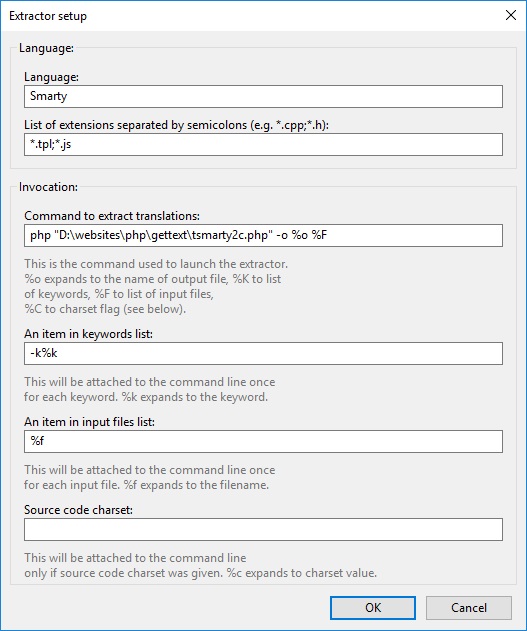
- Edit the Catalogue Properties - Will not appear until you have created a new catalogue and I have used QWcrm as an example. These settings are stored in the .po file.
- Translation properties
- Project name and version - QWcrm v3.0.0
- Language team - https://quantumwarp.com/
- Language - English (United Kingdom) - set this to the language of the translation you are doing.
- Plural forms - leave as 'Use default rules for this language' unbless you know why you want to change this.
- Charset - UTF-8 (recommended)
- Source code charset - UTF-8 (recommended)
- Source Paths
- Base path - This should be the root folder of your project.
D:\websites\htdocs\develop\qwcrm
- Paths - . (only a period)
- Excluded paths - This is important to reduce the files that are scanned such as cached files which also have gettext() functions in them. These are my exclusions, yours will be different.
cache\
nbproject\
libraries\
logs\
media\
themes\default\js\dhtmlcombo\
themes\default\js\tinymce\
themes\default\js\jscal2\jscal2.js
themes\default\js\jscal2\unicode-letter.js
themes\default\js\jscal2\css\
- Base path - This should be the root folder of your project.
- Sources keywords
- Additional keywords - These are only required if you are using motranslate.
_gettext    - This is for the function _gettext()
__          - This is for the function __()
- Additional keywords - These are only required if you are using motranslate.
- Translation properties
NB:
- I could not get %f to work with this process and so I had to use the folder name themes. Not exactly sure if Poedit is adding the rest of the file location onto it.
- You must use %F in your extractor string i.e. uppercase.
- themes is my root folder that is holding all of my .tpl files
- you will notcie that i have added *.js and this is because I have some files that are *.js with some smarty tags in that need parsing.
- when using this extrator the files you configure in the catalogue (i.e. include excludes) will be ignores because you are not using the %f option. I would like to get this fixed so i can use it.
- because we are not using %F for the file list and instead a hardcode value we will need to change the target directory for each project for the Smarty Extractor. You could create multiple extractors and just keep them disabled until you need them.
- Also when you are not using the particular smarty extractor you will need to disable it as it will always search that directory.
- If there are not translations found by the smarty extractor then Poedit will generate and error saying thas the .po file might be corrupt. This might also be the case of all extractors but I cannot be 100% because i am not going to spend time testing that hunch.
- Poedit does not always save you preferences and settings so make sure you save and check them if things are not working.
- in Poedit a folder 'Exclusion' will override a folder 'Inclusion'.
I will just explain a little here about this extraction process. All of the other Extractors are using xgettext() to scan files and return a correctly formatted .po file. xgettext() is dated and will not recognise a lot of languages and you can not add custom scans in to it.
Poedit extractor switches explained (This is useful so you can workout how to build you own parser.)
- -o - This is just a standard switch that is pass to the extractor. It is not specific to Poedit. However the xgettext() uses this to denote the output file and so does tsmarty2c.php
- %o - this is a placeholder for Poedit to swap out with the tempory .pot file location where changes are merged to.
- %k - this placeholder is to be able to pass custom function names to your script (or xgettext) to scan within for strings i.e. instead of gettext("translate me") you could scan for chicken("translate me") or football("translate me"). It is not mandatory to have this.
- %f - this is placeholder for the file list. I am not sure of the format but it is in a format that ngettext() will accept. All files are passed in 1 large list here. I can't work out if this is type, but to pass the list you need to use %F.
- --from-code=%c - this is always added on to the end of the command line and is to specify what charset the files houls be open as. I do not need this so have removed it. I thing it is mainly for xgettext. My scripts have been running with it attached though.
- NB: the instructions for Poedit for the extractors does not make sense. There is information left out.
So what happens with an extractor when you hit 'update from sources'
- poedit scans the project's folders (as per your rules) for allowed files and builds a list
- one of the following happens (not sure which)
- The files are passed as a single command line to an extractor that matches the file extensions (possible goes to multiple extractors if an extension is registered in more than 1 extractor)
- Each file is passed as a single command line to an extractor that matches the file extension (possible goes to multiple extractors if an extension is registered in more than 1 extractor)
- the extractor then parses these files and then merges the strings it finds to a temporary pot.file (using msgmerge.exe)
- the next extractor is run and those files are merged into the same temporary .pot file(using msgmerge.exe)
- once finished Poedit loads this temporary .pot file in to memory and you are returned to the main screen
- your changes have not been saved yet. For this you actually need to hit save to apply the changes to you .po file.
- Poedit will now build the .po and .mo files
Extract the Translations
- Comodo Sandbox which is part of the Comodo Internet Security (CIS), if running, will cause the extraction process to fail because it blocks the PHP script.
- You need to disable the Comodo Sandbox before running the extraction. This might also be the case for other sandboxes and Firewalls.
- So now run Poedit and extract the translations as outlined above by
- Click the Update from sources menu item
- Click the Update button.
Misc
Download an older version of Poedit
- To get an old version I just went to Chocolately and looked inside the Poedit install script.
- Examples:
My Current file locations
These might not be the same as the instructions above becasue things change over time.
- D:\websites\ (Xampp)
- D:\websites\libraries\gettext\tsmarty2c.php
- D:\websites\libraries\gettext\msgcat.exe
- D:\websites\libraries\gettext\msgmerge.exe
- + add msgcat.exe and msgmerge.exe into the filepath, or were these put into the poedit program folder
Other Links
- GitHub - Garefild/PoeditSmarty - Gettext extension support for Smarty templates (*.tpl)
Cannot extract strings when using my Custom Extractor
Diagnose
2.2.3/2.4.3 shows an error when using my custom extractor, which is useful, so I can now diagnose.
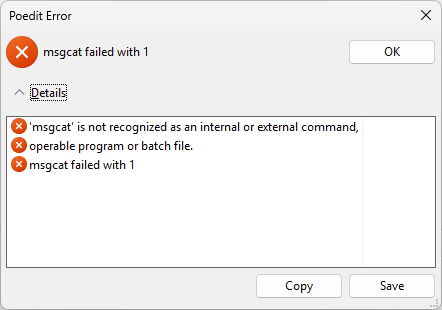
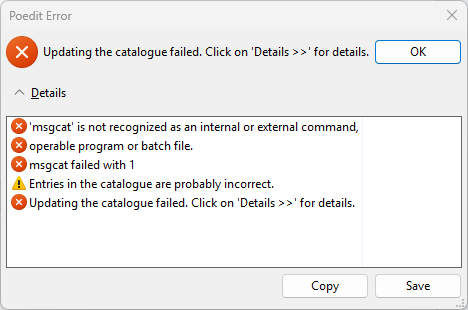
18/10/2025 15:48:26: 'msgcat' is not recognized as an internal or external command,
18/10/2025 15:48:26: operable program or batch file.
18/10/2025 15:48:26: msgcat failed with 1
18/10/2025 15:48:27: Entries in the catalogue are probably incorrect.
18/10/2025 15:48:27: Updating the catalogue failed. Click on 'Details >>' for details.
- The first 2 lines are what you get when you type `msgcat` directly into the command line.
- 3.x does not show errors so you cannot see what is going on.
- If Poedit seems to finish a lot quicker than expected.
If you cannot extract any strings:
It might be one of your custom extractors is broken. Disable them all but the one you want to fix and then look at the potential issues below.
- Check the extractors settings are correct (as per this tutorial)
- msgcat.exe and msgmerge.exe are not in your file path (this is the culprit in the log above, and is most likely your error)
- The `tsmarty2c.php` extractor might not like your version of PHP (works with 8.1 and 7.4)
- Microsoft Defender or another firewall might be preventing your custom extractor to work.
- Works with Windows defender and Malwarebytes running.
- Comodo CIS had an issue when running.
- Run POEDIT as administrator.
- You can run in normal mode.
- New versions might not like the old extractor
- Newer versions do not give you an error when an extractor fails. (3.x+)
- Are the msgcat.exe and msgmerge.exe compatible with your system. ie. a new enough version, correct architecture (x86/x64). I would say it should be the same as the PHP version you are running.
- Restart your PC after changing your environmental `PATH`.
Gettext translation system
gettext() is a translation system written by GNU people and is present on many systems natively. This makes it a good standard to use. Gettext does have some issues especially on PHP and I will outline what I have found here with possible solutions
I now use motranslator which is based on the same technology as gettext because of the following:
- gettext translation file (.mo) is cached by the server and is never refreshed until you restart server, so changes you make will not be seen untill then. Not practical for shared webhosting.
- On Windows gettext will not allow translations to other than default language - There are some untested workarounds but they are messy (Custom Code, Thread Safe?, PHP as FastCGI not as a module)
- On Windows gettext will only read the directory that belongs to the default language meaning all translations need to go in the default local directory to allow translations.
General Gettext
Gettext Tutorials
- How to Build a Multilingual PHP App | Toptal (Good Tut)
- PHP Gettext: Quick Start Guide to Creating Translations Using gettext in PHP (Good Tut)
- PHP internationalization with gettext tutorial - LingoHub - Translation Service Hub (Good Tut)
- Gettext i18n system - LingoHub - Translation Service Hub (Good Tut)
- A Quick Gettext Tutorial
- How to translate using gettext and poedit - YouTube
- PHP and Javascript Internationalization using Gettext and Poedit
- PHP internationalization with gettext tutorial - LingoHub - Translation Service Hub
- Localizing PHP web sites using gettext » Pablo's Development Blog
- Gettext i18n system - internationalization for gettext
- Gettext PO Localization - LingoHub - Translation Service Hub
- php - Gettext: Translation of strings with HTML inside? - Stack Overflow
Gettext Documentation
- GNU gettext - GNU Project - Free Software Foundation
- GNU gettext utilities
- gettext - Wikipedia
- PHP: Gettext - Manual
Gettext software
- GitHub - vslavik/gettext-tools-windows: GNU gettext tools compiled binaries for Windows
- GetText for Windows (Official Source)
- windows - What is msgcat and how to use it - Stack Overflow
- gettext 0.19.8.1 and iconv 1.14 - Binaries for Windows - mlocati - Michele Locati - Has both 32bit and 64bit with static and dll based version. These are kept upto date.
Misc documents
- National Language Support (NLS) API Reference
- php - Is en_UK an illegal locale? - Stack Overflow
- php - List of All Locales and Their Short Codes? - Stack Overflow
- Translate gettext PO Files | Transifex Documentation
- How to Translate With GetText PO and POT Files
- Ruby localization: i18n, g18n, gettext, padrino... - what's the difference? - Stack Overflow
- Why GetText is Better than Rails I18n - Translation.io
- Ruby gettext internationalization tutorial on using the fast_gettext gem
Issues I have found with gettext
It is not straight forward to getting gettext() to workout of the box, especially when using xammp on windows. HEre I will address the issues I came across while trying to get translation to work. These issues probably also appear on diffrent setups.
Apache Gettext Caching issue
When i was developing QWcrm on my windows xammp setup I would make changes to translation strings in th .PO file (via POedit) and these would not get reflected in my software. After a lot of research I discovered that when you run PHP as an Apache module the the getttext translation files upon first load are cached 'premanently' or for a time which I can not figure out. So to get around this I needed to find a way of refreshing the cache or turning it of for my development site.
Solutions I found
- change the .MO filenames loaded when ever you make changes - this works but is a bit of a mess and I would not recommend it for production sites.
- use PHP as Fast CGI. When PHP is loaded as a module the .MO files are cached 'permantely' or for an undisclosed time I can not figure out but this apparently is not the case when using PHP as Fast CGI
- The only true way to clear the cache it to restart apache. I think if you are running PHP as an Apache module, you have to restart Apache for the catalog to be reloaded.
- clearstatcache() - i could not get this to work
I will now outline my research below
Emptying of MO gettext cache without restarting apache links
- server caching of gettext translation files « zenphoto forums - renames the files on change before reload. this is more trick than emptying the cache
- https://blog.ghost3k.net/articles/php/11/gettext-caching-in-php - renames the files on change before reload. this is more trick than emptying the cache
- How to clear php's gettext cache without restart Apache nor change domain? (PHP) - Codedump.io - a few issues here including the use of symbolic links but i could not this to work on windows
- How to clear php's gettext cache without restart Apache nor change domain? - Stack Overflow - a few issues here, symbolic links and clearstatcache()
- PHP gettext caching workaround - renames the files on change before reload. this is more trick than emptying the cache. Also mentions changing the bindtextdomain
Gettext not working on windows / xampp
These following issues can cause a real problem when devloping with gettext on windows. The main issue I came across is the localisation handling.
Issue
- gettext will work but only with the default language/region
- The reason is that the language/region is set for the whole computer and cannot be changed for individual processes. I believe that this is why there are 2 types of apache/php thread safe and non thread safe. I am not 100% how to apply the 2 variants and I dont know of any work aruonds to change the settings just for xampp.
- Windows uses different region codes thant those used by gettext (gettext = de_DE whereas windows = deu)
Solutions
- if you use the standard gettext file layout windows will always be able to access the default language folder. This gives to unique features
- it allows translation to work normally by using the default language (at least you can test gettext is working)
- you can add in the other language translation files into the default language folder and then they can also be used (this is a workaround)
- not confirmed - is this because I do not have the other languages installed on my windows PC - see this thread
You can write code to utilise the workaround outline above by address the locale issue. When trying to fix this do not forget about the caching issue above.
Links
- Getting gettext to work in Apache on windows: Why the stupid script just won't work?
- php - Gettext will always use system default locale - Stack Overflow
- PHP, Apache, MySQL, Windows : WampServer
- PHP: setlocale - Manual
- php - Gettext example not working on Windows 7 - XAMPP - Stack Overflow
- PHP gettext on Windows - Stack Overflow - this outlines that setlocale(LC_MESSAGES, “en_US”); is for linux and putenv(“LC_ALL=en_US”); is for windows
- locale - PHP/Gettext Problems - Stack Overflow
- PHP :: Bug #66265 :: gettext is not working anymore - This has some code to possibly fox the windows regional issue and definately some pointers
- PHP :: Bug #49349 :: gettext behaves differently in php 5.3.0 (5.2.x ignored setlocale errors) - an insight to the history of the issue
xgettext will not scan within double quotes / remmed lines
xgettext is very particular about what it scans for, it seems to be syntax aware rather than just searching for the strings. i.e. if a line is remmed out it will ignore it.
- xgettext cannot extract strings from templates · Issue #622 · tornadoweb/tornado · GitHub
- you cannot put the gettext() or _() on the same lines as an remmed line (i.e. <!-- -->) because they will get ignored.
- Can cause the error unterminated character set constant error but the scanning carries on.
Scanning source files for translations strings
once you have your project done you need to grab all of the strings and translate them, doing this manually would be difficult and you would miss strings. I outline the options I have found below:
- Use software to extract the gettext strings
- Scan .tpl files with specialised scripts
- Compile all smarty templates and then just scan them with POedit. It is not ideal but will work
Applications
- POEdit- will scan your PHP files for standard gettext() strings. It will not scann for {t}..{/t} strings in the .tpl files
- POedit + a custom extractor that will scan the .tpl files. I dont currently have one.
- Eazy Po - Eazy Po is a translation editor and a catalog manager for Gettext translation files.
Smarty TPL Scanning software
- smarty-gettext tsmarty2c.php - the command line utility - This utility will scan templates for {t}...{/t} placeholders for translation strings and output a .pot file (.po template).
- tsmarty2c V2 - this is a custom command line PHP script
Poedit Links
- php - How to make gettext and poedit recognize custom file types? - Stack Overflow - mentions on how to add other file types to the extractors.
- GitHub - umpirsky/Twig-Gettext-Extractor: The Twig Gettext Extractor is Poedit friendly tool which extracts translations from twig templates. Twig Gettext extractor
- How to make gettext and poedit recognize custom file types? - php - smarty - gettext - poedit - TechQA - mentions on how to add other file types to the extractors.
- theme development - How to create .pot files with POedit? - WordPress Development Stack Exchange - covers the subject and mentions Eazy PO.
- php - How to use Poedit with smarty templates? - Stack Overflow - This is very useful and needs looking at further. Shows you how to use PoeditSmarty to create a .pot file.
- Smarty :: View topic - {t} tags and PoEdit parser - This tells you how to run tsmarty2c.php on the command line to output a .pot file. Basically using the > operator to output to a file.
- php - How to use Poedit with smarty templates? - Stack Overflow
- Poedit and smarty parser - A useful example using the command line
- How To Merge Two PO Files Using POEdit | MarketPressThemes
- Extract .po string from .volt file - Discussion - Phalcon Framework
Smarty Poedit Parsers (software) / and other parsers than can potentially be used
- smarty-gettext/smarty-gettext: Gettext plugin enabling internationalization in Smarty Package files. - this tutorial is based on this.
- PoeditSmarty: Gettext extension support for Smarty templates (*.tpl) - Library for syncing gettext catalogs with Smarty sources. Library parses files and writes results as xgettext files, whose are processed by Poedit parser. Soon I will make exe version without java (I dont have so much time)
- smarty-gettext/tsmarty2c: Smarty Gettext Translation String Ripper - a new verions that in not ready?
- GettextParser: Gettext parser for Poedit
- PoeditSmarty: Gettext extension support for Smarty templates (*.tpl) - Java version but source code is not available.
- Jsgettext - A Javascript parser for Poedit written in PHP
- xgettext-js: xgettext string extractor tool capable of parsing JavaScript files - gettext-js is a utility for extracting translatable strings, written in and capable of parsing JavaScript files. It is similar to the GNU xgettext program, but returns strings as a JavaScript array.
Poedit notes
- in version 2 all of the parsers have bve removed and put into 1 extractor which you cannot edit or turn off so you should use version v1.83
- because there are no extractors to see how they are configure i will give you one below. All of the parsers (except TWIG) use xgettext. the only different between the settings are the language name
- Language: Perl
- List of extensions: *.pl;*.PL;*.pm;*.perl;
- Command to extract translations: xgettext --language=Perl --add-comments=TRANSLATORS: --force-po -o %o %C %K %F
- An item in keywords list: -k%k
- An item in input files list: %f
- Source code charset: --from-code=%c
- if you run xgettext --help on the command line you will see all of the switches listed
- in ngettext -o is an alias of --output=FILE and all other switches are similiar.
Compiling all smarty templates
- php - How to use Poedit with smarty templates? - Stack Overflow - this also has some code to help with this option of $smarty->compileAllTemplates()
- Extracting PO Files automatically · bbrdaric/smarty-gettext Wiki · GitHub - this also deals with compiling the ttempaltes and this method allows you to keep the file names althought the line numbers will not match.
Translating in Smarty
This section is involve in actually translating the strings in the smarty software.
Smarty translation links (various)
- LAMP : Linux Apace PHP PERL mySQL: Internationalization PHP web sites using Smarty and gettext
- php - Smarty and gettext - Stack Overflow
Smarty Software
- GitHub - smarty-gettext/smarty-gettext: Gettext plugin enabling internationalization in Smarty Package files.
- GitHub - gueff/smarty_modifier_getText: PHP Smarty: a modifier for internationalization tool gettext
- PHP Smarty: a modifier for internationalization tool gettext
- php-gettext in Launchpad
- Google Code Archive - Long-term storage for Google Code Project Hosting.
- Extracting PO Files automatically · bbrdaric/smarty-gettext Wiki · GitHub
tsmarty2c.php Command line examples
setup the software as per these instructions - configure the software, you dont need the poedit software for this to work.
- php "D:\websites\php\gettext\tsmarty2c.php" D:\test.pot %f | "C:\Program Files (x86)\Poedit\GettextTools\bin\xgettext -LC --add-comments --no-location -"
- this involves sending it to xgettext and is not needed here
- i have just added to show you can send output to another program with a pipe (|) character
- php "D:\websites\php\gettext\tsmarty2c.php" -o test.pot "D:\websites\htdocs\develop\qwcrm\themes"
- this will scan the 'themes' directory recursively for all .tpl files and parse them for the {t}...{/t} strings
- php -q tsmarty2c.php mytemplate.tpl > mydomain.c
- this will output to a file
- you could just use the -o switch
Compressing PHP output with gzip or deflate
In this article we will be discussing the compression of output from a php, not normal assets such as JS and css. Because the nature of PHP files is dynamic we have to use another method.
After needing to compress my PHP output for QWcrm I started researching on the internet after thinking it would just be a case of a couple of lines of code. What I discovered is there are several ways to compress PHP output and each has their pros and cons. I also found that some people were incorrectly using the wrong or outdated methods. Below I will go through each method I found and then I will sum up my thoughts at the end so you can easily workoout what method you want to use.
One other thing to note is that everyone goes on about how they gzip their content, but in these modern times there are 2 compression methos GZIP and DEFLATE, deflate being the newer method and can offer better compression.
.htaccess - (for static assets and PHP sometimes)
I have discovered that on some server installs that the following code (in particular text/html) will compress PHP output. Obviously you have to have mod_deflate installed. Worth a try and add other file types as needed.
<IfModule mod_deflate.c>
    <IfModule mod_filter.c>
        AddOutputFilterByType DEFLATE text/html
    </IfModule>
</IfModule>
Below is the normal way of compressing with deflate (gzip replacement) and the legacy gzip. I have added these for references only as it keeps coming up but will not actually compress PHP output but as a combined effect can help reduce the download footprint of the webpage and its assets.
Example 1 - Enable compression via .htaccess (mod_deflate)
This seems to be the prefered .htaccess compression method now because it gets better ratios.
<IfModule mod_deflate.c>
	<IfModule mod_filter.c>
		AddOutputFilterByType DEFLATE text/html text/css text/javascript application/javascript application/x-javascript
	</IfModule>
</IfModule>
Example 2 - Enable compression via .htaccess (mod_gzip)
http://www.awesomeinfolab.com/enable-gzip-compression/
I have never come across this method before in htaccess and might not work on all apache installs. I am thing of PHP as Fast-CGI/'Apache Module'
<ifModule mod_gzip.c>
    mod_gzip_on Yes
    mod_gzip_dechunk Yes
    mod_gzip_item_include file .(html?|txt|css|js|php|pl)$
    mod_gzip_item_include handler ^cgi-script$
    mod_gzip_item_include mime ^text/.*
    mod_gzip_item_include mime ^application/x-javascript.*
    mod_gzip_item_exclude mime ^image/.*
    mod_gzip_item_exclude rspheader ^Content-Encoding:.*gzip.*
</ifModule>
Links
- How to enable gzip compression on Apache
- Active Gzip Compression | CSS-Tricks
- Enable Gzip compression for your website
- How to enable compression and gzip for page speed.
- Enable gzip compression | GTmetrix
- An introduction to gzip / mod_deflate - InMotion Hosting
ob_start("ob_gzhandler") - (Simple 1 liner)
This takes advantage of Php's buffered output and buffers all output of the script until the Php engine has completed, and then runs all the output through a special function that gzip compresses it before sending it on to the browser.
Just place this at the very top of all your PHP pages and it will send gzip-compressed output to the browsers with the correct headers.
ob_start("ob_gzhandler");
The function basically says start buffering PHP content and tag it to says the outputted content should be gzipped. The procedure should also send the correct headers so the browser knows it is compressed. I also think that unless the browser has told the server that it supports compression that the content will be returned uncompressed. All modern browsers send the 'I support compression' headers.
Some say once the script is finished it will flush the buffer and output the content automatically and that is why you can get away with 1 line, however this article from magicmonster tells you to add the flush command at the end to flush the cache.
ob_end_flush();
The method mentioned above is quick and easy, but the downfalls are that it only works on Apache with mod_gzip and according to the Php manual this is not the preferred method for gzipping.
You can increase the compression ratio by altering the php.ini or add the following to the script before ob_start("ob_gzhandler")
ini_set('zlib.output_compression_level', 4);
Another example
<?php if (substr_count($_SERVER['HTTP_ACCEPT_ENCODING'], 'gzip')) ob_start("ob_gzhandler"); else ob_start(); ?>
This example adds a check to see if the browser send the “Accept-Encoding: gzip” or “deflate” header before enabling the compression, however the buffer is still enabled even if compression is not required.
(From the Php manual at www.php.net)
note that using zlib.output_compression is preferred over ob_gzhandler().
Links
- How to enable gzip compression with Php - Excellent article I got some of this information from
- PHP: ob_gzhandler - Manual
- Using gzip compression on PHP pages (magicmonster) - This is a really easy to read and following article.
- Fast, Effective PHP Compression | Perishable Press - The methods might not work on all Apache/PHP installations.
Full PHP buffer
Create a buffer, fill the buffer, compress the buffer data and send the content to the client
This is similiar to ob_start("ob_gzhandler") but there is a little more to it.
Example 1
http://www.webcodingtech.com/php/gzip-compression.php
This example utilises the PHP buffer correctely and manual takes the buffered content, sends the compress data headers relevant to the compression method, then it compresses the blob before returning it to the buffer. The buffers is then dispaly or returns to the browser as compress content. I dont think this method is dependant on having Apache mod_gzip installed for the auto detection of the compression headers from the browser or to send the correct output headers.
This example has some issues an seems dated to use for compression. I think PHP has moved on. I would not use print as echo is quicker and I have no idea what print("\x1f\x8b\x08\x00\x00\x00\x00\x00"); does.
// Include this function on your pages
function print_gzipped_page() {

    global $HTTP_ACCEPT_ENCODING;
    if( headers_sent() ){
        $encoding = false;
    }elseif( strpos($HTTP_ACCEPT_ENCODING, 'x-gzip') !== false ){
        $encoding = 'x-gzip';
    }elseif( strpos($HTTP_ACCEPT_ENCODING,'gzip') !== false ){
        $encoding = 'gzip';
    }else{
        $encoding = false;
    }

    if( $encoding ){
        $contents = ob_get_contents();
        ob_end_clean();
        header('Content-Encoding: '.$encoding);
        print("\x1f\x8b\x08\x00\x00\x00\x00\x00");
        $size = strlen($contents);
        $contents = gzcompress($contents, 9);
        $contents = substr($contents, 0, $size);
        print($contents);
        exit();
    }else{
        ob_end_flush();
        exit();
    }
}

// At the beginning of each page call these two functions
ob_start();
ob_implicit_flush(0);

// Then do everything you want to do on the page
echo 'Hello World';

// Call this function to output everything as gzipped content.
print_gzipped_page();
Links
- How to enable gzip compression with Php - Excellent article, I got example 1 from it.
- Use GZip compression on your PHP files · GitHub - An example script. This probably is in a legacy format.
zlib.output_compression = on - (automatic and invisible)
This is the prefered method for gzipping over ob_gzhandler()
The zlib extension can be used to transparently compress PHP pages on-the-fly if the browser sends an “Accept-Encoding: gzip” or “deflate” header. Compression with zlib.output_compression seems to be disabled on most hosts by default, but can be enabled with a custom php.ini file:
The zlib extension is the undelying technology and the zlib.output_compression = On is a switch that enables transparent/invisible compression on all PHP content. The zlib extension is also the library that is used for other compressions such as ob_gzhandler. I would need to check which compressions operations were covered by it.
This method is installed on most servers but left of by default. It will automatically send the output back to the client's browser in a compressed form if the 'allow compressed content' header is sent with the page request. If enabled in the php.ini then no further coding is required in any php (or other) script, or for that matter any assets.
Enable via php.ini
Add or alter the following line in the php.ini
zlib.output_compression = On
Enable via a PHP script
If zlib.output_compresssion is disabled but installed, you can enable either by editing the php.ini (as above) or you can add the following in to your PHP script. This will only enable compression for the script it is included in. and you must add this code before any headers or output is sent from the script. You should also note that having this method of compression will cause errors if further compression methods are implemented in your scripts.
if (extension_loaded("zlib") && (ini_get("output_handler") != "ob_gzhandler"))
{
    @ob_end_clean();
    @ini_set("zlib.output_compression", 1);
}
As you can see this simple script makes a few checks, that the libary is present and that ob_gzhandler() has not been set. This is perhaps optional depending on your script, the ob_end_clean() just makes sure any buffers are emptied, I am not sure this is needed either. The @ symbol just surpresses errors and again these could be removed
Links
gzencode / gzcompress / gzdeflate - (for a single blob)
There is a difference between these 3 functions even thought they all compress a blob you supply to them. However the concesous is to use gzencode() as it outputs in the correct format including the required checksums. This function is also supports both gzip and deflate compression algorithyms.
Joomla Example
I have included this to see how these guys do it as they have more experience than me. This process happens in 2 distinct sections, the first check to see if the gzip function is enabled whilst check to see if the server supports zlib compression and that ob_gzhandler has not already been set.
/**
 * Execute the application.
 *
 * @return  void
 *
 * @since   3.2
 *
 * From {Joomla}libraries/cms/application/cms.php
 */

 /**
 * @package     Joomla.Libraries
 * @subpackage  Application
 *
 * @copyright   Copyright (C) 2005 - 2016 Open Source Matters, Inc. All rights reserved.
 * @license     GNU General Public License version 2 or later; see LICENSE.txt
 */

public function execute()
{
    // Perform application routines.
    $this->doExecute();

    // If we have an application document object, render it.
    if ($this->document instanceof JDocument)
    {
        // Render the application output.
        $this->render();
    }

    // If gzip compression is enabled in configuration and the server is compliant, compress the output.
    if ($this->get('gzip') && !ini_get('zlib.output_compression') && (ini_get('output_handler') != 'ob_gzhandler'))
    {
        $this->compress();

        // Trigger the onAfterCompress event.
        $this->triggerEvent('onAfterCompress');
    }

    // Send the application response.
    $this->respond();

    // Trigger the onAfterRespond event.
    $this->triggerEvent('onAfterRespond');
}
The second section actually does the compression and further checking, and yes there is some duplication of these checks. This fucntion supports the use of gzip or deflate compression algorithyms which is great for compatability. If you look at the code you can see that gzencode() is used and that if performs compression on a single variable (blob) rather than a page. gzencode() is able to use both algorithyms where as the other 2 functions this section covers cannot.
The code has been compress but because of the nature of the function you have to manually send the 'Content-Encoding' header so the browser knows the payload is compressed and how it has been compressed.
/**
 * Checks the accept encoding of the browser and compresses the data before
 * sending it to the client if possible.
 *
 * @return  void
 *
 * @since   11.3
 *
 * From {Joomla}libraries/joomla/application/web.php
 */

 /**
 * @package     Joomla.Platform
 * @subpackage  Application
 *
 * @copyright   Copyright (C) 2005 - 2016 Open Source Matters, Inc. All rights reserved.
 * @license     GNU General Public License version 2 or later; see LICENSE
 */

protected function compress()
{
    // Supported compression encodings.
    $supported = array(
        'x-gzip' => 'gz',
        'gzip' => 'gz',
        'deflate' => 'deflate'
    );

    // Get the supported encoding.
    $encodings = array_intersect($this->client->encodings, array_keys($supported));

    // If no supported encoding is detected do nothing and return.
    if (empty($encodings))
    {
        return;
    }

    // Verify that headers have not yet been sent, and that our connection is still alive.
    if ($this->checkHeadersSent() || !$this->checkConnectionAlive())
    {
        return;
    }

    // Iterate through the encodings and attempt to compress the data using any found supported encodings.
    foreach ($encodings as $encoding)
    {
        if (($supported[$encoding] == 'gz') || ($supported[$encoding] == 'deflate'))
        {
            // Verify that the server supports gzip compression before we attempt to gzip encode the data.
            // @codeCoverageIgnoreStart
            if (!extension_loaded('zlib') || ini_get('zlib.output_compression'))
            {
                continue;
            }
            // @codeCoverageIgnoreEnd

            // Attempt to gzip encode the data with an optimal level 4.
            $data = $this->getBody();
            $gzdata = gzencode($data, 4, ($supported[$encoding] == 'gz') ? FORCE_GZIP : FORCE_DEFLATE);

            // If there was a problem encoding the data just try the next encoding scheme.
            // @codeCoverageIgnoreStart
            if ($gzdata === false)
            {
                continue;
            }
            // @codeCoverageIgnoreEnd

            // Set the encoding headers.
            $this->setHeader('Content-Encoding', $encoding);

            // Header will be removed at 4.0
            if ($this->get('MetaVersion'))
            {
                $this->setHeader('X-Content-Encoded-By', 'Joomla');
            }

            // Replace the output with the encoded data.
            $this->setBody($gzdata);

            // Compression complete, let's break out of the loop.
            break;
        }
    }
}
So that is how Joomla does compression and it should be noted that this method is probably the most compatible way of doing compression.
Links
- PHP Compression: gzcompress vs gzdeflate vs gzencode - This article goes in to what the differences are between these 3 blob compression functions and which one to use and why, for reference is gzencode
- Which compression method to use in PHP? - Stack Overflow - Again this gice information about the 3 different functions and which one to use and why.
- PHP: gzencode - Manual
What I used in QWcrm
I wrote my own function bas heavily of the Joomla function to enable gzip. In QWcrm I was able to do this becaus emy page is stored in a single varible/blob that I can manipulate.
In the main index.php I have the following code
################################################
#         Page Compression                     #
################################################

// Compress page and send correct compression headers
if ($gzip == true && $VAR['theme'] !== 'print') {

    $BuildPage = compress_page_output($BuildPage);

}
This is the function code stored in include.php
###########################################
#  Compress page output and send headers  #
###########################################

/**
 * Checks the accept encoding of the browser and compresses the data before
 * sending it to the client if possible.
 *
 * @return  void
 *
 * @since   11.3
 *
 * From {Joomla}libraries/joomla/application/web.php
 */

/**
 * @package     Joomla.Platform
 * @subpackage  Application
 *
 * @copyright   Copyright (C) 2005 - 2016 Open Source Matters, Inc. All rights reserved.
 * @copyright   Copyright (C) 2017 - Jon Brown / Quantumwarp.com
 * @license     GNU General Public License version 2 or later; see LICENSE
 */

function compress_page_output($BuildPage)
{
    // Supported compression encodings.
    $supported = array(
        'x-gzip'    => 'gz',
        'gzip'      => 'gz',
        'deflate'   => 'deflate'
    );

    // Get the supported encoding.
    $encodings = array_intersect(browserSupportedCompressionEncodings(), array_keys($supported));

    // If no supported encoding is detected do nothing and return.
    if (empty($encodings))
    {
        return $BuildPage;
    }

    // Verify that headers have not yet been sent, and that our connection is still alive.
    if (headers_sent() || (connection_status() !== CONNECTION_NORMAL))
    {
        return $BuildPage;
    }

    // Iterate through the encodings and attempt to compress the data using any found supported encodings.
    foreach ($encodings as $encoding)
    {
        if (($supported[$encoding] == 'gz') || ($supported[$encoding] == 'deflate'))
        {
            // Verify that the server supports gzip compression before we attempt to gzip encode the data.
            if (!extension_loaded('zlib') || ini_get('zlib.output_compression'))
            {
                continue;
            }

            // Attempt to gzip encode the page with an optimal level 4.
            $gzBuildPage = gzencode($BuildPage, 4, ($supported[$encoding] == 'gz') ? FORCE_GZIP : FORCE_DEFLATE);

            // If there was a problem encoding the data just try the next encoding scheme.
            if ($gzBuildPage === false)
            {
                continue;
            }

            // Set the encoding headers.
            header("Content-Encoding: $encoding");

            // Replace the output with the encoded data.
            return $gzBuildPage;

        }
    }
}

####################################################################
#  Get the supported compression algorithms in the client browser  #
####################################################################

function browserSupportedCompressionEncodings() {

    return array_map('trim', (array) explode(',', $_SERVER['HTTP_ACCEPT_ENCODING']));

}
In future I will try and see if the mod_deflate option is working on other servers as this might be built into newer version of the module to treat PHP output as normal files and compress them.
Other Links
- output buffering - What's the use of ob_start() in php? - Stack Overflow - A thread explaining what it is used for, which is not just compression.
- How To Optimize Your Site With GZIP Compression – BetterExplained - This covers the use of gzip in general, the protocol and sending of headers to then receiving back compressed assets. It does not cover PHP compression.
- Enabling Gzip Compression of PHP, CSS, and JS Files Without mod_deflate - WarpConduit Computing - An intersting article on compressing assets without using mod_deflate by using an intermediatery PHP file and .htaccess rewrite rules. I can say I would ever use this but there might be situations it could be useful.
- Speed Up your Website with Gzip Compression - An overview of gzip and real world usage. This is useful for noobies who want a little bit more information.
- How to compress .php, .css and .js files without mod_gzip or mod_deflate | Ardamis - This article has some good ideas and explanations but perhaps would not be the way I did compression.
- Enabling Gzip Compression of PHP, CSS, and JS Files Without mod_deflate - WarpConduit Computing - If you really need to do this.
My ADOdb Notes
This is just a simple article to references most of the simple ADOdb functions I use in QWcrm and what they do:
Smarty Call
$smarty->assign('currency_sym', get_company_details($db));
The Basic Function
I will use this function for the demo. This function just returns all of the company information or a single item.
function get_company_details($db, $item = null){

    global $smarty;

    $sql = 'SELECT * FROM '.PRFX.'TABLE_COMPANY';

    if(!$rs = $db->execute($sql)){
        force_error_page($_GET['page'], 'database', __FILE__, __FUNCTION__, $db->ErrorMsg(), $sql, $smarty->get_template_vars('translate_system_include_error_message_function_'.__FUNCTION__.'_failed'));
        exit;
    } else {

        if($item === null){

            return $rs->GetArray();

        } else {

            return $rs->fields[$item];

        }

    }

}
The Results
I will be changing the line and listing the results
return $rs->GetArray();
$rs->GetArray();
Array
(
    [0] => Array
        (
            [0] => QuantumWarp
            [NAME] => QuantumWarp
            [1] => 123456
            [NUMBER] => 123456
            [2] => The Gurking
            [ADDRESS] => The Gurking
            [3] => London
            [CITY] => London
            [4] => Greater London
            [STATE] => Greater London
            [5] => LA1 W10
            [ZIP] => LA1 W10
            [6] => AF
            [COUNTRY] => GB
            [7] => 123456
            [PHONE] => 123456
            [8] => 123456
            [MOBILE] => 123456
            [9] => 123456
            [FAX] => 123456
            [10] =>
            [EMAIL] =>
            [11] => £
            [CURRENCY_SYMBOL] => £
            [12] => GPB
            [CURRENCY_CODE] => GPB
            [13] => %d/%m/%Y
            [DATE_FORMAT] => %d/%m/%Y
            [14] => media/logo.png
            [LOGO] => media/logo.png
            [15] =>
            [WWW] =>
            [16] => 10
            [OPENING_HOUR] => 10
            [17] => 0
            [OPENING_MINUTE] => 0
            [18] => 17
            [CLOSING_HOUR] => 17
            [19] => 0
            [CLOSING_MINUTE] => 0
            [20] => 3.50
            [TAX_RATE] => 3.50
            [21] => <p>welcome</p>
            [WELCOME_MSG] => <p>welcome</p>
            [22] => <p>thanks</p>
            [INVOICE_MSG] => <p>thanks</p>
        )

)
- ADODB Manual - Link 1 - Generate a 2-dimensional array of records from the current cursor position, indexed from 0 to $number_of_rows - 1. If $number_of_rows is undefined, till EOF.
- Returns all rows.
$rs->GetRows();
- Generate a 2-dimensional array of records from the current cursor position. Synonym for GetArray() for compatibility with Microsoft ADO.
- Returns all rows.
$rs->GetAssoc();
Array
(
    [QuantumWarp] => Array
        (
            [NAME] => QuantumWarp
            [0] => 123456
            [NUMBER] => 123456
            [1] => The Gurking
            [ADDRESS] => The Gurking
            [2] => London
            [CITY] => London
            [3] => Greater London
            [STATE] => Greater London
            [4] => LA1 W10
            [ZIP] => LA1 W10
            [5] => AF
            [COUNTRY] => GB
            [6] => 123456
            [PHONE] => 123456
            [7] => 123456
            [MOBILE] => 123456
            [8] => 123456
            [FAX] => 123456
            [9] =>
            [EMAIL] =>
            [10] => £
            [CURRENCY_SYMBOL] => £
            [11] => GPB
            [CURRENCY_CODE] => GPB
            [12] => %d/%m/%Y
            [DATE_FORMAT] => %d/%m/%Y
            [13] => media/logo.png
            [LOGO] => media/logo.png
            [14] =>
            [WWW] =>
            [15] => 10
            [OPENING_HOUR] => 10
            [16] => 0
            [OPENING_MINUTE] => 0
            [17] => 17
            [CLOSING_HOUR] => 17
            [18] => 0
            [CLOSING_MINUTE] => 0
            [19] => 3.50
            [TAX_RATE] => 3.50
            [20] => <p>welcome</p>
            [WELCOME_MSG] => <p>welcome</p>
            [21] => <p>thanks</p>
            [INVOICE_MSG] => <p>thanks</p>
        )

)
- ADODB Manual - Link 1 - Generates an associative array from the recordset. Note that is this function is also available in the connection object. More details can be found there.
- ADODB Manual - Link 2 - Returns an associative array for the given query $sql with optional bind parameters in $inputarr. If the number of columns returned is greater to two, a 2-dimensional array is returned, with the first column of the recordset becomes the keys to the rest of the rows. If the columns is equal to two, a 1-dimensional array is created, where the the keys directly map to the values (unless $force_array is set to true, when an array is created for each value).
- Returns all rows.
$rs->FetchRow();
Array
(
    [0] => QuantumWarp
    [NAME] => QuantumWarp
    [1] => 123456
    [NUMBER] => 123456
    [2] => The Gurking
    [ADDRESS] => The Gurking
    [3] => London
    [CITY] => London
    [4] => Greater London
    [STATE] => Greater London
    [5] => LA1 W10
    [ZIP] => LA1 W10
    [6] => AF
    [COUNTRY] => GB
    [7] => 123456
    [PHONE] => 123456
    [8] => 123456
    [MOBILE] => 123456
    [9] => 123456
    [FAX] => 123456
    [10] =>
    [EMAIL] =>
    [11] => £
    [CURRENCY_SYMBOL] => £
    [12] => GPB
    [CURRENCY_CODE] => GPB
    [13] => %d/%m/%Y
    [DATE_FORMAT] => %d/%m/%Y
    [14] => media/logo.png
    [LOGO] => media/logo.png
    [15] =>
    [WWW] =>
    [16] => 10
    [OPENING_HOUR] => 10
    [17] => 0
    [OPENING_MINUTE] => 0
    [18] => 17
    [CLOSING_HOUR] => 17
    [19] => 0
    [CLOSING_MINUTE] => 0
    [20] => 3.50
    [TAX_RATE] => 3.50
    [21] => <p>welcome</p>
    [WELCOME_MSG] => <p>welcome</p>
    [22] => <p>thanks</p>
    [INVOICE_MSG] => <p>thanks</p>
)
- ADODB Manual - Link 1 - Returns array containing current row, or false if EOF. FetchRow( ) internally moves to the next record after returning the current row.
$rs->GetRowAssoc();
Array
(
    [NAME] => QuantumWarp
    [NUMBER] => 123456
    [ADDRESS] => The Gurking
    [CITY] => London
    [STATE] => Greater London
    [ZIP] => LA1 W10
    [COUNTRY] => GB
    [PHONE] => 123456
    [MOBILE] => 123456
    [FAX] => 123456
    [EMAIL] =>
    [CURRENCY_SYMBOL] => £
    [CURRENCY_CODE] => GPB
    [DATE_FORMAT] => %d/%m/%Y
    [LOGO] => media/logo.png
    [WWW] =>
    [OPENING_HOUR] => 10
    [OPENING_MINUTE] => 0
    [CLOSING_HOUR] => 17
    [CLOSING_MINUTE] => 0
    [TAX_RATE] => 3.50
    [WELCOME_MSG] => <p>welcome</p>
    [INVOICE_MSG] => <p>thanks</p>
)
- ADODB Manual - Link 1 - Returns an associative array containing the current row. The keys to the array are the column names. The column names are upper-cased for easy access. To get the next row, you will still need to call MoveNext().
- Returns one row.
- same as $rs->GetRowAssoc($toUpper=true)
- you can use $rs->GetRowAssoc($toUpper=false) to give all lowercase
$rs->fields[$colname];
QuantumWarp
- ADODB Manual - Link 1 - Returns the value of the associated column $colname for the current row. The column name is case-insensitive.
- Returns one field.
- The 'f' is supposed to be lower case, it does not work otherwise.
Conclusion
Muliple Records/Rows = $rs->GetArray(); This returns a 2 dimensional array which allows you to loop through the records which are also arrays.
Single Record/Row = $rs->GetRowAssoc(); - This returns a standard associative array.
Single Item from a column in a single Row = $rs->Fields[$colname];
Links
Website Legal Terms and Policies - What are they and which should i use?
We have all seen the terms and conditions pages and privacy policies on websites, most of us have not read them but they are an important part in protecting yourself from litigation from people on the internet and it helps set out a framework on how interactions between your website and the end user should occur. So you have made a website and you know you need to add them, but what now?
What do all the different terms mean? / What are they all for?
There are many different polices that I have come across so before you decide what you want on your website I should outline the main policies and what they are for below.
Terms and Conditions can be used as a blanket term or a specific policy. If you are running a website that provides pricing information, advice or any other service, you may want to consider adding a Terms and Conditions page or similiar page. This can absolve you of responsibility if anyone mistakenly uses your information for the wrong purposes, or wants to hold you liable for damages they have incurred by using your website or its information. Some other useful functions of a Terms and Conditions page is:
- Website terms and conditions give information about a websites content and how visitors are and are not permitted to use it. https://www.rocketlawyer.co.uk/documents-and-forms/website-terms-and-conditions.rl#
- Help protect your website and its users with clear and fair website terms and conditions. These terms and conditions for a website set out key issues such as acceptable use, privacy, cookies, registration and passwords, intellectual property, links to other sites, termination and disclaimers of responsibility. Terms and conditions are used and necessary to protect a website owner from liability of a user relying on the information or the goods provided from the site then suffering a loss.
- A Terms and Conditions agreement is the agreement that includes the terms, the rules and the guidelines of acceptable behavior, plus other useful sections, to which users must agree in order to use or access your website and mobile app.
- Sample Terms and Conditions Template - TermsFeed - This article describes what terms and conditions are,
According to some, the name of the contract does not matter and that perhaps is why there are so many variations for the same thing, but read my thoughts below. You can call the contract what you want as it is a contract between you and the customer but I would stick with these rules because a good lawyer could say you tried to confuse the end user if the name was to different from what the contents purpose was.
Here is a non-exhaustive list of the different names of policies and terms:
The descriptions below are not the absoulte meaning of the titles because of the interchangability but I feel they are an apt description of what they are for.
- Terms and Conditions
- Can be used as a blanket term or a specific policy terms.
- Terms and Conditions of Business
- The orginal term for doing business as Brick and Mortar
- Terms of Service (TOS)
- A “Terms of Service” is also known as TOS. It is a set of rules that users should agree with whenever they engage in the use of a product or service. In some instances, it can serve as a disclaimer under some conditions like website use. A “Terms of Service” has different sections like user rights, responsibilities, definitions and disclaimers. http://www.termsgenerator.net/terms-of-service-generator/
- These are distinct from terms and conditions of business which are concerned with the e-commerce aspects of selling goods or services online, rather than the way in which a website is used. Any businesses with an online presence must include certain details in order to abide by the Electronic Commerce Regulations. Website terms and conditions are the best place to include such information. Ensuring that your users understand the limitations of how they can use any website content, including text, images, videos and music, helps to secure your intellectual property.
- What Is a Term of Agreement Page and How to Write It? | Terms Generator
- Terms of Use (TOU) / Terms of website use / Terms and conditions of use
- This is effectively the same as a 'Terms of Service' but with a prose/title written from the users role.
- A Terms of Use agreement can be used for websites, SaaS apps, mobile apps, Facebook apps, APIs and more. The purpose of a Terms of Use is to set the rules to which your users must agree to in order to use your website, mobile app, API etc. https://termsfeed.com/blog/sample-terms-of-use-template/#Download_Terms_of_Use_Template
- While a Terms of Use is recommended to have, it’s not mandatory by law as the Privacy Policy agreement is required.
- Sample Terms of Use Template - TermsFeed - This article describes what terms of use are
- Terms and conditions of supply / Terms of Supply
- This is the name that can be given to a policy covering the supply of goods or service
- Terms of sale
- If you are selling goods and need more terms that are not covered by your statuary laws or you by law have to define them, then this is the name you would use.
- https://store.digitalriver.com/store/defaults/en_GB/DisplayDRTermsAndConditionsPage/env.design
- Privacy Policy
- Privacy Policy outlines some or all the ways how your company gathers, uses, discloses, and manages a customer's or your visitor's data It's a legal document to protect a customer's or visitor's privacy. http://termsandconditionstemplate.com/privacy-policy-generator/
- Why do I need a privacy policy? - Unlike with website terms, privacy policies may be required by law, depending on where you operate. In any case, it’s good practice to have one, especially if you collect any sort of private data from your users (eg. personal details, contact details, account info, cookies). Additionally, you may need a privacy policy statement to use third-party services like Instagram, or to list your app in a commercial marketplace like Google Play. http://getterms.io/
- Cookie Policy
- This is for disclosing your use of cookies and to be compliant with the law and the EU Cookies Directive regulation. https://termsfeed.com/cookies-policy/generator/?ref=blog-sidebar-start-here
- The EU has some weired rules and one of them is about having a cookie policy. This policy is the most pointless thing in the world and has been changed many times.
- Disclaimer
- Many bloggers and website owners around the Internet get paid for their content, so their opinion or articles could have a slight bias. A disclosure policy lets your readers know exactly how you are compensated and how that affects your articles and services. This makes your readers more comfortable with the content you provide.
- You need a disclaimer on your website to reduce your significant legal risks, as well.
- You need a disclaimer so as to be able to at least have some claim to a defense.
- This is needed on Blogs just incase you make a mistake.
- A dislaimer can be used to make an explicit disclaimer against information or product that you supply where you what iot to be absolutely clear that you can not be held liably.
ie Nothing on this site shall be considered legal advice and no attorney-client relationship is established. docracy.com
- Refund Policy
- This is just simple your companys policy on how and when a customer qualifies for a refund and what obligations they have. This is useful in the UK and EU where we have the Distance Selling Regulations (DSR) where it is required that the customer is aware of the return conditions before purchase.
- DMCA
- By following the “safe harbor” provisions of the DMCA, a website or blog owner acknowledges that if a copyright holder believes there is infringing material on the website, then the website owner will remove it if the copyright holder provides proper notice as specified in the DMCA. The notice also prevents people from abusing website owners with fictitious, unsubstantiated requests. https://disclaimertemplate.net/
- If you operate a website or blog where you have member-posted content, you need to have a DMCA Takedown Notice on your website to help protect yourself from both copyright holders and your members.
- Has Your Blog Content Been Copied? A DMCA Takedown Notice May Help | Affiliate Playground - An article about the DMCA procedure
- Dealing with website content theft | SEQ Legal - An article about content theft iwth an interesting point reguarding the UK and DMCA
T&C, TOS, TOU, are they the same?
The following articles all point towards them all being the same
- Contractual term - Wikipedia - When you search on Wikipedia for Terms and Conditions you are redirected to this page telling you it is a contractual term.
- Terms of service - Wikipedia - Opens with "Terms of service (also known as terms of use and terms and conditions, commonly abbreviated as ToS or TOS and TOU)"
- Term of Service vs. Terms of Use vs. Terms and Conditions - This is one of the first links that comes up in any of the search engines, it is short but to the point with examples.
- Terms of Service - Priori Legal - This is an article with an example Terms of Service written by a lawyer. In his opening statement he says how all of these terms are the same.
- Terms and Conditions - Priori Legal - This is an article with an example Terms of Service written by a lawyer. In his opening statement he says how all of these terms are the same.
- Sample Terms of Use Template - TermsFeed - This article under the section What is a Terms of Use is says because this agreement simply acts as a contract between you, the company, and the users that are using or accessing your website or mobile app, the agreement can be named as you’d like:
- Terms of Use (ToU)
- Terms of Service (ToS)
- Terms and Conditions (T&C)
- User Agreement
- Conditions of Use
- On Termsfeed Terms & Condition Template/Terms of Service Template/Terms of Use Template are all exactly the same.
My Thoughts
Original before the internet this contract between you and the customer was called Terms and Conditions of Business which was then shortend to Terms and Conditions. This is what should be used for Bricks and Mortar business that primarily deal with a physical product. It should be noted that when you search for Terms and Conditions on Wikipedia that you are redirected to a page called Contractural term, which it probably is rather than a document name. Now we are in the age internet, people are still using Terms and Conditions to denote their agreement with the end user. I however feel that because you deliver things through a website, whether you deliver a physical product or not, maybe just a blog or advice, you are offering a service! This means that you should use Terms of Service. But what about Terms of Use I hear you say? Terms of Use is just another prose of Terms of Service instead of looking at it from the website or companies side you have looked at things from the user's point of view, or at least that is what the name implies. These terms are all interchangable in this modern world even thought I am not 100% convinced when you arbitrarily choose one of these terms it is the correct one, hence my musings here. The title must make sense to the policy it entitles.
It does now seem that Terms of Service is the most popular term name for websites. I have read some advice just to call the document Terms and not add any of the other ancillary words, I would perhaps refrain from that so the customer and laywers know what you meant. You can quite happily call the hyperlink Terms but give the document a proper title.
Building your Legal Polices layout on your website and adding these to you website
There are a couple of different parts to consider when you want to add legal policies to your website.
- Layout on the website
- Hyperlink
- Page URL
- Main Page/Article/<h1> Title
- Sub Titles/Sections/Clauses/<h2>
- Do you require a EU Cookies Policy
- Type of website (Interactive website/ecommerce/bricks and mortar)
- Physical location, USA/UK/EU etc..
- The actual policies required (Terms and conditions / Privacy Policy / EU Cookies Policy etc..)
There are that many different variations used on websites all over the internet but no real standard on how to layout your 'Terms and Conditions' and 'Privacy Policy' and even how to actually layout out those policies. What I hope to achieve in this article is show you how to configure all these different parts based on your business model and website by following rules I set down in the following sections giving rise to a standard.
When filling in these documents consider using an email that is not your primary address so if spammers get hold of it you can chnage the email on the policies easily. I am not sure about the legalities of this and in fairness i do think it will cause any issue sunless you are in the middle of communication for an issue and even then the email address will be available. Use something like privacy2015@quantumwarp.com and then you can change the year if needed without killing of your main email address.
1) Hyperlink and Page URL
The hyperlink is the first thing a customer will look for on the home page when looking for the terms and conditions. In the USA the privacy policy law states that there should be a link on the homepage (if not all) with the word ‘Privacy’ prominently part of it pointing to the sites privacy policy. There does not seem to be a similar directive for 'terms and conditions' but we shall use the same model and even though this is a USA law there is no harm applying it to the rest of the world.
If in the UK/EU you need to select whether you want a single privacy page incorporating your cookies policy and privacy policy or if you want them as seperate pages. If you have lots of cookie information then maybe having a seperate cookies policy page.
This table will help you how decide how to build your hyperlinks for your Privacy Policy and Terms and Conditions pages link to your terms page. Select the relevant rows for your scenarion below, considering:
- Country
- Hyperlink Text
- UK/EU single/separate cookie and privacy policy page(s)
This will result in giving you the hyperlink that matches your ciscumstances.
| Selection | Result | |||
|
Country |
Hyperlink Anchor Text |
Page Slug / SEF URL |
Notes |
|
|
1 |
All |
Terms & Conditions |
../terms |
All policies would be listed in their own right here i.e. ‘Terms of Service’. (i) single page with all listed (ii) a holding page with links to all of the polices (ideal if too large) – both will have paragraphs at the top saying they all form part of a single agreement Use ‘&’ instead of ‘and’ in the hyperlink text to make it shorter. This is the most common but is optional |
|
2 |
All |
Terms Of Service |
../terms |
Only use this if you need to be very specific. If you use this then i would recommend the resultant page must be titled 'Terms of Service' otherwise it could be confuding |
|
3 |
All |
Terms |
../terms |
Use this when there is not a lot of real estate |
|
|
||||
|
4 |
USA/Rest of World |
Privacy |
../privacy |
Use this when there is not a lot of real estate |
|
5 |
USA/Rest of World |
Privacy Policy |
../privacy |
|
|
6 |
UK/EU |
Privacy |
../privacy |
Use this when there is not a lot of real estate |
|
7 |
UK/EU |
Privacy Policy |
../privacy |
Do I need cookies in the link?) |
|
8 |
UK/EU |
Privacy & Cookies Policy Privacy & Cookies |
../privacy |
both policies on one page |
|
|
||||
|
9 |
UK/EU |
Privacy Policy |
../privacy |
separate page (opt) |
|
10 |
UK/EU |
Cookies Policy |
../cookies |
separate page (opt) |
Notes
- Where page real estate is short, you can use the shortend hyperlink anchor text : ‘Privacy’, ‘Terms’, ’Cookies’ (optional)
- google.com does not mention cookies in a hyperlink anywhere on hompage. the cookies policy is part of the privacy policy so perhaps you do not need a link specifically for the cookies policy. Seems to be the case.
- A separate cookies page could be useful if there is a lot of information and/or you develop apps like ITV that then use your domain/website
- These rules are good across different languages
- The content and its page title can change without affecting the logic
- To be compliant with US privacy laws the word Privacy must be promiscuous, very visible and on the home page
My Selection
- Terms Hyperlink (option 1)
- 'Terms & Conditions' for the hyperlink anchor text
- ../terms for the page slug
- the use of ampersand keeps the link shorter
- This seems to be the most popular options and does not tie me to using ‘Terms of service’ on the ../terms page
- It allows me to change the terms at a later date without having to change the hyperlink
- It is well recognised in the USA and UK
- I have enough room for the full anchor text
- Privacy Hyperlink (option 8)
- 'Privacy & Cookies' for the hyperlink anchor text
- ../privacy for the page slug
- I have enough room for the full anchor text
- It is well recognised in the USA and UK
- I did not want a separate cookies page
- Cookies Hyperlink (n/a)
- I did not want a separate cookies page so this is not needed
2) Terms and Conditions Page Layout
We have identified your hyperlink and page slug for your selected scenario. We now need to establish the actual layout of the content, titles and sections which can be just as complex unless someone just tells you what they would do.
I have seperated this process out in to 2 sections, Terms and Conditions and Privacy Policy to keep things logical as they have different thought processes and are held on different pages. In this section we will deal with the Terms and Conditions page.
Page Title
We now need to select the option by your type of business model because this has the biggest influence for the page name.
This table will help you decide how to name and layout your page titles for Terms and Conditions.
| Selection | Result | |||
|
|
Type of Business |
<h1> / Primary Title / Page Title |
Rename TOS policy to ? and add it as a subthing (<h2> Section / hyperlink / clause ) to the main policy as defined by the page title |
Notes |
|
1 |
Non-interactive website |
Disclaimer |
x |
Add disclaimer only, you do not really need a 'Terms of Service'. You can use option 2 if you do want one. |
|
2 |
Interactive Website Only |
Terms of Service |
x |
All rules can be put in the TOS as clauses |
|
3 |
Website + e-commerce |
Terms of Service |
Terms of Website Use |
All rules can be put in the TOS as clauses |
|
4 |
Website + e-commerce + Bricks and Mortar |
Terms and Conditions / Terms of Service |
Terms of Website Use |
|
|
5 |
Bricks and Mortar only |
Terms and Conditions Terms and Conditions of Business Terms and Conditions of Sale |
x |
|
Notes
- 'Terms of Website Use' is used under 'Terms of Service' to keep the policy as the singule document that can be accepted and the sections are easily identified to their area of cover.
- If unsure you could just use Terms and Conditions / Terms of Service as page title.
- The page title (as can the policies) can always be changed at a later date to match your needs. Users would need updating as per your outlined policies (ie. By email, modify date at bottom of the T&Cs, by triggering users to re-agree to terms next time they login)
- Notice the use of ampersand, this keeps the link shorter but you can use ‘and’ if you want
My Selection
Option 4
- The combined title prevent misunderstanding and utilses the 2 most common names for this contract
- It is universal and easy to understand
- The TOS can easily be expanded
- The website use terms still under the single policy are in a clear section
Page Layout
The link, page(s) and title(s) are now set. You have a couple of options that you can use to display your content not. These are the variations of layouts that you can apply to your terms page when you require more than a TOS, such as terms-of-sale which includes DSR (EU regulation, Distance Selling Regulation) to be accepted or displayed.
Example subthing names, these now come into play.
- Terms of Website Use
- Terms and Conditions of Sale
- Returns Policy
Subthings is the name I have given to the <h2> sections/hyperlinks/clauses reference points within the terms and conditions we are building here. You will use these containers once you have decided which you prefer
These are the available layouts and their pros/cons. This section is more about personal preference.
This is dealing with layout and sub title stuff, everything else is done.
| Selection | Selection | Result | ||||
|
|
Terms page type |
Subthing policy type:
<h2>Sections Hyperlinks Clauses |
Example sites |
Notes |
||
|
1 |
1 page 1 policy |
Clauses |
x |
Probably not suitable if you are adding a lot of extra policies, you will need to make sure that all of the new clauses numbers match with the pre-exisiting policy, but ideal for small personal sites with interaction. |
||
|
2 |
1 page 1 policy |
<h2> Sections |
x |
All policy areas are added as <h2> sections under the main <h1> title of that page so they is 1 policy to agree too. There must be a maintained hierarchy You could add the sections as extra clauses in the Terms, but adding a <h2> section is cleaner when adding another policy so you don’t have to change all of the rerferences |
||
|
3 |
1 page 1 policy |
Hyperlinks |
All policy areas are added as sections under the main title of that page so they are 1 policy to agree too. There must be a maintained hierarchy. However, other policy terms can hyperlinked (ideal when they are long) with a paragraph at the beginning of the policy telling you of this. |
|||
|
4 |
1 page 1 policy |
Clauses <h2> Sections Hyperlinks |
x |
A combination of all 3 ways to add additional policies and conditions is possible but just be careful to keeps things organised. |
||
|
5 |
1 Index page Multiple policies |
hyperlinks |
When you have many terms and conditions you can list all of your terms and policies here as hyperlinks You might struggle having it agreed someone accepting these terms by pointing to this page. The TOS would be on its own page in this scenario. Paragraph saying all of these make up the terms and conditions? |
|||
Notes
- These ideas could potentially be transliterated onto the privacy and cookie pages but is not necessary.
- 1 page is better as it is clear that this is what the user agreed to and can be pointed to by most software with the ability to select 1 page of terms to accept.
My Selection
Option 2
- single policy with multple sections is easy to manage
- can easyily be accepted as a single TOS
- easy to expand
3) Privacy / 'Privacy and Cookie Policies' Page Layout
We now have identified your hyperlink and page slug for your selected scenario. We now need to establish the actual layout of the content, titles and sections which can be just as complex unless someone just tells you what they would do.
I have seperated this process out in to 2 sections, Terms and Conditions and Privacy Policy to keep things logical as they have different thought processes and are held on different pages. In this section we will deal with the Privacy Policy page.
the layout of these polciies is much simplier. so the decision process is much simplier
This table will help you decide how to name and layout your page title(s) for the Cookies and Privacy policies. consider:
- Country
- Single or Multiple pages for your policies (should of already been decided in stage 1)
| Selection | Result | |||
|
|
Type |
<h1> / Primary Title / Page Title |
<h2> Titles |
Notes |
|
1 |
USA/Rest of world |
Privacy Policy |
x |
x |
|
2 |
UK Single Page 1 policy |
Privacy and Cookies Policy |
x |
If you get a pre-done policy for the UK with Cookies as part of it, just fill in the information and you are done |
|
3 |
UK Single Page 1 policy 2 sections |
Privacy and Cookies Policy |
Privacy Cookies |
This allows you to get a good privacy policy yet use a cookie audit tool that generates it’s own cookie policy (atticat) and add them together easily. Also makes updating easy because you don’t have to merge them, just replace. |
|
4 |
UK Single Page 2 polices |
Privacy and Cookies Policies |
Privacy Policy Cookies Policy |
You might consider changing the hyperlink anchor text to ‘Privacy’ with this option. |
|
5 |
UK 2 Pages Privacy |
Privacy Policy |
x |
If your Privacy Policy mentions Cookies then add a link to your cookies page saying more info available and that the Cookies Policy is part of the Privacy Policy. |
|
6 |
UK 2 Pages Cookies |
Cookies Policy |
x |
x |
Notes
- You only need a Cookies Policy in the UK/EU
- If you choose to have a separate Cookies and Privacy Policy either on a single or multiple pages, then you should at least have a clause as (or similiar) below to show acceptance of the cookies policy. You should also remove any cookie clauses in the privacy policy to prevent confusion.
1.2 By using our website and agreeing to this policy, you consent to our use of cookies in accordance with the terms of our Cookies Policy.
- Only use a separate Cookies Policy page if you use lots of cookies that need identifying
My Selection
Option 3
- Single Page (UK)
- Less pages to manage
- I don’t have a lot of cookies on my site
- Less links on my homepage
- Google only has a single policy integrating cookies
- I am in the UK and need a cookies policy
- Single Policy 2 Sections (UK)
- 2 sections so I can easily manage updates to the policies
- I can use the atticat cookie audit tool to generate a cookie policies with all the reference cookies as needed rather than doing it manually.
- I also have a really good privacy policy where I can remove the cookie section
- I am in the UK and need a cookies policy
- I removed the cookie clauses/section from my Privacy Policy
- I modified a clause (1.2) that says by accepting the privacy policy I also accepted the cookies policy. This is required so the cookies policy is refrenced in the privacy policy.
- only had to change the title heirarchy slightly
4) Creating your Terms and Conditions content
Terms and conditions are usually very specific to your website and sometimes your country and state. There is a lot of common statements such as liability and do not hack my website. I have use the phrase Terms and Conditions throughout this article to loosely reference this section. As you know many websites call their terms different things and then these terms might include more things that the Terms of Service. In the tables above you have decided what actuall polices you want on your site so i will try and make the following instructions as general as possible so the workflow is the same (or as close to) for all options.
To start with these are the recommended sources. I will refer to the following documents as Terms of Service
- UK - SEQ Legal (static document)- see my building notes below on how to convert to HTML
- USA - termsofservicegenerator.com (generator)- This is the sister document to the one from freeprivacypolicy.com. This is not free, but dont take the first offer, you can get it cheaper by going through freeprivacypolicy.com and saying no thanks twice.
For more sources see the links section, for both generators and static documents.
Once you have the Terms of Service by filling in the document by following the instructions or by using the generator wizard
- Convert to HTML
- Modify the Title to match your selection (ie. 'Terms of Website Use' and <h2> vs 'Terms of Service' and <h1>)
- Edit the relevant page on your website for your Terms of Service
- Add the Primary page title <h1>
- copy and paste the generated HTML into the page
- modify any links in the Terms of Service that reference the Privacy Policy or Cookies Policy to match your configuration.
- save page
Optional
- You now need to add in all other policies as clauses/sections/hyperlinks as per your selection.
- Add in the additional paragraphs to denote hyperlinks as included in the policy
5) Creating your Privacy Policy content
We now have the page created for your privacy policy and the titles we are going to use but we need content. Do not just go and copy and paste content from the internet as this violates copyright and the privacy policy would most likely not be correct for your website. There are many websites where you can get privacy policies for your website legally but I will outline the recommend ones below:
- UK - SEQ Legal (static document) - see my building notes below on how to convert to HTML
- USA/Rest of World - freeprivacypolicy.com (generator)
For more sources see the links section, for both generators and static documents.
Once you have the Privacy Policy by filling in the document by following the instructions or by using the generator wizard
- Convert to HTML
- Modify the Title to match your selection (ie. 'Privacy' and <h2> vs 'Privacy Policy' and <h1>)
- Edit the relevant page on your website for your privacy policy
- Add the Primary page title <h1>
- copy and paste the generated HTML into the page
- save page
6) Creating your UK/EU Cookies Policy content
If you are in the UK or the EU you need a Cookies Policy. You can either have this on the same page as the privacy policy as a section or a seperate policy or it can be on its own page. With any of these options the process is the same except how you alter the page and section titles as required.
- Run the Atticat Free cookie audit tool in the chrome browser. This will do what irt says and audit all the cookies you use and generate a HTML cookie policy.
- Copy the generated HTML cookies policy to the selected location (Section on the Privacy Page/Seperate Policy on the Privacy Page/Standalone cookie page)
- Modify the Title(s) to match your selection (Section on the Privacy Page/Seperate Policy on the Privacy Page/Standalone cookie page), make sure you adjust both the names and <h1><h2>... as needed.
For more sources see the links section, for both generators and static documents.
7) DMCA Page (optional)
The DMCA allows communities to be protected from users posting copyrighted materials on the site as long as that website operates a DMCA policy to remove the content as per the rules they set down. It might be an obligation to show this via a page with a DMCA decalration on it. I am not sure whether is 100% required but it doe snot harm to have it on just incase.
If you operate a website or blog where you have member-posted content, you need to have a DMCA Takedown Notice on your website to help protect yourself from both copyright holders and your members.
Firstly aquire a policy:
- Dmca Takedown Notice | disclaimertemplate.com - This is a word document that you can edit and you only have to leave the copyright notice in.
- Creative Commons DMCA Notice & Takedown Procedure - Creative Commons - This document can be used under the Creative Commons Attribution 4.0 International license and icludes Counter-Notification rules.
For more sources see the links section, for both generators and static documents.
Now follow these simple instructions:
- Create a page entitled DMCA / DMCA Policy on your website
- make its slug ../dmca
- Get a DMCA policy edit it as per the instructions
- Once edited, paste it into the page and save it
- Done
If you do receive a DMCA Takedown request, just take the material down straight away. These companies will have a lot money and resources than you.
My Selection
- DisclaimerTemplate.com
- really easy to edit
- not sure if it 100% compatible with UK law but it cannot harm to say you will remove the dodgy content
8) Done
You have now added terms and conditions to your website with a decent organisation standard and hopefully some really good content. I would encourage to review your terms and conditions and privacy policy on a regular basis to make sure you are still compliant. If you are a good sized company, and you have completed this process perhaps get a lawyer to check everything out or supply some specific terms.
Building my Policy Content / What I did (UK)
Instuctions for SEQ Document / Page Preperation
These are my instructions to get the Terms and Conditions and Privacy Policy I have used on this site from SEQ Legal, how to lay them out and why.
Firstly these instructions are my interactive website based in the UK.
Resources I used
- SEQ Legal - Privacy Policy
- SEQ Legal - Website terms and conditions
- Atticat Cookie audit Extension for chrome
- Joomla (obviously) to put the site on and some of the formatting via the WYSIWYG
- A Gantry Cookie Consent ATOM from inspire theme for getting cookie consent notification - you can use any code that does the same effect on your platform
Preparing the Documents from SEQ Legal
Editing the SEQ Documents
This process should be done for all of the SEQ documents you are going to use on your site.
- create a copy of the SEQ legal document and prefix it MY- (so you can have disticnt copies and not get mixed up)
- open your MY- copy of the document
- remove the intro page and the draft notes at the bottom
- open the orginal copy of the document and scroll down to the drafting notes. this is so you can have them next to you while you follow the instructions and edit your document as needed. The notes are very useful and should be read.
- Follow these Editing Notes
- The optional sections you do not use, use strikethrough, do not delete
- when there is an OR statement, the one(s) you do not use you should be strikethrough and not deleted
- Now proceed through the document as per the included SEQ Legal instructions
- save
Once edited, we no need to transfer this into a html document/web page
- select all of the document and copy and paste this into a WYSIWYG (i use JCE editor in Joomla)
- the text will now be converted into html
- go through and delete all of the striketrhough text and sections
- select all of the text and click both 'Cleanup HTML' and 'Remove Formating' which will take all of the document back to standard HTML but with no formating
- we now need to add the formatting back in
- make the main title <h2> and add an anchor of 'terms-and-conditions-of-use' or 'privacy-policy' etc..
- go through the text and bold all of the headings (i.e. 1., 2. , 3. etc..)
- find the italic sections and make them italic again, most likely personal/company information
- To keep the list items in the document with the correct reference on them i.e.(a), (f) etc.. and to make them proper HTML List items we need to follow these instructions:
- select each group of list items and click on the Circle List item menu. This will convert the list into a list with circles before the (a), (b), (c) etc..
- now view the source code of the document and copy this into Notepad++
- in notepad++ do a text search and replace: circle --> none
- copy the new text from Notepad++ back into the source code page of the WYSIWYG
- return to the normal WYSIWYG window
- You will no have <li> lists with the original document references but no circle bullet points
- add the last edited date at the bottom, in blod and italics e.g. Terms and Conditions Last Edited on 2017-03-21
- you could make a backup of the new html if you wanted.
Create Terms and Conditions Page
- Create the page Terms and Conditions with the alias of https://quantumwarp.com/terms
- Publish the article on the home page in the legal menu at the bottom, present on all pages.
- Prepare the HTML version of the SEQ Website terms and conditions
- Paste this code in to the Joomla article
- Change the primary title to Terms of Service
- Save and close
Create Privacy & Cookies Policy Page (single page)
Create page
- Create the page Privacy and Cookies Policy with the alias of https://quantumwarp.com/privacy
- Edit the joomla article and add the primary title of Privacy and Cookies Policy
- Publish the article on the home page in the legal menu at the bottom, present on all pages.
Adding Privacy section/policy
- Prepare the HTML version of the SEQ Privacy Policy
- Edit the Joomla article
- Paste this code in to the Joomla article, below the primary title
- rename the title Privacy Policy to Privacy and set to <h2>
- Save
Adding Cookies section/policy
- Edit the Joomla article
- Edit clause 1.2 in the Privacy Policy to reference the cookies policy we are creating here. so it reads as follows
1.2 By using our website and agreeing to this policy, you consent to our use of cookies in accordance with the terms of our Cookies Policy. - in clause 1.2 I made the 'privacy and cookies policy' hyperlinked to the 'Privacy and Cookies Policy'. This is not mandatory.
- Delete Section 13.0 from the Privacy Policy Section (should of already been deleted). This is the section that deals with cookies
- Run Atticat cookie policy generator and paste the results after the Privacy Policy Section. The code is already outputed as clean HTML.
- Paste this code in to the Joomla article, below the Privacy section/policy adjusting title heirarchy as needed (each <h> tag will need increasing by 1 so that Cookies In Use on This Site is set to <h2>
- Rename Cookies In Use on This Site to Cookie Policy / Cookies In Use on This Site
- Save
Cookie Consent Popup
I installed the Cookie Consent ATOM from inspire theme for getting cookie consent notification.
Create DMCA Page
I created a page as per the instructions above but added the following sentence (with hyperlink) so as to facilitate easier contact. I am not sure if this breaks the contract in any way but I would like the least amount of hassle, so i would just remove the offending content.
You may contact us via the contact form so we can deal with this issue.
Additonal Options
I added the following clause so it is easier at a later date to expand my Terms & Conditions / Terms of Service. This statement also get the user to acknowledge that hyperlinked sections are part of the TOS.
This website is operated by Bob Marley (referred to as "QuantumWarp/we/our/us"). As user of this website (referred to as "you/your") you acknowledge that any use of this website including any transactions you make ("use/using") is subject to our terms and conditions below (which includes any other important hyper-linked sections e.g. Privacy & Cookies Policy.
The following policies form the Terms of Service, this is the contract between you and us for using our website or services and the purchasing of products or services.
Notes
Atticat Cookies Policy Generator
- Use atticat chrome addin. It audits the cookies and give you a nice policy already preformatted (http://www.attacat.co.uk/resources/cookies)
- If you think you are going to use it, say yes. like i am not using a/b marketing now but I might. If i answer yes I dont have to go back and consitently alter my policy
- Most questions probably should be answered yes.
- Embedding a youtube video is a 3rd party service usage
- If you use a cookies template you still have to find all the cookies and populate it, hence why this tool is great.
SEQ Privacy Policy
- This policy does mention goods
- (d) send you goods purchased through our website;
- (e) [supply to you services purchased through our website];
- 9.3 - I added notify you by updating the modification date
- 13. Cookies - I removed this section as I was using Atticat Generator
- 14. I am not registered as a data controller
- 15.2 altered to 'This site operates under the Jurisdiction of England and Wales.'
SEQ Terms and condition of Use
- From the notes: this document includes provisions covering user accounts and user-generated content (although the latter are not as detailed as in some of our more sophisticated website terms and conditions documents).
- Rename 'Terms and conditions of use' to 'Terms of Service' ? (most things say TOS)
- 4.1(e) - [use [our website services] by means of a web browser], I need to alter this if I have extra services
- 5.1 - use data collected from our website for any direct marketing activity (including without limitation email marketing, SMS marketing, telemarketing and direct mailing). - I think this implies a 3rd party and not me
- 8.2 can close your account - not sur joomla has an option for this.
- 9.2 - this controls the re-use of the user submitted content
- 14.2 - I selected the options to change the terms and conditions withou notification - when going it would be good to change this to notification by email and that the modification date at the bottom
- 14.3 - if user has given specific consent to the TOS then if the TOS change we will ask you again for consent
- 18.1 - 'privacy and cookies policy' changed to 'privacy and cookies policies' - also in more than one place - ,maybe change it to this
Additional Options for Terms
After building your Terms of Service / Terms and Conditions you might find that you need to add a few extra options, policies or terms that are not covered in my article but none the less are very useful. I will outline the ones I have come across here:
Implicit Consent and Hyperlinked Sections
The following statement adds implicit acceptance of tetms by just usign the site and it also denotes hyperlinked sections are included in the terms by hyperlinking sections and further makes this clear by giving a short list of examples.
You can of course alter this to just promote either Implicit Consent or Hyperlinked Sections
This website is operated by Bob Marley (referred to as "QuantumWarp/we/our/us"). As user of this website (referred to as "you/your") you acknowledge that any use of this website including any transactions you make ("use/using") is subject to our terms and conditions below (which includes any other important hyper-linked sections e.g. How to use this website, Returns and refunds, and Privacy policy. In addition, you will find other useful information within Customer services. Please:
- read through these terms and conditions carefully before using this website.
- print a copy for future reference.
- also read our Privacy policy section regarding your personal information.
Transaction Clause
Not all Terms of Service will come with a clause like this or indeed any e-commerce clauses. This clause is a vehicle to be able to attach other terms and conditions to your primary Terms of Service document and still allow end users to explicitly except it. You can if needed, also hyperlink 'terms and conditions of supply' and/or alter the name of the document being included. You are also not limited to adding just this one clause, you can add further clauses like this or modified clauses following the same basic layout.
Transactions concluded through our site
Contracts for the supply of [goods OR services OR information] formed through our site or as a result of visits made by you are governed by our terms and conditions of supply.
USA Specific Laws / Policies
If your company is located in the USA and/or your website is hosted in the USA (not 100% about this) then you need to comply with their rules and laws. I am not sure how international law matters are handled in reguards to this as to which regions laws are applied. These extra rules are mailny to do with the Privacy Policy, I am not sure if there are any specific changes required to the Terms of Service.
To make things easy you could add compliance for all of the laws and polices that are required for the USA (including the California ones) and this should not adversely you current privacy policy as these extra policies are usually on top of what is already there.
The extra Privacy Rules are:
- Information Protection
- Cookies (not to an EU level just that they are used)
- Third-party Disclosure
- Third-party links
- Google (including DART and some other stuff)
- CalOPPA
- COPPA
- Fair Information Practices
- CAN-SPAM Act of 2003
You can read my 'Privacy Policy Notes' for further information or just use Google as these are well known rules. My advice would be to generate a Privacy Policy with freeprivacypolicy.com as this is upto date with all of the rules and is USA centric.
Other Things you can add to your TOS
- Linking Policy - not used so much nowadays but can be useful to describe how other people can link to your site and how you link from your site. This can quite easily be part of your TOS.
- Trademarks - Trademark protection is very useful. This give information how you allow the use of your trademakrk and in what circumstances it is allowed.
Notes
In this section I will add the notes I made but did not need to go in the instructions or elsewhere in this article.
Dont use your primary email for these online policy documents just incase spammers get hold of it, use something like privacy2015@quantumwarp.com and then you can change the year if needed without killing of your main email address.
Privacy Policy Notes
I did these notes whilst using the freeprivacypolicy.com generator to make my Privacy Policy document with it.
- There seems no specification to a regional/country law, except that most countries require you to have a privacy ploicy and som of the califonian/american law reuire that privacy ploic to have the word 'pricay' in the hyperlink and should be conspicuously i.e. on the home page. the calfifornian ones should be adehered to unless they cause you issues as this is usually the standard
- There are some references to some american based rules such as CalOPPA COPPA which can be adopted by non-us. If you are in the UK I do not thing you are under any obligation to use the us laws.
- It covers the following areas:
- Information Protection
- Cookies (not to an EU level just that they are used)
- Third-party Disclosure
- Third-party links
- Google (including DART and some other stuff)
- CalOPPA
- COPPA
- Fair Information Practices
- CAN-SPAM Act of 2003
- CAN-SPAM (do not need this unless you are want to send unsolicted emails) - i do not really want to put my address on my site
- https://en.wikipedia.org/wiki/CAN-SPAM_Act_of_2003
- It exempts "transactional or relationship messages.
- only needed if you are sending unsolictied emails
- There are no restrictions against a company emailing its existing customers or anyone who has inquired about its products or services, even if these individuals have not given permission, as these messages are classified as "relationship" messages under CAN-SPAM.[13] But when sending unsolicited commercial emails, it must be stated that the email is an advertisement or a marketing solicitation. Note that recipients who have signed up to receive commercial messages from you are exempt from this rule.
- In general the privacy policy is just saying what data you collect and how you use it, the terminology is alomost universal. This piad one covers more ground and is us centric.,
Terms and Conditions
- look at a lawyers website (preferable online law specialists) local to your country and see what they have done. you would expect their site to be correct.
- When considering your terms and privacy policy the following can affect them:
- e-commerce
- Is the site is owned by a company or is a personal project
- blogs
- interactive
- EU
- US based
- The rest of the world
- A generic Terms of Service and Privacy policy is better than non, and makes your site more compliant
- Embedding a youtube videos is classed as using a 3rd party service
- Terms and Conditions - Definatley use these if your site is commercial or a company becaus eit includes leagal terms related to the UK.
- You would add extra information about paid subscriptions etc.. to Terms of Service
- Copyright is usually taken care of in the T&Cs
- Services need contracts - Overview of the Terms and conditions for supply of services to consumers via a website | Rocket Lawyer – very cool answer
- TOS – addresses the use of your website and the interactions. It would not necessarily cover sales in a shop etc.
- if you cannot find local terms and condions for you country, use the US ones and possibly alter the jurisdiction to your country. If you are in the EU, add the EU cookie policy on via the Atticat chrome extentions. You might need to use Google Translate to make it into your own language.
Acceptance of Terms
Acceptance of terms was a major part of this article and now I want to explain a little more.
There are 2 types of acceptance:
- Implicit - This means you automatically accept the terms by using the site or service without you haveing to give any specific consent.
- Argos - See the paragraph at the top.
- Explicit - To give your explicit consent you must perform an action showing you give permission such as clicking a button or selecting a check box
- Twitch - When you sign up there is a sentence saying "By clicking Sign Up, you are indicating that you have read and agree to the Terms of Service and Privacy Policy" so when you sign up you have given you Explicit consent
- ADD another site here where you have to click on a checkbox
- Joomla registration with a checkbox
There might be a difference between countries and then depending on what the terms are, you might be required to get explicit consent for the terms to of been deemed as accepted. There is no harm is having the terms implicitely accepted like Argos and then explicitely accepted by the use of a checkbox during registration to your site. This should cover both aspects.
I have read that in American (USA) courts unless a click is made (i.e. accept the terms and conditions checkbox) the acceptance is not likely to be upheld. This is one reason I am striving with these rules so that acceptance is upheld for both UK and US law. There might be times where implicit terms are accepted in the USA but i do not have any example sites for that.
Enable Acceptance of TOS in Joomla
Joomla is my platform of choice but this particular feature is hidden, Joomla enabling TOS articles:
- https://www.gavick.com/documentation/joomla/terms-conditions-registration-checkbox
- http://www.informit.com/articles/article.aspx?p=1858258&seqNum=5
I have not come across a plugin that will allow me to get users to re-accept the terms and conditions, but this would be useful, also Joomla calls it's terms, terms of use but when you sign up to Joomla it says accept Terms of service
Why a single page is important?
This is another central point of this article was to create rules for laying out the content so that all systems were able to accept the terms. What do I mean with this statement?
Most CMS systems such as Joomla or Wordpress have facilites to accept the Terms of Service (TOS) but you will only have the ability to select one page of terms. This is where my terms rules come into play as all of the different options allowing you to make a single page of terms that can be selected and then accepted. A single page allows you to get explicit consent for all of the terms you require.
The basic rule is that the Terms of Service page should clearly reference all other required terms and policies by hyperlinks with a paragraph saying to the end user that this is the case or that all of the other policies should be part of the singular Terms of Service policy.
Do you need to click to accept terms of sale?
If digital you cn just make this part of your TOS and then is hould not be an issue. When considering Bricks and Mortar businesses I think that you would need to reference it on your invoices and it would be Implicit consent you get because they would get the terms on the invoice after paying or could look them up on your website.
Twitch Legal Document Model
Twitch is an excellent example of a large site and how it handles it slegal documents so that is why I have given it a special mention here. Blow I will outline the main points:
- The hyper links on the homepage are
- Terms which goes to https://www.twitch.tv/p/terms-of-service
- Privacy Policy which goes to https://www.twitch.tv/p/privacy-policy
- Cookie Policy which goes to https://www.twitch.tv/p/cookie-policy
- All Twitch's documents are under the directory/slug https://www.twitch.tv/p/ - This is good if you have lots of documents you can file them all under one directory to keep things neat.
- Twitch's Terms of Service is their primary terms page and within the second paragraph they referer to other polices including Terms of Sale and says as such are all incorporated into the Terms of Service. This example proves how you can have 1 TOS that incorporates other policies with merging them, but just by inclusion.
When using the Twitch Services, you may be subject to any additional posted guidelines or rules applicable to specific services and features that may be posted online from time to time (the “Guidelines”). One example is Twitch's Community Guidelines. Twitch may also offer certain paid services, which are subject to the Twitch Terms of Sale as well as any additional terms or conditions that are disclosed to you in connection with such services. All such terms and guidelines are incorporated into these Terms of Service by reference.
- Their hyperlink policies is not as neat as mine
- The explicit acceptance of the Terms of Service (which includes other Twitch policies) on Twitch is done by:
- The fact that when you signup/register on Twitch you have to fill in a form and on this form there is the following statement
-
By clicking Sign Up, you are indicating that you have read and agree to the Terms of Service and Privacy Policy
- To complete your registration you have to click on the 'Sign Up' button which then gives your explicit acceptance of those terms linked.
- Also should be noted that this could be a way of including other terms and conditions if you absolutely needed to do it this way.
- Most Terms of Service have references to include the Privacy Policy Twitch in these modern times is just making things a lot more obvious.
Questions
- Can a website and a bricks and mortar and it's website be classed as 2 different entities? Is this by default?
- A note on invoice that the terms are available on the website or print them all on it like Scan (UK)
Links
The following are links that I helped me figure out my rules and how everything worked.
How to write your Terms and Conditions
If you really need to write your own terms and condtions then have a look through these guides.
- Terms & Conditions Template | eCommerce How-to Guide | smallrevolution - Learn to write best practice Terms & Conditions for your eCommerce store. Fair, clear and personalized with the help of hand picked examples and templates.
- How to Make Terms and Conditions and Privacy Policies for a Business | wikiHow - An easy to read article on making your own terms and conditions.
- How to Write Terms and Conditions (with Sample Terms and Conditions) | wikiHow - An easy to read article on making your own terms and conditions.
- How to Write Terms and Conditions | Legal123.com.au - How to Write Terms and Conditions for Your Website – the Legal123 guide. Pretty much everything you need to know about posting Terms and Conditions on your online business website in Australia.
- How to Create Terms & Conditions for a Website | Chron.com - an article on how to write your own terms and conditions
- Protect Your Website - Terms and Conditions & Privacy Policy | Udemy - A cource from udemy on how to "Write a Terms and Conditions & Privacy Policy Agreement for Your Website or Mobile App"
- Where can I generate terms and conditions for an eCommerce website online? - Quora
- How to Write a Privacy Policy | The Docracy Blog
- It’s OK if you copied your Terms of Service | The Docracy Blog - an article going through the Pros and Cons of this method.
Sources of information
- SEQ Legal - All of the documents have details notes and there are many articles on this site covering legal matters.
- Rocket Lawyer - Has articles on various legal things and for each of the documents it has information about what they are for.
- Docular - For each of the documents it has information about what they are for.
- Off To See My Lawyer, Legal Advice For Entrepreneurs - For each of the documents it has information about what they are for.
- e-lawresources.co.uk - A little dated but the information is still good.
Privacy Policy vs Terms and Conditions
Some people get confused between these two documents, I hope these helps.
- Privacy Policies vs. Terms & Conditions - TermsFeed
- What is the difference between a privacy policy and terms and conditions - Quora
Terms and Condition Monitoring Sites
Large companies are always changing their terms and conditions and these sites help you see what the terms mean and when they change.
- Terms of Service; Didn't Read - We are a user rights initiative to rate and label website terms & privacy policies, from very good Class A to very bad Class E. Terms of service are often too long to read, but it's important to understand what's in them. Your rights online depend on them. We hope that our ratings can help you get informed about your rights.
- TOSBack | The Terms-Of-Service Tracker - TOSBack is a collaboration between the EFF, the Internet Society, and ToS;DR. Every day, we check the Terms and Policies of many online services to see if any of them have changed.
- Docracy Terms of Service and Privacy Policy Tracker - Changes - Using Docracy's unique document change analysis, we are now tracking terms of service and privacy policies for hundreds of the world's top sites.
Cookie Audit Tool / Policy Generator
There are some apps out there that you can use to build up a Cookie Policy along with what cookies are actually used. I am not 100% you have to do this anymore.
- Free cookie audit tool | Attacat of Edinburgh - a very easy to use Google Chrome Extension
Document Generators
For all of us that do not have lots of money or are not lawyers these generators will be good enough, just give the content a read over once they are created. Lawyers want you to scare you in to spending money that you do not have. The internet is great you can get a document and print it out without ever needed a laywer. When you do earn enought money to warrant the laywer fees (or you can afford it ) then you should get one but until then use a generator.
Some of these generators are by well respected companies (ie. shopify) and if they were complete bollocks they would not offer them. It is true that a generic terms and conditions cannot cover all situations, btu most of them.
You should check the generated content as a lot of them are USA centric and need adapting for the EU and UK, in either case it is always good to read the output to make they are correct for your situation.
- In some places you can swap state for 'England and Wales'
- I have used all of these generators listed here to output sample documents.
Generator Articles
- Generate Terms & Conditions with TermsFeed - This is an article on Termsfeed
- Free Website Terms and Conditions Templates for Your Blog | Affiliate Playground - a brief look at some generators and other resources
Free Generators
- bennadel.com - Privacy Policy / Terms Of Service Generator. really easy to use, the documents are to the point and not overcomplex. ideal for the small websites. Doesnt have any refence in it for ecommerces
- Shopify Tools
- Common: The submission form is the same for refund policy/terms and considtions/privacy policy, all have your full address. All docs are plain text so will need making into html (use a WYSIWYG). Add blockers wi
- Terms and conditions - this is from a big company, is country aware and is for an ecommerse site. It does use the supplied email to send you the document. You do not need to be a shopify customer but they do try. It asks if you website uses cookies (obviously it does) but it might asdd a cookie thing on. The emails take a minute or 2 to come through. The email contains a link, not the actual document. The document is indepth but is text only, you will have to make it into html. For some reason the generator reduces lancashire to LAN
- Privacy Policy - this has a cookie clause, the cookies it mentions will not match yours if you do not use shopify
- Refund Policy - simple to use
- termsandconditionstemplate.com
- Terms and Conditions (make a donation if you want) - you must keep a link on the terms and conditions unless you make a donation, you can give your email to be kept updated whena new version comes out. The results are supplied in both html and text. They seem quite in depth and warrant a full read. IT does not automnaitcally add a link into their website, you should add this manually?
- Privacy Policy (make a donation if you want) - There are a lot of selectable options in the privacy policy wizard covering Website Visitors, Personally-Identifying Information, Security, Advertisements, External Links, Google Adwords Remarketing, Aggregated Statistics, Affiliate Disclosure, Cookies, Credit (donate to remove), E-commerce, Business Transfers, Privacy Policy Changes, Protection of Collected Information (recommended for membership sites) = very in-depth. You can add your own custom polices. If you get the captcha wrong it will wipe oout what you have typed, case sensitive and check adblockers causing issue. The policy is supplied in plain text and html
- getterms.io - Privacy Policy and Terms and Conditions (combined) - fill in 3 boxes and click, the output is in html, a good documents, not as in depths as some but it covers all the main stuff.
- seotoaster.com - E-commerces Privacy, Terms & Conditions - This is a 7 page wizard. when you click on the finish button it redirects you to the seotaster homepage not the plicy. you have to click back and hope it is still there. Considering it covers all 3 topics it is not very long and you have to aquire the html mnaully. the generator also seems to store the details in apersitnet cookie. dont forget to remove the <div> tags surrounding the policy. i cannot work out if the bit at the top needs to be included aswell
- termsgenerator.net - This site also has templates and other generators and descriobes the terms. the website has many generators, descriptions and templates.
- Terms of Service - easy to read and can include ecommerse, the output is html but you will need a wysiwyg to extract it (seems similiar to seotaoster)
- Terms of Use - it contains private policy?
- Terms and Conditions - there are not many options to configure. the terms are quite lengthy and well written
- Terms and Conditions Template for Ecommerce Website - Not working yet http://www.termsgenerator.net/ecommerce-website-terms-and-conditions-generator/
- Privacy Policy - a lot of options to select from, this is quite a good generator. very easy to use
- Cookie Policy - 2 boxes very easy, the policy is simple and to the point. It is justs text and is not a full audit with specific cookies labelled aprat from the possible use of non specified anayltics
- Disclaimer - http://www.termsgenerator.net/disclaimer-generator-tool/, the actual generator is there but a bit hidden,
- madsubmitter.com
- Terms and Conditions (remove credit with a donation), has a credit card awareness checkbox, as mention it includes a backlink (fair enough) and the terms cover all of the basics and are well set out.
- Privacy Policy (remove credit with a donation) has a cedit card awareness checkbox, a failry basic policy which briefly mentions cookies
- privacypolicyonline.com
- Common - there are some article son this site about this topic. It adds a link at the bottom of the plicy but does not say anywhere you have to keep it
- Privacy Policy - generate your own Privacy Policy that fills all of the requirements of the leading PPC and Affiliate sites such as Google Adsense, Commission Junction and the most popular sites used for site monetization. has a nice feature to obsucate email address with javascript. this is not needed for joomla. your can generate a doc or html.
- Disclaimer - easy to make, short and to the point
- Terms of Service - very configurable with allsorts of compnay information. make sure that you tick the boxes to iunlcude the information
- Terms and Conditions - this uises the same apges as above
- alpineinternet.com
- Common: is stuck to using USA address, you have to use a wysiwyg and jsbeatifier to ge the html code. The generated html code is a bit messey but nothing terrible. Alpine will also email them to you
- Privacy Policy - quite a good size policy but It mentions cookies in a single paragraph.very easy to use. Make sure you swap out the american state in the text because you cannot do it in the generator.
- Terms and Conditions - Easy to use. covers all the basics and is well set out
- Return Policy - Easy to use, The policy is only emailed to you
- Other Generators: Google Analytics Tracked Link Builder, Professional Bio Interview, Organizational History Interview, Professional Services Agreement Generator
- Legal River: I think this site is dead
- Terms of Service - This allows you sleect trerms of service sections (general terms/sales/blog) and also give you a description of these sections. Definately USA centric. NOT WORKING
- Privacy Policy - NOT WORKING
- Same1 - All the same Company
- Disclaimer Generator (disclaimertemplate.net) - very easy just add your company name - outputs html
- Terms and Conditions Generator (termsandcondiitionssample.com) - easy to use, covers all of the basics and is well set out, outputs html
- Terms and Conditions Generator (termsandconditionsgenerator.com) - slightly different to above
- Terms and Conditions Generator (termsofservicegenerator.net) - easy to use
- Terms of Use Generator (termsofusegenerator.net)- very in depth and easy to use. outputs html
- Privacy Policy Generator (privacypolicygenerator.info) - easy to use - goods terms, adds a link at the bottom of the document but does not say anywhere you have to remove it.
- might be the same generators as
- freeprivacytermsgenerator.com - Terms and Conditions/Privacy Policy Generator (free) - easy to use and a simple wizard. you can download ither as a pdf or as HTML . The html is a little messy but nothing major
- freeprivacypolicy.com - Privacy Policy (free) - It has options for ecommerce, indepth questionaire incling PCI compliance, SSL, advertising tracking. It has a page for 'CalOPPA - California Online Privacy Protection Act', 'COPPA' and 'FTC's Fair Information Practices'. You can add additional clauses. This is a very indepth privacy ploicy creator. At the end you have to sign up to a newsletter to get your ploicy (fair enough). The policy is then email to you. You are then upsold to buy 'terms of service' for $15. I woul dlike to see the generator first. if you click no thanks it goes to $7. maybe ask them for a demo on terms of service. you can build it before purchase? You are given a username a password and can edit and download your policy. well set out but the html is a little messy but nothing terrible. possibly worth the $7. It also does not describe the single licese very well./ contact them via the live chat. i am sure you can get the $7 deal easy again.
- Docular - ideal if you only have 1 site
- https://docular.net/documents/template/174/free-privacy-policy
- https://docular.net/documents/template/175/free-cookies-policy
- https://docular.net/documents/template/5200/free-returns-policy
- https://docular.net/documents/template/365/free-anti-spam-policy
- https://docular.net/documents/template/368/free-linking-policy
- https://docular.net/documents/template/5199/free-delivery-policy
- https://docular.net/documents/template/5193/free-it-support-terms-and-conditions
- https://docular.net/documents/template/173/free-website-terms-and-conditions
Paid / Freemium Generators
Some of the free sites give you free terms and consitions/privacy policys etc.. but leave out vital parts of the contract unless you pay. Some of these terms left out make them almost pointless so I have added these under paid.
- TermsFeed (Freemium) - most needed things are paid for, you 'might' get a useful document if you are an individual running a smalll site, the rest is paid for. The builder wizard seems quite good. It has features like being able to select what country you are in. A paid document can get expensive really quickly. One feature is that I believe it is a pay for once service so when updates to the document are made you are notified by email and can get the update for free.
- Rocket Lawyer (you have to sign up for a TRIAL)
- website terms and conditions - an indepth wizard. It is UK aware. When you have finished the wizard you can see the document and you are prompted to register to view you document at any time. You cannot download it at this point so you must register. This subscription service has many other document generators available not just for websites
- and more
- E-Terms - E-Terms are the UK's leading provider of custom-made Website Terms and Conditions. We've helped over 2,000+ businesses with their website legal documents, with prices starting at just £35.
- Privacy & Cookie Policy Generator - for Websites and Apps | iubenda - Privacy laws require privacy policies on websites and apps: Use our lawyer-crafted, self-updating and international privacy policy generator.
- Internet Legal Armor - Easily generate unlimited "law firm quality" website legal documents and sell them to your clients! Add revenue to your business with our online compliance system. Website Legal Protection Made Easy!
- Docular - A large online library of legal documents that you can build using their generator technology. Both a selection of free and paid options.
Document Templates (static)
Some websites offer excellent templates, free and paid, that require you to manually alter them giving you the same efect as a generator.
Free
- Sample Terms and Conditions templates – Ecwid Help Portal - English and German
- Website Terms and Services Agreement | indiafilings.com
- Free Website Terms and Conditions | Contractology - You pay to remove the Contractology Credit. They also offer free under the same terms : Anti-Spam policy, Copyright Notice, Cookies Policy, Legal Disclaimer, Linking Policy, Medical Disclaimer, Privacy Statement, Website Disclaimer. (Website T&Cs by SEQ Legal LLP is licensed under a Creative Commons Attribution 2.0 UK: England & Wales License.)
- Sample website usage terms and conditions | nibusinessinfo.co.uk - There is also samples of: Privacy Policy, Website Disclaimer, internet and copyright notice & gudielines, business email disclaimer, acceptable internet use policy, acceptable email use policy
- Terms of Use - Creative Commons - This document has been released into the public domain CC0
- Privacy Policy - Creative Commons - This document has been released into the public domain CC0
- Creative Commons DMCA Notice & Takedown Procedure - Creative Commons - This document can be used under the Creative Commons Attribution 4.0 International license
- Policies - Creative Commons - Other policies that can be used by Arrtibution or CC0
- Free Sample Terms And Conditions For Your E-commerce Website - Free sample terms and conditions for your e-commerce website (UK specific). A clear set of terms and conditions is a vital step in your navigation and checkout process. We've compiled this example set of T&Cs that you can use as a guideline to create your own for your website.
- Free Website Disclaimers | DisclaimerTemplate.com
- Dmca Takedown Notice | DisclaimerTemplate.com - Download a Free DMCA Takedown Noticetoday to protect your online business.
- TermsGenerator.net - This site also offers templates you can use, such as: Standard Terms and Conditions, Online Store Terms and Conditions, Website Content Disclaimer Examples, Ecommerces Terms of Service Example, Standard Disclaimer, website Legal Discalimer, confidentiality Disclaimer and maybe a few more if you look in the sitemap. This site also offers generators and is listed in the generators list above.
- Free legal documents | SEQ Legal - A UK based company that offers a great selection of free legal notices and documents are available on this website. They are both legally sophisticated and easy-to-use, and you can download them without registering. You pay to remove the Credit link. They offer the following documents: Anti-Spam Policy, Cookies Policy, Copyright notice, Legal disclaimer, Linking Policy, Medical Disclaimer, Privacy Policy, Website disclaimer, Website Terms and conditions. They also offer many other documents in the areas of: IT contracts, Commercial contracts, Disclaimers.
- Social Media Competition Terms and Conditions - If you are running a competition in social media, you must draw up some Terms and Conditions to communicate the rules of your promotion. As soon as you ask people to ‘enter for a chance to win’ you will be running a ‘legally regulated competition’.
- Priori Legal Legal Document & Form Learning Center - Priori Legal is a curated legal marketplace connecting businesses with a network of vetted lawyers. Our Document Learning Center features legal forms and documents drafted by members of our network. They have agreed to share some of the documents they regularly use in the course of their practice along with annotations explaining different provisions and outlining decisions you might need to make.
- Privacy Policy - Priori Legal
- Privacy Policy 2 - Priori Legal
- Terms and Conditions - Priori Legal
- Terms of Service - Priori Legal
- Website Linking Agreement - Priori Legal
- Many other documents in many other areas.
- Docracy - Free Legal Documents - Docracy is the web's only open collection of legal contracts and the best way to negotiate and sign documents online.
- Privacy Policy - Number 10 - Use Number 10 Downing Streets Privacy Policy as a base for making my own policy page. The UK Goverment must have this right and you can re-use the document under the Open Goverment License.
Paid / Freemium
- Disclaimer Template | Website Disclaimer - This site offers paid for documents and gives some information about the law. These guys seem to know what they are doing.
- Legal documents - Docular - Docular helps you to create professional legal documents. Choose a template, customise online and download. It's that simple. All the documents currently available on Docular have been created by English-qualified lawyers. (Owned by SEQ Legal). There is a restriction to only be able to use 1 copy of each of the free templates, and this means 1 project.
- Website Contracts | Templates by SEQ Legal - We supply downloadable template legal agreements and other legal documents relating to business, employment, media and technology. (Owned by SEQ Legal)
- Terms of Service Generator (by freeprivacypolicy.com) - this is the upsell from the free privacy policy. If you go throught the Privacy Policy generator you will get this at a massive discount. The privacy Policy Generator seems to be the most comprehensive that I have seen so the Terms of Service generator should be the same quality.
- Simply-Docs - Legal, Business & Property Documents & Templates - This site has many areas of documents with a UK slant
- Off To See My Lawyer, Legal Advice For Entrepreneurs - for all small and medium sized businesses in the UK, we offer bespoke and 'oven ready' terms and conditions with a smile
Research
Various Terms and Conditions
I used these to research this article and looked at how these lot did things.
- BBC
- GOV.UK
- Premier League
- Parcel Force
- SEQ Legal
- Docular
- Filehippo
- Natwest
- The Guardian
- Samsung UK
- Dell (UK)
- art.co.uk
- Edwardes UK Electrical Wholesalers
- Nexon
- Akeeba (has on 1 page for TOS and PP)
- Fatmedia - Has Terms as a PDF
- Bigcommerce - When you sign up it has the message (By providing your email, you are agreeing to our terms of service)
- PC World UK
- Scan sames as on the back of the invoice
- Zen Internet massive index list of policies
- Rocket Lawyer
- Argos
- Twitch this is a good example of the 3 main policies and a legal menu - By clicking Sign Up, you are indicating that you have read and agree to the Terms of Service and Privacy Policy. This policy is great for larger sites when you look how they arrange their documents.
- SpeedTest
- Chain Reaction Cycles
Reviews
While doing my research I had to assess a couple of sites and their products.
SEQ Legal
- Their documents are set out more like a legal document
- it has a lot of clauses. This prevents a lot of future issues.
- This is a very tight contract and goes quite far to protect the owner fo the site.
- Available to all and free as long as you leave the credit in. takes a lot more setting up
- It does not mention the sales of goods.
- it says that "Subject to Section 12.1, these terms and conditions[, together with [our privacy and cookies policy],] shall constitute the entire agreement between you and us in relation to your use of our website and shall supersede all previous agreements between you and us in relation to your use of our website" 18/18.1
- SEQ say that if you have your own cookie policy, or you use their standalone cookie policy then you should remove the section from the privacy policy
- Terms and Conditions - the document is well written and comes with many notes to help you configure it
- SEQ Legal does not cover sale of goods, just the use of the website
- These documents does has specific references to the UK Law
UKWADA
Their documents are only available if you are a member
- policies are easier to read, not concerned if you are a company, mentions that goods bought are goverend by 'terms and conditions of supply'. not available to everyone, done by a UK law firm lawid~ it mentions the sale of goods.
- Cookie document - this document needs you to fill in the cookies used (here come attacat)
- UKWADA used Lawdit Solicitors http://www.lawdit.co.uk/ to create the documents
- These documents does has specific references to the UK Law
- It does not have including provision that give me use of content that is uploaded.
- Has a linking clause
- HAs many other clauses, it is quite a rounded document but does not feature a massive use of legal terms.
Docular (free)
- Owned by SEQ Legal
- Same documents (i think)
- More a generator than static templates as you can configure them
- Limitied to 1 copy of a free template, both an instance and license (not an issue with the ones from SEQ Legal)
- Docular allows the downloading of all docs in html or word
- Can store your generated documents on their system for editing
- They have a time limit on how long you can edit a document for which is concerning. I have mentioned this to the site owner.
Prestashop
I looked into how prestashop handled acceptance of terms and here are my findings.
- Prestashop does not require you to accept terms and conditions on sign up, but give you the optio for them to accept the 'term of service' before they make an order. They also have a page called 'terms and conditions of use'. The cleary denotes 1 policy for using the site and one for the sale of the fgoods - these tersm might be the same? the second box just selecting the apge toa gree to.
- Setting the Terms of Service rule in PrestaShop 1.5 | InMotion Hosting
- Require Terms of Service before Processing Orders in Prestashop 1.5 | Web Hosting Hub
- when you sign up, prestashop does get you to agree to a small privacy policy paragraph.
- during checkout you get the following:
Terms of service

I agree to the terms of service and will adhere to them unconditionally. (Read the Terms of Service) which teakes you to the 'terms and conditions of use'

this sort of implies 1 terms and conditions page and only accepted when a purchase is made. perhaps a european thing.
- Require Terms of Service before Processing Orders in Prestashop 1.5 | Web Hosting Hub